Merge all SVG layers & Export script (WIP)

Hi everyone,

EDIT: Get latest here: https://github.com/SimonHeggie/KritaSvgMerge/releases/download/v1.1/svg_merge_save_v1.1.zip

(The rest is old post)

I have started a script to capture my and several other people’s need for being able to export multiple SVG layers in one go.

My first step of creating a script to go through a file with only vector layers and merge them was successful. As of writing, you can find it here:

https://github.com/SimonHeggie/KritaSvgMerge/blob/main/KritaSvgMerge.py

The next step I know I need to focus on is detecting all vector layers in the document so that they can be ordered above the layer stack for merging.

Then perhaps there may need to be some thought as to how embedded child layers should be treated. Obviously below the parent, but then ensuring the code knows how that translates to a linear chain of layers before the merging process.

That’s to allow people to have their vector’s grouped and stacked throughout their document as needed. But for now I can recommend people to embed their SVG’s in KRA files if they want to have those amongst other files until I add this additional functionality.

What’s next after that?

I would like to extend the functionality and combine it with outputting the SVG layer. So it’d be like; Do this process but without removing the old files, which probably requires a copy of all layers in the stack to memory and to hide those from being effected… Then perform the export SVG layer command; user selects a place to save it it; then the layer deletes itself and the rest of the document remains intact.

Please feel free to try my script and offer advice on what API I’m going to be needing for this. Any advice on how I Structure this going forward, by my guest.

I have not hooked it up as an addon yet, but you can copy and paste and run it from the ‘Tools/Script/Scripter/’. So long as you only have a bunch of vector layers, this will merge all of them until there’s only one vector document left.

I’m using Krita 5.2.3 btw.

-S

Currently, I’m stuck on getting vector layers to be sent up to the top of the stack.

==== Warning: Script not saved! ====


AttributeError: ‘GroupLayer’ object has no attribute ‘moveNode’

In file:

In function: move_vector_layers_to_top at line: 21. Line with error:


I figured this would work?

from krita import Krita, Node

def move_vector_layers_to_top():
    doc = Krita.instance().activeDocument()
    if not doc:
        print("No active document found.")
        return
    
    root = doc.rootNode()
    if not root:
        print("No root node found.")
        return
    
    vector_layers = [node for node in root.childNodes() if node.type() == "vectorlayer"]
    
    if not vector_layers:
        print("No vector layers found.")
        return
    
    for layer in reversed(vector_layers):  # Move from bottom to top to maintain order
        root.moveNode(layer, None)  # Moving to `None` places it at the top
    
    print(f"Moved {len(vector_layers)} vector layers to the top.")

move_vector_layers_to_top()

Alas.

It does not.

Lil’ help. :wink:

EDIT:

Ok so 2 problems I detected during my attempt to explore a way to do this:

-You can find vector layers and move them to the top, BUT if there is a group layer you seem to need the lock group API which I do not have; other wise the vector layer will just go inside the folder.

-I can’t seem to reliably loop through the vector files to automate this process of sending them all to the top. Either my scripts require manual multiple clicks or crash Krita. Any help there too would be apreciated.

But this is my algorithm strategy for this part:

  • Lock all group layers before moving anything.
  • Find all vector layers in order.
  • Move each vector layer up until it can’t move further.
  • Unlock the group layers after completion.

If I can get THAT done, I can simply connect the process with the merge down script and all of a sudden it’s worth releasing as an addon, just for that.

Again thinking ahead; I look forward to solving the issue of linking this up with a SVG export command and then removing the merged duplicate.

Some progress.

I have a new prototype of the script which will take all vector layers and group them so that it can start at the top and merge down. This might actually be universally helpful now, but I figure it’s still raw and not worth packaging as an addon just yet.

Still, don’t be shy, test it out.

Hello, I tried your code to kra file with contains some vectorlayers and paint layers.
Surely It failed the case of the vectorlayers in GroupLayer.
And,I also looked into various solutions. (some python reference site and,ask copilot etc…)

So I found a way that seems to work well.
How about using the following function?

def find_vector_layers(layer, vector_layers):
    if layer.type() == 'grouplayer':
        for child in layer.childNodes():
            find_vector_layers(child, vector_layers)
    elif layer.type() == 'vectorlayer':
        vector_layers.append(layer)

And Replace line:12 in your latest code.

    vector_layers = [layer for layer in root.childNodes() if layer.type() == "vectorlayer"]`

# to change a following code

    vector_layers = []
    for layer in root.childNodes():
        find_vector_layers(layer, vector_layers)

A following images are result with running replaced code.

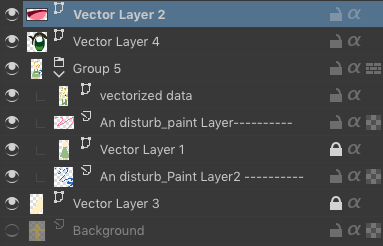
Before

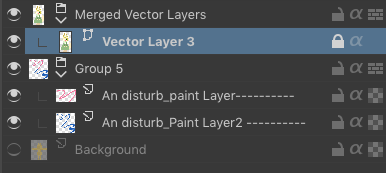
After

When drawing a path using vectors in Krita, unintentionally the vector layers are often distributed across multiple layers. If you can combine them into one, it will be easier to work with path concatenation and booleans and many vector workflow.
Thank you very much! look forward to complete of the plugin.

Cheers!

1 Like

That’s it :slight_smile:

I’ll update my script.

Thanks for your help!

EDIT:

Next issue I’m working through…

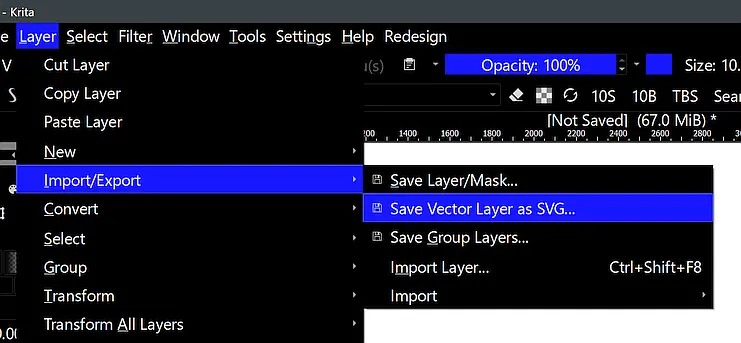
I got it to the point where it will merge then go to the SVG save dialogue, but for some reason my export fails.

from krita import Krita, InfoObject
from PyQt5.QtWidgets import QFileDialog

def find_vector_layers(layer, vector_layers):
    """ Recursively find all vector layers, even inside groups. """
    if layer.type() == 'grouplayer':  # If it's a group, search inside it
        for child in layer.childNodes():
            find_vector_layers(child, vector_layers)
    elif layer.type() == 'vectorlayer':  # If it's a vector layer, add it
        vector_layers.append(layer)

def merge_all_vector_layers_and_export():
    app = Krita.instance()
    doc = app.activeDocument()

    if not doc:
        print("No active document found.")
        return

    root = doc.rootNode()
    vector_layers = []
    
    # Recursively find all vector layers (including inside groups)
    for layer in root.childNodes():
        find_vector_layers(layer, vector_layers)

    if len(vector_layers) < 2:
        print("Not enough vector layers to merge.")
        return

    # Create a new group layer
    group_layer = doc.createGroupLayer("Merged Vector Layers")
    root.addChildNode(group_layer, None)  # Add group at the top level

    doc.refreshProjection()

    copied_layers = []

    # Copy vector layers into the new group (leave originals untouched)
    for layer in vector_layers:
        layer_copy = layer.duplicate()  # Create a duplicate
        layer_copy.setName(layer.name() + " (Copy)")  # Rename to avoid conflicts
        group_layer.addChildNode(layer_copy, None)  # Add copy to the group
        copied_layers.append(layer_copy)

    doc.refreshProjection()

    # Merge copied layers from top to bottom
    while len(group_layer.childNodes()) > 1:
        top_layer = group_layer.childNodes()[-1]  # Get the topmost layer
        below_layer = group_layer.childNodes()[-2] if len(group_layer.childNodes()) > 1 else None

        if below_layer:
            top_layer.mergeDown()
            doc.refreshProjection()

    # Get the final merged vector layer
    merged_layer = group_layer.childNodes()[0] if group_layer.childNodes() else None

    if merged_layer:
        print("All vector layers successfully merged into a single layer inside the group.")
        print("Original layers remain unchanged.")

        # Prompt the user for an SVG filename
        file_dialog = QFileDialog()
        file_dialog.setDefaultSuffix("svg")
        save_path, _ = file_dialog.getSaveFileName(None, "Save Merged Vector Layer as SVG", "", "SVG Files (*.svg)")

        if save_path:
            # **Fix: Use an empty `InfoObject()` instead of `exportConfiguration()`**
            export_config = InfoObject()  # Krita's expected empty export configuration
            success = merged_layer.save(save_path, 72, 72, export_config)

            if success:
                print(f"SVG exported successfully: {save_path}")
            else:
                print("Error: SVG export failed.")

        else:
            print("SVG export cancelled.")

    else:
        print("Error: No merged vector layer found.")

merge_all_vector_layers_and_export()

The error:

==== Warning: Script not saved! ====
All vector layers successfully merged into a single layer inside the group.
Original layers remain unchanged.
Error: SVG export failed.

Terminal:

SAFE ASSERT (krita): "shape" in file /builds/graphics/krita/libs/ui/kis_node_manager.cpp, line 165
qt.xkb.compose: failed to create compose table
SAFE ASSERT (krita): "shape" in file /builds/graphics/krita/libs/ui/kis_node_manager.cpp, line 165
qt.svg: $Home/Downloads/krita-logo-dark.svg:18:6: Could not resolve property: #pattern0
qt.svg: $Home/Downloads/krita-logo-dark.svg:18:6: Could not resolve property: #pattern1
qt.svg: $Home/Downloads/krita-logo-light.svg:18:6: Could not resolve property: #pattern0
qt.svg: $Home/Downloads/krita-logo-light.svg:18:6: Could not resolve property: #pattern1
qt.svg: $Home/Downloads/krita-logo-dark.svg:18:6: Could not resolve property: #pattern0
qt.svg: $Home/Downloads/krita-logo-dark.svg:18:6: Could not resolve property: #pattern1
qt.svg: $Home/Downloads/krita-logo-light.svg:18:6: Could not resolve property: #pattern0
qt.svg: $Home/Downloads/krita-logo-light.svg:18:6: Could not resolve property: #pattern1
""
WARNING: the destination object of KisSynchronizedConnection has been destroyed during postponed delivery


(I censored the url a bit…)

EDIT:

After some probing it seems that Krita can’t export the selected Vector layer because it won’t update in order to allow me to select the new vector layer, so when it attempts to export the SVG there is a failure.

-S

1 Like

I sound that sad Krita can’t export as SVG layer directly.
So it might have to export SVG as a text data using ptyhon’s standard functions…
for example use open() and f.write()

1 Like

It’s so frustrating how close we are to a sollution.

I don’t have a clue why Krita is not able to let me select newely merged assets for export. I have detected that there really isn’t anything available for selection when I go to export what I’ve just merged. It’s like it’s not there until the entire script is dropped. Because then if I want I can manually go and export the vector layer to SVG, but I really wanted a one click export.

But surely there is a way of doing this. Maybe a dev knows.

-S

1 Like

Perhaps I misunderstand something here, but this is a standard Krita option, don’t you have access to it via your script or are you talking about something different?

Michelist

Yes, that’s the function, unfortunately I don’t see a way to properly handle it via code. We’re missing some part of the source code info on that, whether we overlooked it because we couldn’t find it is another story.

The issue is that when Krita is done merging those layers I can not get the layers to select for export to SVG. Not possible in script for some reason to keep that selection before exporting. As a user having waiting for the script to finish? Yes. But no python API that I have found will give me this simple function without it failing to export.

I’m not sure why but it will act as though those newly merged vector layers are not available for selection. I tested with error that tells me what I have selected before it goes to export and it kept telling me I had another layer selected instead. Which is strange because in the previous operations I had merged down, never dropped the selection.

Basically I need my script to export the merged vector layer and Krita is not letting me go through with it for some reason.

If I fix this, we’ll get a SVG exportor that works no matter how many layers you work with.

Otherwise the user will have to load this script only to still need to manually export them remove the duplicate merged data.

-S

1 Like

Maybe it would be better to first collect vector layers to new document and then you would have options on how to edit it before export.

Just for fun plugin that collects layers to new document using name + type + color_label filters.

File tree

%AppData%/krita/pykrita/
    collect_layers_plugin/
        __init__.py
    collect_layers_plugin.desktop

__init__.py

import re

from krita import (
        Krita,
        Extension)

from PyQt5.QtCore import (
        Qt,)

from PyQt5.QtGui import (
        QColor,
        QStandardItemModel,
        QStandardItem)

from PyQt5.QtWidgets import (
        QDialog,
        QDialogButtonBox,
        QVBoxLayout,
        QHBoxLayout,
        QLabel,
        QLineEdit,
        QListView)


def walk_nodes(top_nodes):
    _memo = set()  # just to be sure that each node is walked only once
    stack = list()
    for n in reversed(top_nodes):
        unique_id = n.uniqueId()
        if unique_id not in _memo:
            _memo.add(unique_id)
            stack.append(n)
    while stack:
        cursor = stack.pop(-1)
        yield cursor
        _memo.add(cursor.uniqueId())
        stack.extend(c for c in reversed(cursor.childNodes()) if c.uniqueId() not in _memo)


class CollectLayersDialog(QDialog):
    _type_names = (
            ('Paint Layers', 'paintlayer'),
            #  ('Group Layers', grouplayer'),
            ('File Layers', 'filelayer'),
            ('Filter Layers', 'filterlayer'),
            ('Fill Layers', 'filllayer'),
            # ('Clone Layers', 'clonelayer'),
            ('Vector Layers', 'vectorlayer'))
            # ('Transparency Masks', 'transparencymask'),
            # ('Filter Masks', 'filtermask'),
            # ('Transform Masks', 'transformmask'),
            # ('Selection Masks', 'selectionmask')

    _color_labels = (
            Qt.transparent,
            QColor(91, 173, 220),
            QColor(151, 202, 63),
            QColor(247, 229, 61),
            QColor(255, 170, 63),
            QColor(177, 102, 63),
            QColor(238, 50, 51),
            QColor(191, 106, 209),
            QColor(118, 119, 114))

    def __init__(self, **kwargs):
        super().__init__(**kwargs)
        self._init_models()
        self._init_window()
        self._init_ui()
        self._connect_signals()

    def _init_models(self):
        self._layer_types_model = QStandardItemModel()
        types_root = self._layer_types_model.invisibleRootItem()
        for type_label, type_name in self._type_names:
            type_item = QStandardItem(type_label)
            type_item.setData(type_name)
            type_item.setCheckable(True)
            type_item.setCheckState(Qt.Unchecked)
            types_root.appendRow(type_item)

        self._color_labels_model = QStandardItemModel()
        colors_root = self._color_labels_model.invisibleRootItem()
        for color in self._color_labels:
            color_item = QStandardItem('')
            color_item.setBackground(color)
            color_item.setCheckable(True)
            color_item.setCheckState(Qt.Unchecked)
            colors_root.appendRow(color_item)

    def _init_window(self):
        self.resize(800, 400)
        self.setWindowTitle('Collect Layers')

    def _init_ui(self):
        layout = QVBoxLayout()
        self.setLayout(layout)

        self._banner = QLabel('<br /><h1>Collect Layers</h1><br />')
        layout.addWidget(self._banner)

        self._name_filter_edit = QLineEdit(placeholderText='layer name filter (regex) ...')
        layout.addWidget(self._name_filter_edit, stretch=50)

        type_and_color_layout = QHBoxLayout()
        layout.addLayout(type_and_color_layout, stretch=100)

        self._layer_types_view = QListView(toolTip='Filter layers based on layer type (Nothing = Include All)')
        self._layer_types_view.setModel(self._layer_types_model)
        type_and_color_layout.addWidget(self._layer_types_view, stretch=50)

        self._layer_colors_view = QListView(toolTip='Filter layers based on color label (Nothing = Include All)')
        self._layer_colors_view.setModel(self._color_labels_model)
        type_and_color_layout.addWidget(self._layer_colors_view, stretch=50)

        self._buttons = QDialogButtonBox(
                QDialogButtonBox.Ok | QDialogButtonBox.Cancel)
        layout.addWidget(self._buttons)

    def _connect_signals(self):
        self._buttons.accepted.connect(self.accept)
        self._buttons.rejected.connect(self.reject)

    def name_filter(self):
        return self._name_filter_edit.text().strip()

    def layer_types_filter(self):
        result = set()
        model = self._layer_types_model
        for row in range(model.rowCount()):
            type_item = model.item(row)
            if type_item.checkState() == Qt.Checked:
                result.add(type_item.data())
        return result

    def layer_colors_filter(self):
        result = set()
        model = self._color_labels_model
        for row in range(model.rowCount()):
            color_item = model.item(row)
            if color_item.checkState() == Qt.Checked:
                result.add(row)
        return result


class CollectLayersExtension(Extension):
    def setup(self):
        pass

    def createActions(self, window):
        show_collect_layers_dialog = window.createAction(
                'show_collect_layers_dialog',
                'Show Collect layers dialog',
                'tools/show_collect_layers_dialog')
        show_collect_layers_dialog.triggered.connect(self._on_show_collect_layers_dialog_triggered)

    def _on_show_collect_layers_dialog_triggered(self, checked=None):
        dialog = CollectLayersDialog()
        if dialog.exec_() == QDialog.Accepted:
            self.collect_layers(
                    dialog.name_filter(),
                    dialog.layer_types_filter(),
                    dialog.layer_colors_filter())

    def collect_layers(self, name_filter, layer_types_filter, layer_colors_filter):
        app = Krita.instance()
        doc = app.activeDocument()
        if not doc:
            return  # nothing to do
        name_filter_re = re.compile(name_filter or '.*')
        result_document = None

        for node in walk_nodes(doc.topLevelNodes()):
            if not name_filter_re.search(node.name()):
                continue  # exclude
            if layer_types_filter and (node.type() not in layer_types_filter):
                continue  # exclude
            if layer_colors_filter and (node.colorLabel() not in layer_colors_filter):
                continue  # exclude
            # include layer (passed all filters)
            if result_document is None:
                result_document = app.createDocument(
                        doc.width(),
                        doc.height(),
                        f'{doc.name()}_collected',
                        doc.colorModel(),
                        doc.colorDepth(),
                        doc.colorProfile(),
                        doc.resolution())
                for initial_node in result_document.topLevelNodes():
                    initial_node.remove()  # ToDo: not sure if this is also removed from memory?

            root = result_document.rootNode()
            cloned_layer = node.clone()
            root.addChildNode(cloned_layer, None)

        # finally show result
        if result_document:
            win = app.activeWindow()
            if not win:
                return  # no window, no show
            win.addView(result_document)


app = Krita.instance()
app.addExtension(CollectLayersExtension(app))

collect_layers_plugin.desktop

[Desktop Entry]
Type=Service
ServiceTypes=Krita/PythonPlugin
X-KDE-Library=collect_layers_plugin
X-Python-2-Compatible=false
X-Krita-Manual=readme.md
Name=Collect layers Plugin
Comment=Collets layers to new duplicated document

collect_layers_plugin.action is missing, but it should be really normal except maybe show_collect_layers_dialog action should have flag that activates it only when there is active document.

/AkiR

1 Like

The reason we use a group node is that it’s a bit quicker and neater to work with.
I think? it’s my assumption that opening and closing a document will increase the overall time it takes to process everything.

But I’ll certainly take a look at your code.

It does work now, Shem Taylor has just found a work around that using some of the other hidden API associated with XML data which can be saved directly as SVG data… SO WE HAVE IT WORKING!

The next step for making this a complete useful addon:

-Remove the temporary vector group merge content.

Then in one click we have a script which will go through the entire document, copy all vector layers down to a merged layer, export that, and clean up the temporary layers. Nice and quick while allowing users

So… yeah almost there :slight_smile:

EDIT:

Done. Time to convert this into an addon for auto deployment alongside the rest of my Installation script.

-S

2 Likes

Just an fyi, there is a convenient findChildNodes, this one line will get you all the vector layers in the document:

doc = Krita.instance().activeDocument()

vector_layers = doc.rootNode().findChildNodes('',True,False,'vectorlayer')

print(vector_layers)

Also, instead of making workarounds for merging, why not just merge it manually? Pretty much what Shapes And Layers split shapes into layers does but in reverse.

1 Like

Now that a solution seems to have been found, I would first like to congratulate you on your success.

My post was not aimed at exporting it this way, it just sounded from a previous post as if Krita did not offer this possibility at all, and via this export function you could certainly have used the Python Plugin Developer Tools to determine the function, the switch below/behind it was my thought to draw your attention to it. It was clear to me that you wanted to solve it with a script or plugin, I was just too taciturn.

Michelist

1 Like

Yeah, I reckon I know what you mean now. Also now I now a new word I did not know before; ‘Taciturn’ :slight_smile:

The code equivalent to what you’re talking about is what I’d been trying until we found a way that did not fail on export…

In the end we kind of hacked it by leverage the existing XML compatibility that my friend was familiar with. This is something that won’t make sense to most people including myself a day ago…

Well it turns out SVG is basically a XML file but named differently. I had no idea; but that’s essentially how we did it. We just treated it like XML data with an svg extension and Krita allowed us to save this with the normal save dialogue.

Btw, we still need to decide where this action would go. I was thinking of creating an SVG save type and instead of letting it save we just do this… But no idea how to make that work. Probably the easier thing is just hanging this under the single layer option and naming it ‘Save multiple Vector layers to flat SVG’ or something.

-S

2 Likes

It’s an addon now… which will hopefully make it easier for people to test this without requiring scripting knowledge.

https://github.com/SimonHeggie/KritaSvgMerge/releases/download/v1.1/svg_merge_save_v1.1.zip

Here’s the latest version.

What works:

Menu item… unfortunately it’s at the bottom of the file menu, not neatly filed into the export section like I’d liked.

Vectors merge within the document which is visualised to the user by showing the over the top of all other layers in the new group and the merge is done while the user is then shown the SVG save dialogue.

Once the user saves their SVG, the merged content is removed and the users document is as they left it, layered and all after all that.

What clearly does NOT work:

  • When the user goes to cancel the SVG save dialogue, I’m not sure how to handle this event where it should delete the merged content. I’m not sure what I have to call. But to be clear, at this point the content must be removed because it is no longer required by the user.

Overall this aught to make some people happy… You could for instance recreate the Krita Logo using this method, then export an SVG.

This saves the manual process of merging all the layers. Win!

But the more help I can get wrapping this up the better.

-S

2 Likes

This topic was automatically closed 4 days after the last reply. New replies are no longer allowed.