ModernGL / GLSL shader programming plugin

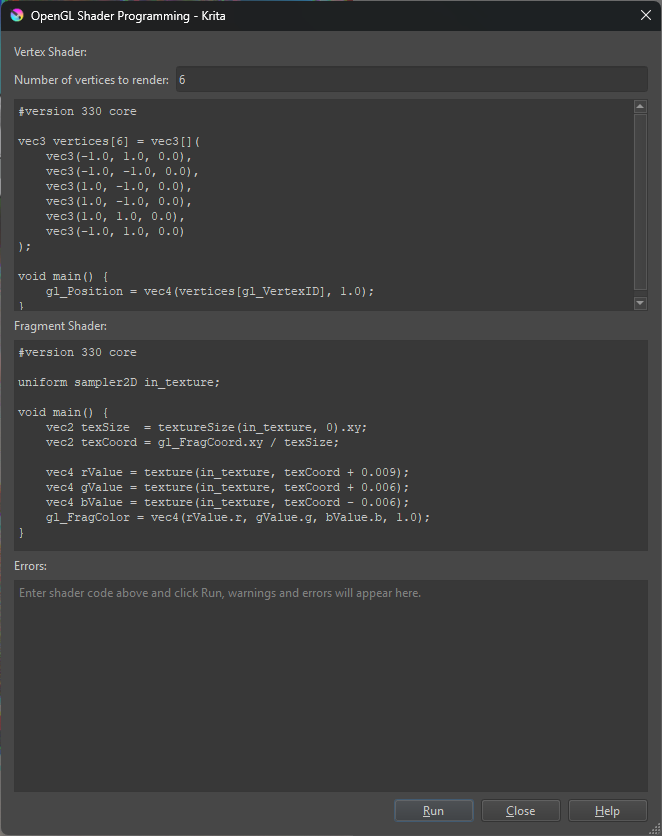
Introducing KritaModernGL, a plugin for Krita that allows programming vertex, fragment, and compute shaders and rendering the result to a new layer. The current selected layer can be used as an input to apply effects too!

Instructions and code
Download

The interface includes a box that will display any errors with the shaders for easy correction and iteration.

This is powered by the ModernGL python package, and uses your computer’s graphics rendering power to run!

Please let me know what you think, I will try to check this community more often, but GitHub might be better for reporting issues. I plan on using this as a base for recreating my old VFX plugin that’s been rather neglected


8 Likes

Hey, this is probably the ultimate gimmick, but something we definitely needed in Krita :smiley: TBH I always wanted to implement something like this, but never had the time. Such an addon could enable a lot of cool techniques, especially if it can read the colors of layers or projections, it would be like SeExpr on steroids!

Alas, it does not work on my system with Krita 5.3 :frowning:

In OpenGL mode I get a black screen (whole Krita window turns black) as soon as I run the pipeline.

In ANGLE (DX11) mode, I get the output layer, but in case of vs/fs example it’s pure black and in case of cs example it’s pure transparent.

I think this plugin has a tremendous potential (Shadertoy in Krita? Why yes please!) but needs much more testing and development to be robust enough. But I’m on board and have many improvement ideas :smiley:

BTW, here are my system specs:
Windows 11 24H2, AMD RX 7900 XTX 24GB, 25.5.1 driver

Yes, GLSL or WGSL would be more common languages than SeExpr. But getting the OpenGL working on all platforms is tricky thing. Thats why I have toyed with WebGPU as it is modern and has good backend support + supports GLSL & WGSL. One more alternative is SDL3.0 as it offers Vulcan context, without need to write 3k+ lines of code for management.

/AkiR

Yeah, your addon worked rather well, AkiR. To me this really gets interesting when it can interact with the layers, so that you can incorporate the shaders into your painting. It could be a neat way to do GPU accelerated filters, but there’s also a lot of hack value to play around with crazy ideas.

Thanks for the report, I’ve been testing with Krita 5.2.2 using D3D 11 via ANGLE on my Windows 11 machine with an Nvidia RTX 4090. I’d hate if this was a driver anomaly with AMD GPUs but its something I will need to investigate.

I had no idea about AkiR’s extension, though glad to see others find these things useful :slight_smile:

EDIT: I can confirm that using OpenGL as the preferred renderer for Krita will cause the whole window to become black… which is VERY not intentional. As for the example code it’s not clear if you tested it on a layer with some content or if you tried on an empty layer or a layer with only a single color. The results are most apparent on an existing image, and the compute shader example will only run on the first 1024x1024 pixels of the image. Will test on an AMD GPU (laptop with integrated graphics) later

Pushed an update to fix the black screen issue when using OpenGL as Krita’s rendering backend Release KritaModernGL - 1.0.1 · SockHungryClutz/KritaModernGL
Turns out Krita may be using some shared OpenGL context in this case and the ModernGL package will try to use any OpenGL context that already exists which can cause issues. Setting up a kind of fence fixed it :slight_smile:

2 Likes

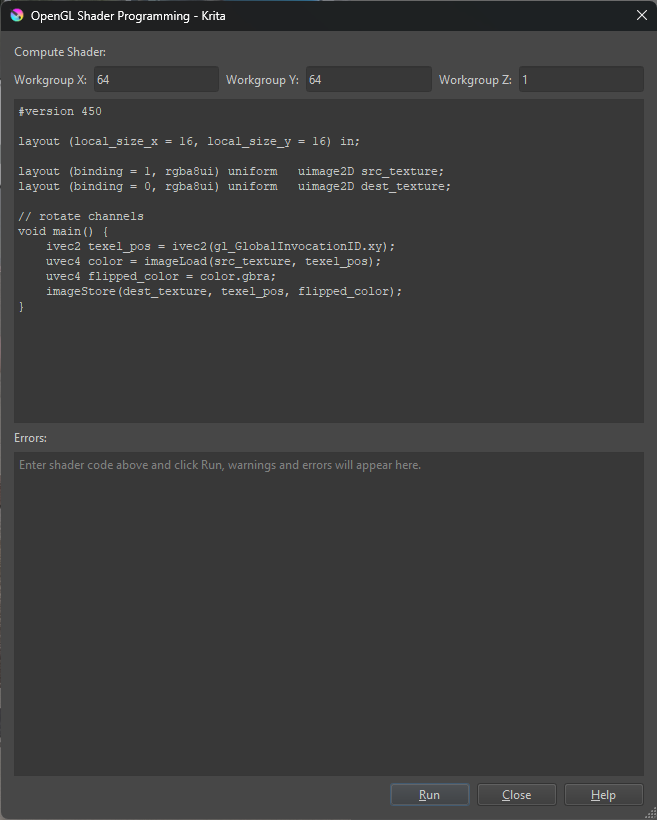
Ah, couple other things I need to update in the documentation, you need to set the vertex shader to render 6 vertices for the render shader example and use 64 as workgroup X and Y sizes for the compute shader.

That said, I was unable to reproduce other reported issues on my laptop with AMD Radeon 760M graphics. I’ll update the documentation but let me know if there’s any other issues :slight_smile:

1 Like

Thanks for an update. It now works well for me in ANGLE (DX11) mode.

OpenGL still has a problem if the image is sufficiently large. For example, with A4 300 dpi (3508 x 2480 pixels), the Krita Window becomes black again (with a smaller white rectangle now) when the shaders are run.

I also tried running it on Ubuntu 24.04, but it failed probably because a binary was missing:

kritamoderngl.kritamoderngl:No valid GLContext build found, attempted: glcontext-3.0.0-cp310-cp310-manylinux_2_17_x86_64.manylinux2014_x86_64

Maybe someone else can check if they can get OpenGL to work on their end. I didn’t debug it further to see what specifically may be wrong.

NB: I think Krita will eventually settle on ANGLE as the only supported GL implementation, which perhaps will make it easier to ensure compatibility.

Thank you for being a(n) (in)voluntary tester, I need to set up a Linux test environment for more testing…

  • Fixed Linux not finding the GLContext binary, the platform string is different between GLContext and ModernGL
  • Fixed issues with large images when using OpenGL renderer backend (probably). I was seeing hard crashes when reproducing this, it’s related to OpenGL context sharing. Toggling the framebuffer option in display settings seemed to affect this as well but should be fixed
1 Like

Excellent, thanks a ton for yet another update! :blush: Now I don’t see any issues on OpenGL on Windows and Linux, and even OpenGL ES on Linux is working fine!

I’m curious what are your plans for this addon going forward? Even in this barebones state this is really useful, as at the very least it can help implement a GPU-accelerated filter, such as chromatic aberration, or similar, which I think this is really neat!

If I were to suggest improvements, those would be around the ease of use and feature enhancements. Some examples:

  • related to reusability:
    • save shaders in the document (not sure if possible?), or
    • make it possible to load shaders from disk (maybe drag and drop?), or
    • add program presets that user can define, like a library of reusable filters; make it possible to export/import presets (lot of UI work, however)
  • multi layer inputs (btw, I see it can work on groups already, which is great!)
  • auto-detect the number of compute workgroups (dispatch size) from the layer/image size.

There’s probably a lot of other cool goofy stuff that could be done, but keeping it simple and focused also has merit, so I’m not going too wild with the suggestions :smiley:

Again, nice work, thanks!

Thank you again!

I don’t have many plans for future updates for this plugin, though usability improvements are good suggestions, like being able to save and load shaders from files. I had considered adding animation support by having a user-defined start and end time and either how large or how many steps in between, and render each frame to a new layer. But mostly my plans are to remake my old VFX plugin which has some easily configurable post processing filters like chromatic aberration and lens flares :slight_smile:

For now I’m fine with keeping this barebones, it does the job of being a little sandbox for shaders

1 Like

Not to resurrect an old thread, but I’ve made quite a few changes since the last post here…

  • Shaders can be saved and loaded to/from files
  • Some more options for vertex primitive modes have been added to the UI so that they’re configurable
  • Multiple texture inputs and outputs are now supported
  • New UI for mapping layers to texture units and frame buffer
  • The layer mapping can be saved and loaded from files too

The download link in the top post still works, but here’s the link again: Download

Thank you to everyone who has tried this out, given feedback, or interacted with the repository on GitHub, it means a lot to me!

2 Likes

Does this plugin support version 5.3.0? I used the example code from GitHub, but neither ANGLE nor OpenGL is able to output the rendered content to a new layer; the “Render Result” layer consistently remains empty.

Sorry for the late reply, 5.3 is supported, I just made a mistake when updating the example. Change the line

out_color = uvec4(rValue.r, gValue.g, bValue.b, 1.0);

to

out_color = uvec4(rValue.r, gValue.g, bValue.b, 255);

Hi, thanks for your reply.

I actually recorded a short video to demonstrate the issue—it’s using Krita 5.3, and I’ve already updated the code exactly as you suggested.

However, the result is still a completely black image. I also tried changing the value 255 to other numbers, but it seems like only the alpha channel is affected (it becomes more transparent), while the RGB channels remain black.

I also tested with a 512×512 canvas size, but the result is exactly the same.

So it looks like the problem might not be related to the alpha value. Could there be something else causing the RGB values not to show correctly?

Let me know what you think—thanks for your help!

I was not able to reproduce this issue on 5.3.1, but it looks like you are using a custom build of Krita. I have no idea what changes the build could be making, but it may also be worthwhile to check your display settings inside Krita and see if any option changes the output

You reminded me; I am indeed using a modified version of Krita from a user in the community, from this link: Krita with clipping (test build) - #83 by _LimaoComSal . Clipping masks really help me reduce the creation of many unnecessary layer folders, and I’m also using two types simultaneously.

I downloaded the original 5.3.1 version from the official website again, specified a completely new resource directory to regenerate all configurations and release new resource files, and then tried your plugin again, but the result is the same as in the video above: the entire layer is still filled with that grayscale value.

I also tried Direct3D 11 and OpenGL in the display options, and the result was the same.

Based on the fact that you have Direct3D as an option for the backend, I assume you’re using some flavor of Windows. Do you mind letting me know what version of Windows you’re using, what your CPU/GPU is, and driver version for GPU. At this point I’m thinking there must be some issue with how your system is working with OpenGL. Or it may be because of the version of ModernGL python library that this plugin uses.

No problem at all, I am happy to cooperate with your work. The following is the content of “Help->Show systeminformation for bug reports”. There is also a long list of OpenGL Extensions, but there is a lot of content. I am not sure whether you need it. If you need it, please inform me. Although I am using Win10, I am using OpenGL as the backend, because Direct3D 11 will cause delays when I use the brush to draw, but OpenGL will not. This is what I discovered when I searched for related issues in the forum. My CPU is 12600K, I use Intel UHD770 integrated graphics, and the graphics driver version number is 32.0.101.6737
Krita
Version: 5.3.0-prealpha (git 9d4fcc7)

Qt
Version (compiled): 5.15.7
Version (loaded): 5.15.7

OS Information
Build ABI: x86_64-little_endian-llp64
Build CPU: x86_64
CPU: x86_64
Kernel Type: winnt
Kernel Version: 10.0.19044
Pretty Productname: Windows 10 Version 2009
Product Type: windows
Product Version: 10

OpenGL Info

Qt Platform Name: “windows”
Vendor: “Intel”
Renderer: “Intel(R) UHD Graphics 770”
Driver version: “3.3.0 - Build 32.0.101.6737”
Shading language: “3.30 - Build 32.0.101.6737”
Requested format: QSurfaceFormat(version 3.3, options QFlagsQSurfaceFormat::FormatOption(DeprecatedFunctions), depthBufferSize 24, redBufferSize 8, greenBufferSize 8, blueBufferSize 8, alphaBufferSize 8, stencilBufferSize 8, samples -1, swapBehavior QSurfaceFormat::DoubleBuffer, swapInterval 0, colorSpace QSurfaceFormat::DefaultColorSpace, profile QSurfaceFormat::CompatibilityProfile)
Current format: QSurfaceFormat(version 3.3, options QFlagsQSurfaceFormat::FormatOption(DeprecatedFunctions), depthBufferSize 24, redBufferSize 8, greenBufferSize 8, blueBufferSize 8, alphaBufferSize 8, stencilBufferSize 8, samples 0, swapBehavior QSurfaceFormat::DoubleBuffer, swapInterval 1, colorSpace QSurfaceFormat::DefaultColorSpace, profile QSurfaceFormat::CompatibilityProfile)
GL version: 3.3
Supports deprecated functions true
Is OpenGL ES: false
supportsBufferMapping: true
supportsBufferInvalidation: true
forceDisableTextureBuffers: false

QPA OpenGL Detection Info
supportsDesktopGL: true
supportsAngleD3D11: true
isQtPreferAngle: true
Detected renderers:
(Supported) ANGLE (Microsoft, Microsoft Basic Render Driver Direct3D11 vs_5_0 ps_5_0, D3D11-10.0.19041.546) (OpenGL ES 3.0.0 (ANGLE 2.1.0 git hash: f2280c0c5f93+krita_qt5))
(Supported) ANGLE (Intel, Intel(R) UHD Graphics 770 Direct3D11 vs_5_0 ps_5_0, D3D11-32.0.101.6737) (OpenGL ES 3.0.0 (ANGLE 2.1.0 git hash: f2280c0c5f93+krita_qt5))
(Supported) Intel(R) UHD Graphics 770 (3.3.0 - Build 32.0.101.6737)

Hardware Information
Memory: 31GB
Cores: 16
Swap: Z:/Temp
Okay, now we’re getting somewhere. I grabbed a system with Intel integrated graphics, and although it is running Ubuntu, I was able to reproduce this issue on the latest version of the plugin. However, using the previous version does not show any issues at all