This is how it looks like right now:
And those are the options:
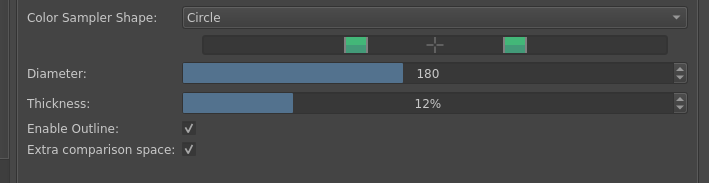
You can turn off the “extra comparison space” (btw would love a suggestion how to call it better if you have any ideas!) to get a normal ring. There is a size, with maximum 400 px, that should be enough. The thickness is in %, which is not super convenient but it’s not like you’re gonna change it all the time. The options are in Configure Krita → General → Cursor.
The extra comparison space is made based on thickness and it’s not customizable. Likewise the outline color or thickness is not customizable, you can only turn it on or off. Both also won’t be, but you can argue for thinner outline, I feel like thinner could be better.
Defaults currently are:
- those two extra circles enabled (otherwise people wouldn’t even be aware that it exists)
- outline enabled
- 180px
- 12%
You can argue for different defaults, except for the circles being enabled by default.
What do you think? Do you like it? Is there anything I missed? I feel like the extra circles solve the issue of “not enough comparison space” while also giving enough space for the color itself (which I felt was missing in the concentric rings design) and the existing options make it pretty customizable. (And there is still an option to go back to rectangles).
You should be able to test those changes in Draft: Touch and hold for color picking (!2501) · Merge requests · Graphics / Krita · GitLab as soon as the pipeline finishes, according to How to test a Merge Request or a new, unfinished feature [Instruction]