Ok, don’t worry then. I choose B 
Perhaps there can be a smaller slider still that does this, so a Rotation Slider (Normal) and Rotation Slider (Small) for small screens. But if this is really an issue, then it would have also been made for the other sliders — and I don’t think that’s currently the case. Besides, you need some screen space to use the slider effectively (for example, good luck using a 48px wide slider).
Some questions from me:
-
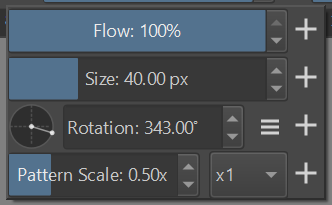
Can the spinbox height be adjusted? I don’t want to introduce a new widget, but maybe it’s just a matter of a single
setFixedHeight()call? It seems to be aligned with the circle, but it does not fit that well with other sliders. -
Is the widget deactivated (grayed out) when you switch to a preset of an engine, which does not support rotation?
good idea Grey out. +1
The height is the same for all sliders, but perhaps it doesn’t affect the height of controls within the widget. I will double check.
The widget is not disabled for unsupported engines. I’m not sure right now how to check for that in the first place… But it’s a good point, it is not ideal if you can adjust the angle and it doesn’t do anything. I will compare it with the brush editor, to see if it’s handled there. If it isn’t, then it looks like a bigger change that should be done separately.
You can check out the “shape engine” brush - it does not define the “size” property, so the related slider gets deactivated.
You could check if the rotation widget implements disabling - spinboxes do.
Huh, interesting, it seems there’s no code to disable size slider if a brush engine doesn’t support it. In case of the size, it will simply reset back to 1.0 (if you drag it and set a different value it will snap right back). The angle selector behaves in the same way – it will stay glued to 0.0 if the rotation is not supported. I didn’t notice anything in code that would clearly state “such and such property is unsupported”.
However, I got feedback from Dmitry that the slider could be tweaked to match the other sliders’ look and feel. In this case, I’ll try to get it updated. That matches wojtryb’s comment too. So we may end up with both a circular selector and a bar slider and everyone will be happy 
There is another option for the looks which is what i would choose: hidden buttons with the spin box frame visible.
It is the other way around, the angle gauge is set to the size of the spin box by default (but can be customized). The gauge, spinbox and buttons are contained in a parent widget but I don’t remember right now how the size policy was set for the spin box. I have the feeling that it was left untouched so the default spinbox vertical size policy is used (not sure). This means that setting the size of the angle selector (container widget) may not affect the spin box. My suggestion is to expose some spinBox() function in KisAngleSelector that returns the pointer to the spinbox to be able to set its size.
Keep in mind that the angle selector uses a customized KisDoubleParseSpinBox and not a slider-spinbox. So if you want to change the type you have to make sure that the custom changes made to the spinbox in the angle selector work for the slider-spinbox as well. I didn’t use the slider-spinbox in the angle selector when I made it because I considered it kind of redundant, since the angle gauge already has slider-like behavior.
Hey, yeah, that’s exactly what I concluded looking at the code today. I left the comment in the PR, but essentially I think we should tweak the looks of the existing widget and don’t touch the custom spin box class. It’s just not worth the additional maintenance.
With a few height tweaks, I can get this, which I think is the sweet spot.