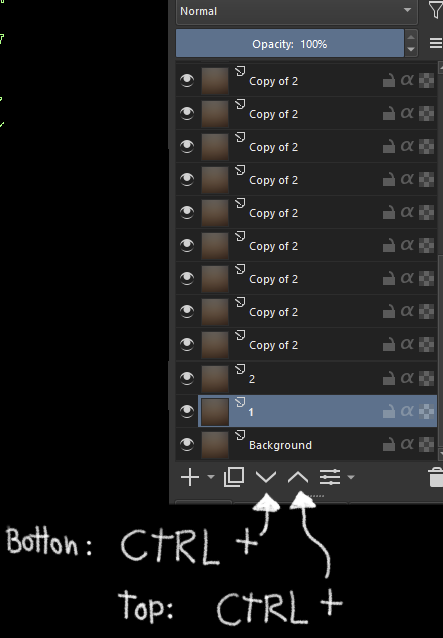
Well, regarding my statement about “4 useless buttons” I may have painted with a bit of a broad brush - as I acknowledged, move to top/bottom would be useful, so it’s only 2 (the existing ones).
However, and I might be missing something here: the more I think about it, the less sense the existing buttons make to me. I mean, moving one position (or a few) per dragging is really effortless and as fast as clicking a button. Moving many positions by repeatedly clicking may even lead to a considerable performance issue, because Krita needs to recalculate projections for each single move. So, depending on canvas size, layer structure, use of filter or transform masks etc., Krita may have to do some heavy lifting.
My suggestion: replace the existing buttons with move to top/bottom, where the layer is moved to the top/bottom of the group. Plus implement the OP’s suggestion with the accelleration key, that then moves to the top/bottom of the whole layer stack. Of course, full customisation would still be preferable.
I agree with this, both about the inefficiency of moving layers multiple times with the existing buttons, and the suggested solution.
It might be an unpopular opinion, but cluttering the interface with rarely used buttons* i) adds unnecessary cognitive load (locate the correct button from many), ii) makes the UX more intimidating for newer users and iii) reserves UI real estate that could be used for other functionality down the line. Some times that is justified if there is no other way to do an action, but in this instance moving a layer one place up or down can be done just as easily with drag and drop, and is even more computationally efficient for multiple moves as mentioned by @dreamkeeper.
I obviously don’t have any data to back up the claim that these particular buttons are rarely used by others, just making a general comment about whether I have a problem with unnecessary buttons being added. That said, I’ve never found myself in a situation where using the buttons would have been faster than drag-n-dropping the layer in place.
Please excuse me for repeating myself.
If everyone was just working with small, manageable layer stacks, where all the layers in the stack are visible, then I would instantly agree with you, but with large stacks, of 50 or even 100+ layers, dragging and dropping can become a pain.
And if the overcrowding of the user interface is really such a big problem for many, then this functionality could possibly be solved via a double assignment of the up and down buttons, a short click works as before and a longer held click triggers the jump up or down?
Michelist
Add/Edit: I prefer to have buttons on the UI that I don’t need, rather than buttons that could support me and are missing for aesthetic reasons.
Well, you are just basing your conclusions on assumptions on how other people work. I personally use 50+ layers on my work and drag and drop a layer one position above or below is exactly as convenient as doing the same thing on a three layer file.
The thing that is more difficult is moving a layer many positions up/down (a valid problem), and that is what the feature request is about. What @dreamkeeper suggested is not to ignore this, but if new buttons are to be added for moving to the top/bottom, they should replace the existing ones for up/down which are arguably less useful.
PS: If you re-read what I wrote above, I (or anyone else I can spot) made no claim about not adding new buttons for aesthetic reasons. It’s perfectly fine to disagree with a proposal, but painting another opinion as just “aesthetic reasons” is just disparaging it without actually putting any effort to answer the counterarguments.
Well all the suggestions by people here are logical and good, having the shortcuts is the first step I think. We can leave the decision about adding the buttons or making a configuration for those to be shown to devs. But this feature to move layer to top most or bottom most place is really nice to have. Please vote for this.
Didnt read many posts but my idea: When pressing page up a temporary rectangle would appear next to layer docker. It would say send to top. you can click on it. This rectangle could appear too if you are dragging layer up. Just hold while dragging and release in this square.
I would agree no need for more icons, there could be a tooltip on hover over the current buttons with added functionality and pointers to default hotkeys.
I will be porting with scripting what I use in After Effects:
(I don’t think the move to top/bottom was implemented, can’t find it anyway.)
ctrl +up and down = Select layers above, below.
ctrl+shift +up/down = Select up and down
ctrl+alt+up and down = Move layers up and down.
ctrl+alt+shift + up/down = Move to top or bottom.
*This one would be just for Krita.
alt+shift+ up/down to Move up/down but stop when I hit the next group layer.
I can’t live without this as some documents have a lot of layers.
Exactly, there is no need to add new buttons.
That’s why I suggested that the existing buttons have another function/action when CTRL is pressed.
I think this works better than pressing 4 keys at the same time.
 )
)