Hi guys.
I did a search, but I didn’t find a similar suggestion / proposal.
Resume:
Button: “move layer / mask down” + Control Key = move the layer to the bottom.
Button: “move layer / mask up” + Control Key = move the layer to the top.
Explanation:
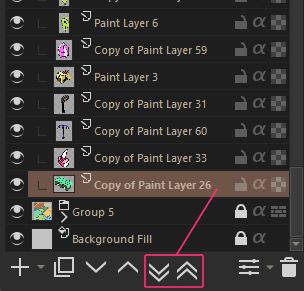
In layers dock there are two buttons: “move layer / mask down” and “move layer / mask up”
These buttons move the (selected) layer by skipping a single layer at a time.
It would be useful if we could send the layer to the top or bottom in a single/one click.
My suggestion: send the layer to the top or bottom at once by clicking on these buttons + control key pressed (or Alt, Shift…etc).
Many thanks to Krita and developers and this community
yes this will be useful option. Currently you can move up and down with Ctrl + Page Up & Ctrl + Page Down. May be we can request for Ctrl + Shift + page up/Down
I think there is a related issue as I do use my trusty shortcuts to move layers up and down. Sometimes I want to move them wayyy up/down (without going to the top/bottom all the time). And I realized moving layers in chain is very laggy (if I stay pressed on the shortcut the ui will definitely lag and the computer would run the fans and all…).
There must be a way to smooth things ?
Dude, I’m sorry, I didn’t understand. Maybe I’m not the best person to help.
(my english is not good either)
You said “in chains”. Did you mean moving multiple selected layers / layers in groups?
Well, if that’s what you mean:
I did a test and moved some selected layers and groups using shortcuts and I didn’t get a delay.
I usually have too many delays with krita when drawing in a file larger than 50 cm x 50 cm (300 dpi). (my computer: I7 3770 with 8 GB ram and HD).
Ok, now I understand.
I thought it was something like ‘linked layers’.
I use windows 8. For me the main ‘bottleneck’ is HD. For the swap file the ideal would be an SSD.
(The test I did moving layers was very simple, it didn’t even deserve to be mentioned, but I wanted to see if there was any delay)
here’s an interesting shortcut, but just select the layer.
It would be useful to move (perhaps holding CTRL at the same time …).
Home = Go to first layer.
End = Go to last layer.
But (for me) it is not very practical to ‘jump’ my left hand to these keys. I keep my left hand to the left of the keyboard. And the keyboard I keep above the tablet. Many people use the tablet on the left or right. I keep everything centered.
I do want to add that any Move layer to top/bottom option in the keyboard shortcuts should take groups into account. If a layer is not in a group, it moves to the top/ bottom of the layer stack. If it is in the group, it moves to the top/ bottom of the group. Otherwise you may accidentally mess up the entire layer organisation.
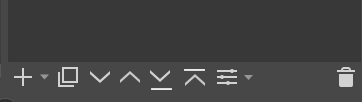
So, this would be 4 instead of 2 (for me) useless buttons then - I never use those, I just drag the layers where I want. Would be great if we could have a configurable button bar there, so everyone could add the actions they need.
Keyboard shortcuts for move to top/bottom on the other hand, that’d be useful.
Do the buttons bother you? I mean you don’t have to use them. Each person will have some useful and some not so useful button but that won’t justify removing buttons.
Agree on having a way to customise all the button in the UI not just the layer docker. But that is another feature request we should discuss it on new topic.
If you work with layer stacks of more than 100 layers, I could imagine that you would evaluate this matter differently and consider this as a gain in comfort. But it’s just a guess, I like this suggestion a lot.
I may not have expressed myself clearly: it’s just that I’d like to have functions there, that are more useful to me - hence my suggestion regarding customisation. That said, 4 (to me) useless buttons in a row would bother me, yes.
Thanks, I like the solution, but I also think it’s too many buttons.
My suggestion is/was: keep the existing buttons, and add a second function (making the layer go top or bottom) with some of these keys: ctrl, alt or shift.

 it can be like this