Hello,
I use the move tools to move layers around but it just suddenly stopped working one day and I don’t understand why. The arrow keys work just fine on my keyboard but I can only use my mouse/tablet to move layers around. I have no clue why the arrows would suddenly just stop responding.
The arrow keys work in the other tools to increase/decrease variables and it used to work fine. Could it be a bug?
Which version are you using. I am using the latest release and I can’t reproduce this issue. I can move the layers with arrow keys. Can you test if it is the same with transform tool?
With the Move tool, the amount of movement for the Move Shortcut arrow keys is set in the Tool Options docker with the Amount: Unit: and Multiplier: values.
Are these at correct/reasonable values?
Also, check the keyboard shortcuts for Move left, Move right, etc.
A move amount of 10,000 inches seems quite wrong and should result in content moving a long way off the canvas. It does if I set that move amount.
If you set it to about 5% of your canvas size in pixels, does that have any effect.
The keyboard shortcuts are in Settings -> Configure Krita -> Keyboard shortcuts and if you type ‘Move right’ in the search bar you should find that the ‘Move right’ shortcut is set to ‘Right’. Similarly for the other move shortcuts.
If things suddenly stop working that means there has been a change somewhere.
It’s usually Shift+Right to move more, unless you’ve changed it.
Uninstalling and reinstalling will have no effect at all because the look & feel behaviour is determined by the configuration files and the contents of the resources folder.
There is actually another thing you may want to try:
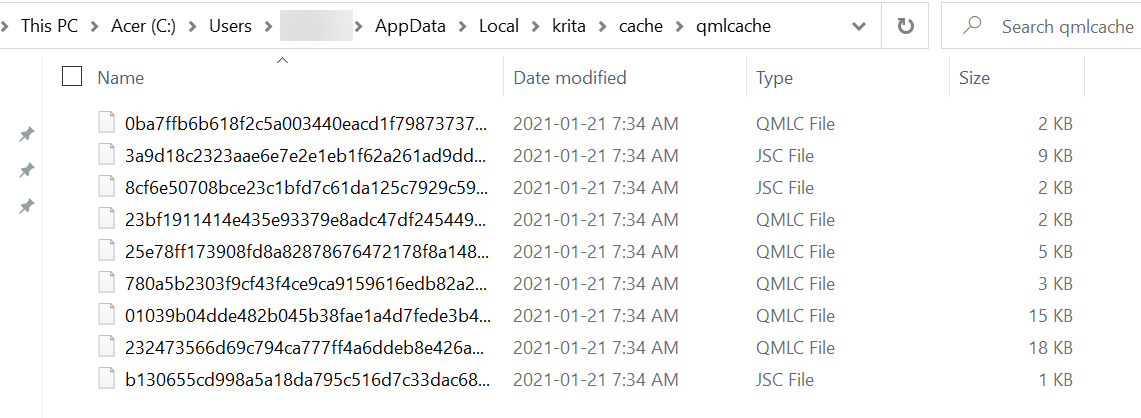
Go to C:\Users\{your-username}\AppData\Local and you’ll find a few files called krita{something}. Those are the confguration files.
Make a folder called ‘old-krita-configs’ and cut/paste the config files into that folder. This will hide them from krita at next startup and force it to make fresh new ones.
Go to C:\Users\{your-username}\AppData\Roaming where you’ll find a folder called ‘krita’. That is the resources folder, Rename it to ‘old-krita’. That will hide it and force krita to make a new one at next startup.
Start krita and see things work properly. (It will be like a the first time you used it with all default settings etc).
If that doesn’t fix it, I’ve no idea what could be going wrong.
Also restore the old configuration files and resources folder so you get your usual look & feel and resources back.
If it does fix it then you have the task of restoring the old configuration files and resources folder one item at a time to determine which one was causing the problem, which is a detailed task.
I then launched… and it’s still doesn’t work, this is so strange.
I use various display screens, a laptop screen, a secondary Samsung Screen and my tablet. Could this be the reason why? I think it started happening when I added my Samsung to the setup.
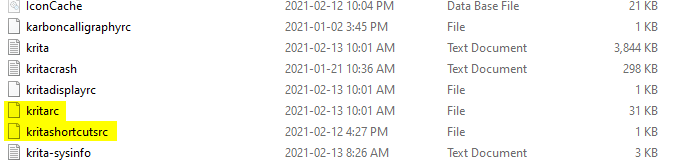
No, you should find a file called kritarc and kritashortcutsrc in \local (not \local\krita) and delete/rename them. (They keep your settings so it might be better to rename for now).
kritarc and kritashortcutsrc are two of the files named krita{something} that you’ll find in -\AppData\Local
I said to cut-paste (i.e move ) them into a new folder to keep them in a safe place.
When you have a correct working configuration, it’s a very good idea to make a backup copy of all your configuration files and put them in a folder called ‘krita-configs-{date}’ to keep them safe for later restoration if things get messed up. And to update that collection of known good configuration files if you make any changes to the configuration.
Similarly, it’s a good idea to make a copy of your -\AppData\Roaming\krita
resources folder and call it ‘krita-resources-{date}’, as a backup for restoration if those get messed up.
That sounds like a change, possibly a significant one.
Try removing the Samsung monitor and restarting your computer