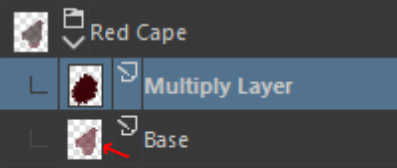
I’ve been trying to fix this myself for the past hour or so, I’m not sure how to fix it. In one of my multiply layers, it seems to not be multiplying as it should be. The color I am trying to use to multiply the layer below it is not the color that it generates. I am trying to shade a darker red over it, but for some reason it is coming out as a weird shade of green/gray. I’m not sure why it is doing this, since it is working fine on all other multiplier layers. Some images are below, any help would be appreciated.
What is the Opacity of the Base layer? That could affect the end result because of alpha inheritance.
Could it be the layers above or below the Red Cape group that are affecting this?
Can you turn off their visibility to see what happens?
@PumpkinKing , I really think too this is the opacity of the shape on your Base layer, as mentioned by @AhabGreybeard (not the opacity of the layer; the opacity of the paint on the layer). If I zoom on your layer stack, I can see the checkerboard pattern in transparency on the layer’s thumbnail. The clipping just inherit this transparency.
I’m glad I could help, but all the credits are for @AhabGreybeard
And no worry, it’s often the simplest details, sometimes obvious and under our nose that take longer to realize, because they often are so obvious we don’t have a routine to check on them.
Actually, I didn’t notice the details of the thumbnail image.
That is why I always try to use large thumbnail images when taking illustrative screenshots.