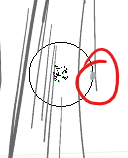
My device is Thinkpad windows 11 laptop and i use the Lenovo pen that comes with it I’d long forgotten the exact type since ive removed the sticker on the pen
my physical pen is pointed on the very edge of the delay and i used a grey dot to represent the pen.
Hi @crab_kap
If this is a 2-in-1 and you’re using a stylus on its screen, set Krita to Windows Ink (Settings > Configure Krita > Tablet settings > Input API – set to Windows Ink.)
You must restart Krita in order to make the change take effect.
1 Like
@crab_kap, I moved your topic into the correct category. Please be so kind to read the category descriptions before creating a new topic in them, they are meant to guide you getting the right answers earlier, and it helps to reduce maintenance work.
Michelist
This topic was automatically closed 30 days after the last reply. New replies are no longer allowed.