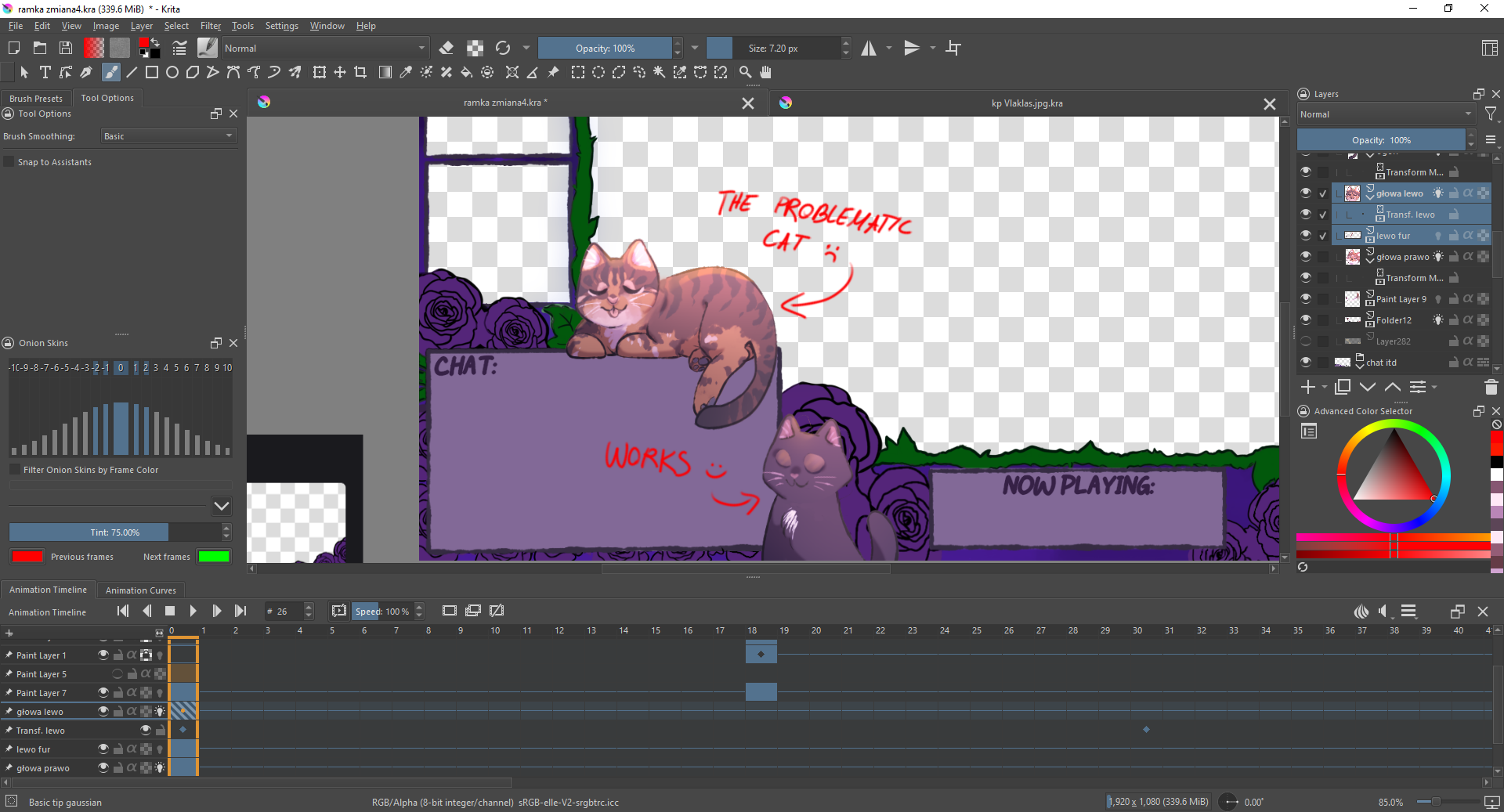
I have this issue I work on an animated frame for a streamer, wchich means the background is transparent. But I animate cats’ heads to move and 2 of them cooperate, they work well, but the third one leaves the shape of it’s head while moving.
The real mystery is that this "ghost” of cat’s head isn’t visible in my file as I work on it, it’s only visible when I render the animation.
Some additional info:
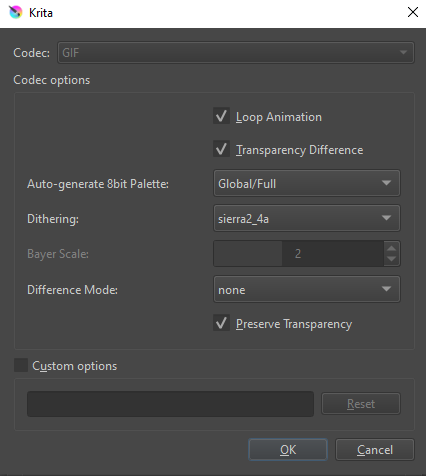
I render this as GIF (bicubic filter, but Idk much about filters maybe I could switch it to another)
The Problematic Cat is the only one with is head on the transparent background. The other two fit in the frame
I have no other masks attached to Problematic Cat, this problem is NOT visible in Krita. Only when I render the animation
Here I have to guess, because I don’t animate, but I guess that your transformation mask introduces partial transparency into your animation.
And if that is true, then your issue is that you are using the wrong format, GIF does not support partial transparency/partial alpha-channel.
You need to look for another format that supports partial transparency/alpha.
Hopefully an animator from the community can confirm this, but I’m very sure it will be the culprit.
I’m sure your description is accurate but it would be much better if you can upload a full screen screenshot of the .kra file opened with the layers docker and the animation timeline docker fully visible.
If you’re using an animated transform mask then another screenshot showing the Animation Curves docker would be helpful.
Also, please upload a screenshot that shows the Render options that you used:
It would be very useful if you provide a download link to a file sharing service (no login or registration requirement) for the .kra file so that someone here can examine it and run this themselves.
I tried uploading a video at the beginning but I wasn’t allowed to as a new user. But I can provide some screenshots! However, the drawing is not mine, as I am only responsible for the animation part and I’m not sure if I am allowed to share the file.
Turns out it is the problem with the transparent background that my transformation mask animation does not really like. When I add background, the problem’s solved but is there any other option to fix this?
I don’t usually work with animated gifs or with transparent backgrounds for animated output.
I suggest you try unchecking the Transparency Difference option to see if that improves matters.
I can understand why you don’t want to make the .kra file available.
You could easily create a test file that has contents which result in this problem and then make that available.
With that you could also try uploading an animated .gif again to show the problem.
You’re not actually a new user but you’ve been away for a long time so you may be being treated as a new user as far as upload and posting limits are concerned. Those limits should be lifted in a couple of days as you keep using the forum.
You should be able to load an animated .gif provided its size is less than 3MB.
The .gif file you have a Google link to does show playing in the Google file service and the problem is apparent. I can download the .gif file but that is not much use.
It would be more useful to create a test file that has this problem so that someone can examine it, manipulate it and then attempt ways to fix the problem, if possible, or to conclude that the problem can’t be fixed - then make that test file available.
Thank You for the information, I uploaded both the file and the gif but the link didn’t work out.
This one should work, though.
However, I already added some background to my animation, as it had been suggested above. It solved the problem, and the animation started to work smoothly afterwards. In that case, unless there is a secret way for a GIF to accept partial transparency, I’d accept this solution.
Thank You very much for Your help and patience, too!
 I work on an animated frame for a streamer, wchich means the background is transparent. But I animate cats’ heads to move and 2 of them cooperate, they work well, but the third one leaves the shape of it’s head while moving.
 Hello
Hello