i’ve beel looking into this bug and got a weird question. What the user should expect about layers being invisible? Should Krita still keep them updated while they are invisible? Or should it update/recalcualte them only when they become visible again?
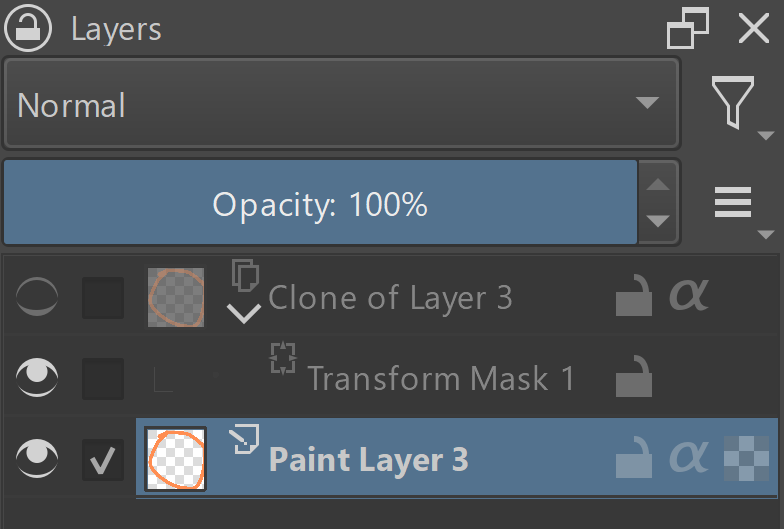
“Clone of Layer 3” is a clone of “Paint Layer 3” and is set invisible. The user paints something on “Paint Layer 3”, what should happen to the clone?
Option 1: the clone is updated rigth away, even though it is set invisible. When the user sets it visible again, nothing is recalculated.
This approach has its own pros and cons:
[+] setting the layer back to visible is quick, since no recalculations are needed
[-] the user cannot actually “disable” layer’s recalcualtions. In complex images with a lot of groups, clones and transform masks it can make the workflow slow
Option 2: If the layer is hidden, don’t update it and consider all its internal state undefined
[+] setting the layer invisible with completely cut it off from the image, so it will not slow down the workflow
[-] when the user finally makes this layer visible, its entire projection will have to be recalulated, which might be slow
[-] (I guess) the worst thing of this approach is that the layer is recalculated every time the user makes the layer visible, whether it changed or not. That could make the standard usecase of toggling visibility of layers back and forth a bit of annoying.
[-] “transitive” clones may stop working: when one has an invisible clone that is a source of another clone (clone layers generally support reading from invisible source) QUESTION: is it s problem actually?
Option 3: If the layer is hidden, don’t update it, but track its internal dirty state. When the user makes the layer visible again, it is recalculated only if any of its content changed
[+] setting the layer invisible with completely cut it off from the image, so it will not slow down the workflow
[+/-] when the user finally makes this layer visible, the projection is recalcualted only if anything inside the layer has actually changed QUESTION: will such random delays on turning a layer visible be a problem for the user?
[-] “transitive” clones may stop working: when one has an invisible clone that is a source of another clone (clone layers generally support reading from invisible source) QUESTION: is it s problem actually?
[-] this system may be really hard to implement
Currently, Krita uses some kind of “Option 1”, i.e. it regenerates all the children layers of group layers, even when the group is invisible. It also updates any layer that has clones (even invisible). It makes the switch of visibility state very quick. The layer should only recalculate its masks, but not all the children.
That explains the behavior in the bugreport: when the user changes the visibility state of the paint layer, the maks is recalculated; but when the user changes visibility of a group, then the layer is not recalculated.
What do you think about this problem? What would you expect from the layers that are invisible? And what approach Krita should take?
Originally, I wanted to change our design to follow “Option 2” approach, but now I’m not sure people would like that… What do you think?
PS:
Afair, in SolidWorks engineering design application there are actually two(!) visibility switches. One switch just makes the object “invisible”, while keeping it attached to the assembly (with all the physics emulation necessary). And the other switch disables the object completely (including physics, like surface intersection avoidance features). Do we need to go so complex? I guess not…
I tend to favor option 1, because the possibly non-functional transitive clones in options 2 and 3 could be a problem, although probably only for a few users. But for these users it will probably be essential.
The most elegant, but probably also the most complex, would be the SolidWorks variant, but Krita is not an engineering software, so I think it is overkill.
But I am not the right person to answer this question, for me this has never been an important function, as I have explored clone layers playfully, but never used them.
So the opinions of those who actually use clone layers would probably be very important here.
Option 1 would be my preference if it is really quick and the speed can be improved.
If not then I would like option3 but can do with option 2 too if 3 is harder or impossible to implement. Because I often have large document with many layers.
Consider my use case I often have two or three variants of an illustration, I use filter masks and clones a lot and also transform mask and this leads really really bad slow down when i work I often have to wait 2-3 minutes to get an updated image after simple toggle of layers.
I do not keep all the variants visible all the time I work on one variant of the illustration hide it and work on next variants which would have clones from first etc. So It would be good for me to not update the clone unless I make them visible because it would then help me work faster with the current variant I am okay with waiting for a bit when I enable the layer
So TLDR; my preferences are option 1 then option 3 and then option 2
That’s not a problem for me at all. The time it takes, it takes, I’m an amateur painter, or better, was an amateur painter and have infinite time and patience, and unlike @raghukamath I don’t use the function.
However, I think with the transitive clones disregarded, 3 could work well/be good (just a feeling, though).
I don’t know how other users who use this feature massively would rate it though. You need, I think, more than just @raghukamath’s and my opinion.
Have you ever needed a feature to disable updates of the clones that are placed in hidden groups? I mean a situation like that:
group1 (hidden)
  +-- clone of paint1 ("visible", but hidden by the parent group)
      +-- some heavy mask1
group2 (visible)
  +-- clone of paint1 (visible)
      +-- some heavy mask2
paint1
In the current implementation in Krita, when you change paint1, both clones are updated and their masks are recalculated, which can be slow. Have you ever faced a situation where you would prefer to disable updates for the clone under group1?
Yes I have groups for the variants I speak of in my reply earlier I often hide the parent group and not the child layers. But I have not thought of disabling any updates since I expect it to be fast such that it is not an hindrance while working on group 2 or if it is not fast enough, then it should not update at all if it is hidden, basically speed is the priority.
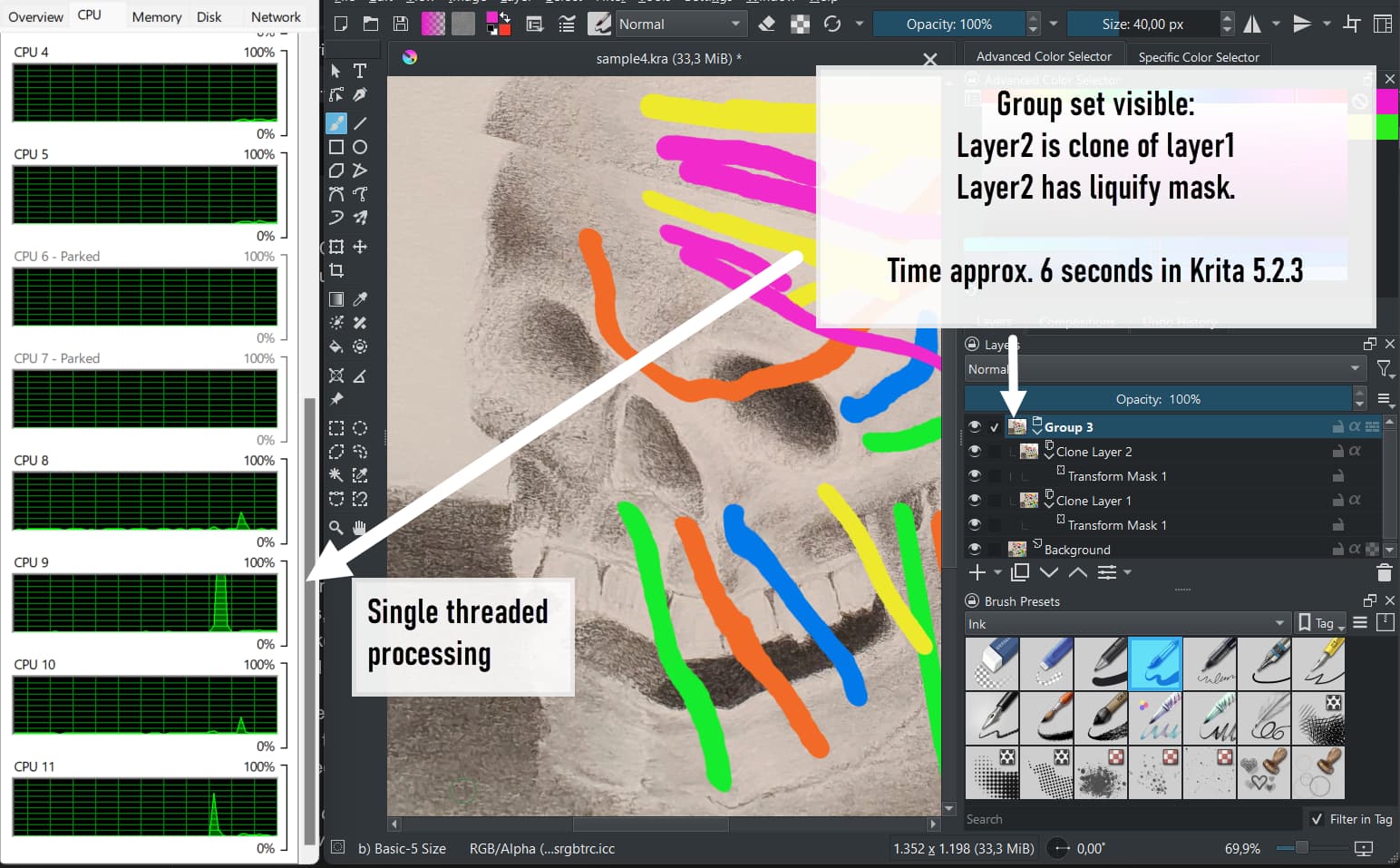
Group
   Layer2 (transform liquify mask) clone of layer1
   Layer1 (transform perspective mask) clone of Background
Background
Document 1300 x 1200 72 ppi
Enabling the group takes around 6 seconds
(Windows 11 notebook with i7-10750H 6Core CPU).
If option 2 or 3 would result in a longer time I would prefer to keep option 1 as it is.
What I noticed is, that enabling the group triggers load on just one cpu core (single threaded processing).
Painting on the background is ok speed-wise with layer1 and 2 being invisible.
So, the document is not very complex but layers / groups get enabled / disabled often. If option 1 is the fastest one in this case please keep it.
Or better: Implement option 1 and 2 and make them user switchable via the preferences.
Or are there plans to make the processing multi threaded? Could that solve the issue in general?
@dkazakov This is also my observation many of the operation on layer which have mask only utilise one core of cpu , at least it shows only one core being used in the task manager on linux. it would be great to have speed increase by using multiple threads.
Heh… it is ally surprising for me that people prefer option 1… I will have to thing about the design a bit more.
I definitely remember that we used to have bugreports telling that “invisible layers are being recalculated and it takes time”. So I’m a bit of scared that full implementation of option 1 will actually make some people unhappy…
Do you mean transform masks? Or just normal masks?
Normal masks should be multithreaded even right now. With transform masks it is a bit more complicated. Theoretically, they are multithreaded, but 1) if they are affine and move the object too much, they extend the “access rect”, which forbids running other threads; 2) if they are non-affine, they are updated using the delayed update mechanism, which is single-threaded.
So, an example document of the issue would be preferred.
It may be another way that mixes option 1 and one of the others: when the layer A is hidden and there are changes that should make it update, then, do not update A immediately, just put a it on some queue or similar of “things that should be updated”. Then, if there is some iddle time where the user does nothing, then trigger the updating of some of the layers (or work of any type) in the queue. If the user sets the layer to visible before the iddle time, then update the layer immediatelly before showing it and remove the updating of the layer from the queue.
Disclaimer: what I just wrote may have multiple flaws design-wise or other. I just wanted to give an idea of a 4th possible option.
When you enable the group it appears but then it takes a long till the liquify effect is calculated. That is what the screenshot of the resource monitor in my post above shows.
Yes, static image recalculation of the transform masks is single-threaded, that is what I said before. I have a feeling like it would be easier just to pass this work to GPU than to make is multithreaded.
Yeah, that is a possible solution. Though looks a bit complicated
My preference is option 1, since I often mouse over my hidden layers to see what’s on them, and I’d like the previews to be current, and I assume options 2/3 wouldn’t update the previews. And I feel like 1 is the more intuitive/expected behavior, so would be less likely to generate bug reports.
Edit: looks like @Deif_Lou already suggested my thought, which is to put the operation in a queue to complete later when the processor is not working on anything urgent.
I’m still technically learning Krita and especially how to make it work for my workflow (lots of layers). I prefer my clones rebuilt instantly, so background refresh is OK. I may be biased because I open my heavy projects on a relatively fast PC workstation.
What I sometimes struggle with is the “updating thumbnails” interrupt at the bottom of the screen. I don’t even need layer thumbnails most of the time (especially on groups, effects etc), but there’s no way to turn them off in Krita.
From the explanation of the original post I would choose option 3.
I don’t mind waiting a bit as it updates because I turn it on. As long as it it not recalculating every time even though there is no new changes to it.
I was experimenting with a new workflow, and my impression was that periodically, my brush would become unresponsive when “refresh thumbnails” was shown (5 seconds maybe?). File with multiple effects, layer styles, groups, clipping masks etc. (Intel 13 gen. with 64GB RAM)
I started looking for a way to turn off thumbnails. Maybe it wasn’t the thumbnail refresh that was stalling me, could be a parallel process. I’m unable to reproduce this right now, but I’ll ping you when I notice this again. Thanks.