Wanted to set the ratio to 16:9 for the selection tool, so that I can drag it to any size on my canvas while maintaining the ratio - but I couldn’t figure out how to translate it in the tools setting, as it only presented me with 1 number, not “X by X”.

Nevermind, just got inspired with the solution. I put in dimensions which I knew were the ratio I wanted (16x9 so I did 1600x900) and then let Krita calculate what the ‘ratio’ value was.
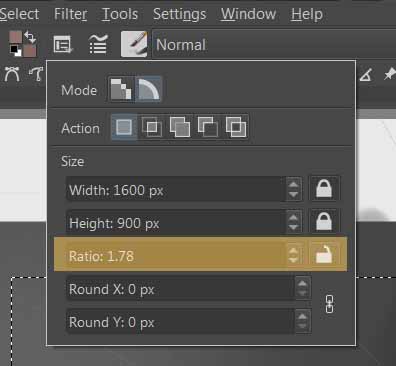
Now I can clear those dimensions, lock the ratio, and use that to my heart’s content. 

Shorter and quicker: right click on the Ratio field (to enter manually number), then type 16/9 , press Enter and Krita will calculate and return 1.78
That’s because math expression are supported in almost all Krita fields.
- divide →
/symbol - multipy →
*symbol
Thanks @Deevad - I didn’t know Krita could handle math expressions. Really helpful to know that. I used to use an identical feature in Adobe After Effects all the time, so I’m looking forward to using it in Krita!
(I changed the thread solution to be your post. Thanks again!)