If it cannot be used for the texture pattern, could someone help edit its PNG so that it could be used for the texture pattern? I tried myself for a while but having no luck. Here is the pattern for anyone willing to help:

Try to make your patterns for use with brushes,
- seamless,
- quadratic,
- not extremely large (max. not above 2k by 2k, better below 512²pixel),
to avoid issues like an impact on performance, ugly seams, and repeated cognizable patterns/seams.
Michelist
That was what I was trying - at least for the size part. When I was first trying to make it seamless, I started the canvas size at 512 pixels by 512 pixels using the picture you provided for the texture pattern as reference. Then I started making the honeycomb pattern shown in the photo I posted, and but it wasn’t seamless after testing it by turning on “Wrap Around Mode”. That was what led to the dimensions being 720 pixels by 400 pixels.
For the quadratic part, I don’t even know what that means. Could you explain how I would do that, or is it already explained in one of the videos you posted earlier? I only had the chance to watch " ADVANCED  Texturing Effects with Krita. FX
 ". Never got to watch the others yet.
I find it easier to make quadratic patterns seamless, it may be that it’s a personal preference of mine.
Michelist
Which video did you link earlier talks about quadratic patterns?
For a long time I used a different tool than Krita to create seamless patterns, and there it was helpful to use quadratic patterns.
I did not say that you’ll find it in a video, I mentioned them only because these are helpful to understand/learn, and as a resource of knowledge.
Michelist …, who has to sleep for a few hours more now, it is 6 AM in Germany.
You could try the Hexacol pattern:
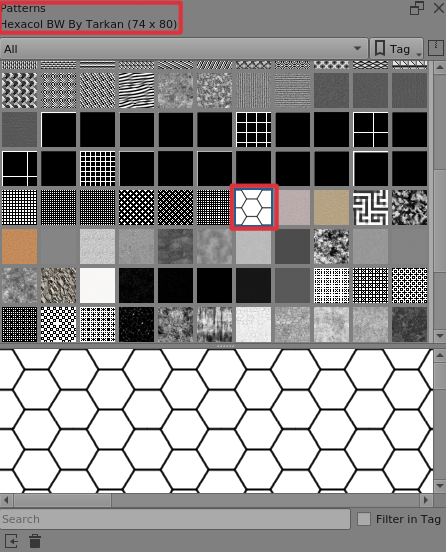
It’s a .pat file in the resources folder but here it is as a .png file:
hexacolBW__2.png
Thanks for the suggestion, but I already tried that. The problem lies with it not being seamless when turning on “Wrap Around Mode” as I mentioned about 10 hours ago. Unless there is a way to resize it within Krita so that it could become seamless with a canvas 512 pixels by 512 pixels or other square canvases smaller than it, I would have to create one myself or find a honeycomb pattern that could make a seamless pattern in the canvas.
The hexacol_BW.png image is seamless in Wrap Around mode. It wouldn’t be any use as a geometric pattern file if it wasn’t.
If you look at the symmetry of it and the repeat requirements in the horizontal and vertical axes, then it’s clear why it needs to be 74 x 80 to get wrapping and a regular hexagon array.
Why do you need a repeating pattern element to be square?
Hello @Michelist 
If you really believe to need that in 512 by 512 pixels, you can download it from here in exact that dimension and seamless.

Michelist
Edit/Add: Hello @AhabGreybeard, I should not do 3 things at the same time. I didn’t even recognize that you posted in between. LOL 
Edit: Updated link to the now fixed and really seamless pattern.
@Michelist
I thought it was too good to be true and I was right. That 512 x 512 pattern is seamless horizontally but not vertically:
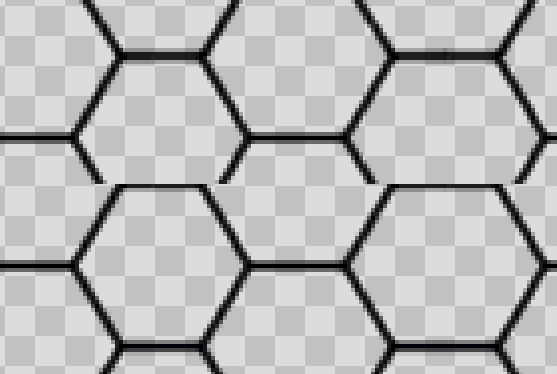

It could be scaled slightly in the vertical direction to give a square seamless non-regular pattern that was almost indistinguishable from a regular hexagon array.
You could work on that
Thanks so much for the help, @AhabGreybeard and @Michelist. I’ll try both of your suggestions and see which I like better. The next picture I post will be the honeycomb pattern with a medium grain - though I will likely try to make the medium grain myself for a while before asking for help. It wouldn’t be fun otherwise.
You are right, and currently I’m wondering what happened. I’ll try to figure it out.
Michelist
Edit/Add: @Nicholas_P, @AhabGreybeard: Pattern fixed and link in posting above updated. Now it is truly seamless. It was a stupid careless mistake.