Hi, this is my first time posting here, so feel free to tell me if I post anything in the wrong place so that I can fix it. I wanted to create a pastel brush from scratch for two reasons: First, I saw people using pastel brushes from bundles, so I wanted to create my own since I cannot afford the bundles they would usually come with. Secondly, I want learn how to make this brush as a reference for whenever I want to create other kinds of brushes.
Before I decided to post my request for help here, I made sure to watch a tutorial about creating brushes. I wanted to at least know what most of the things shown in the “edit brush settings” do and how to save a brush I want make. It was pretty informative of how they work. Now onto the part about creating the pastel brush.
I have two questions to start with: First, is there a specific engine I should choose for creating the pastel brush? I was thinking of using the Pixel Engine originally, but I wanted to ask anyone experienced who sees this if there is a more suitable engine besides that one. Second, what texturing mode should it be set to? I am unsure of which texturing mode is suitable for a pastel brush, as well as other kinds of brushes I want to make, since this’ll be my first time creating a brush in the first place.
Lastly, to anyone who wants to help me create this, I just want to say I appreciate any help I am given as a first-time user of Krita. I also hope to learn more of how to use Krita as I post questions or interact with anyone here. I will also share pictures as I make the brush to get critiques, but if asking critiques about this brush isn’t suitable in this section, feel free to tell me the correct.
Krita bundles are usually available for free, at least most of them, and believe me, the paid ones are no better just because someone is trying to make money from their work, which is not reprehensible.
I offer you the following linked bundle from Galatejaa to test which I have assembled from a kind of multi-part kit to an easily installable bundle in Krita 5. This has reduced its total size from over 70 MB to about 20 MB, with identical functionality.
You can find the bundle including license copies, a copy of the original website in HTML and PDF, as well as the corresponding lead image here:
You have to unzip the ZIP file and you will find the file “Pastel By Galatejaa - Repack by Michelist.bundle” which you can install in Krita via ‘‘Settings’’ >> ‘‘Manage Resource Libraries…’’ and click on the import button.
If you like it, that’s good and if not, then at least it was free. You would also have illustrative material on how a Pastel brush can be structured.
If you’ve watched tutorials on how to edit brushes, you can change the brush tip, and if it’s a textured brush, you can change that too. Then you can edit settings according to what you need. I do this frequently.
Thanks a lot for the recommendation for a bundle. I’ll definitely try out the bundle you recommended for a while to see if I like it enough to use in my art.
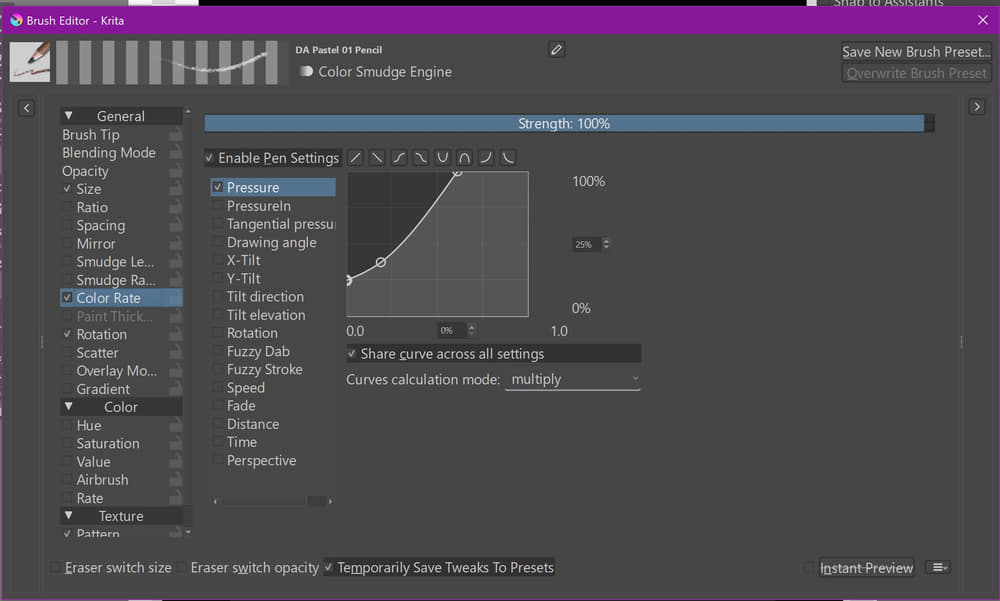
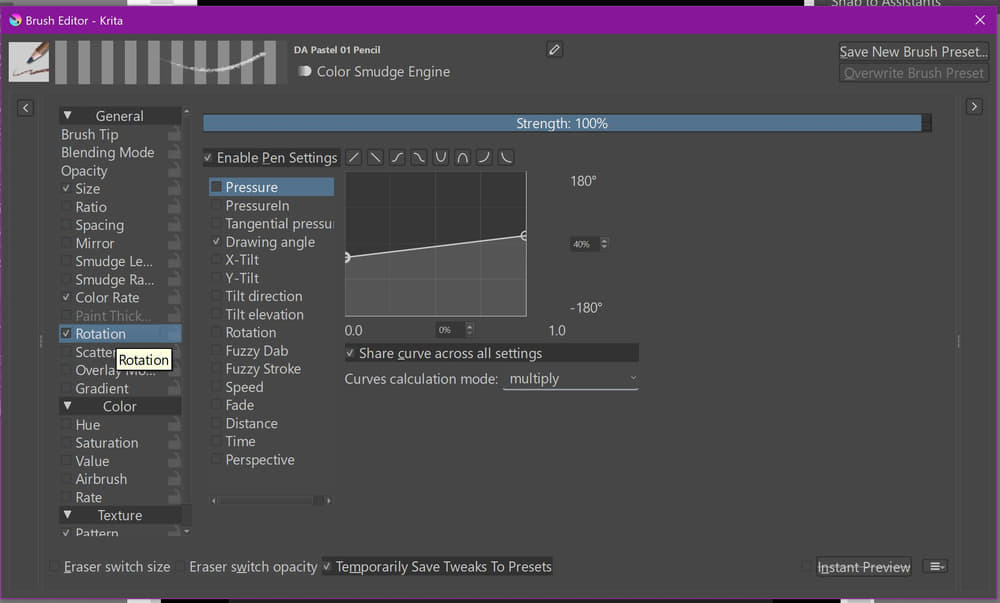
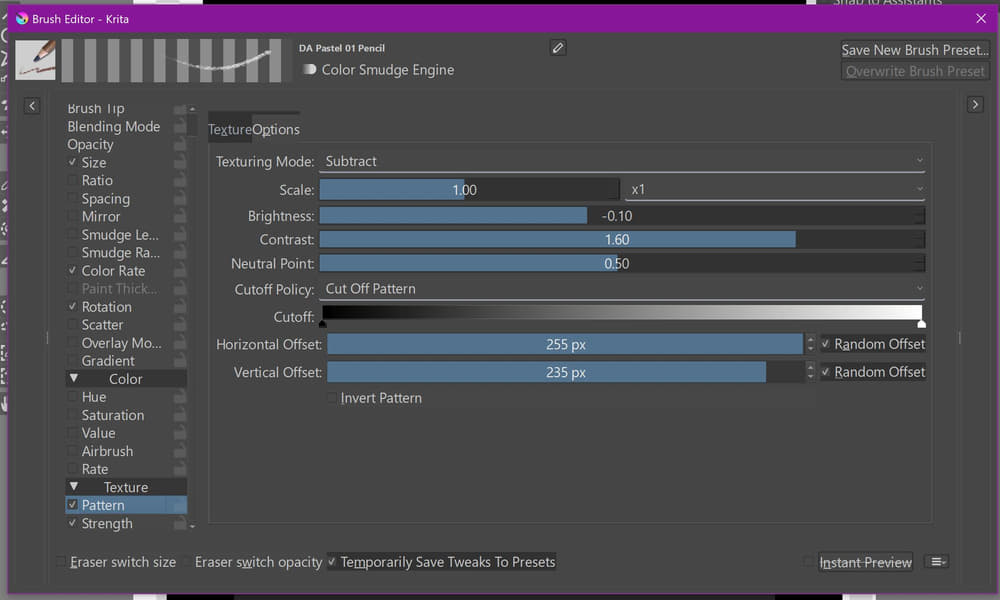
As part of the first reason that I forgot to mention, I saw a pastel brush from a paid bundle called Digital Atelier that I liked. It was called DA_Pastel_01_Pencil, and from seeing its picture in the reference sheet, I wanted to try making a somewhat similar pastel brush that doesn’t rip it off. That was why I was asking about the specific engine and texture mode used for user-made pastel brushes.
Finally, I read the licenses provided in the bundle, but I have a question: does the licenses mean I cannot use the brushes provided in drawings I might intend to sell?
Your last question first, the brushes I posted can not be used in commercial works. But the brushes from the bundle @CrazyCatBird recommended can.
You might want to know that the bundle @CrazyCatBird recommended is made by the one that made the Digital Atelier-Bundle too, @RamonM, additionally they are absolutely free of charge.
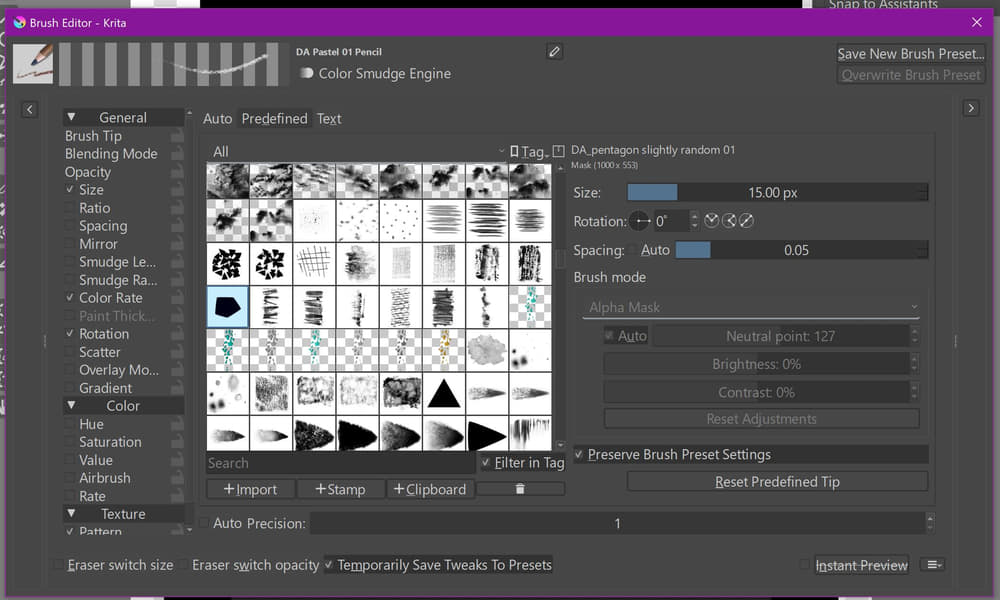
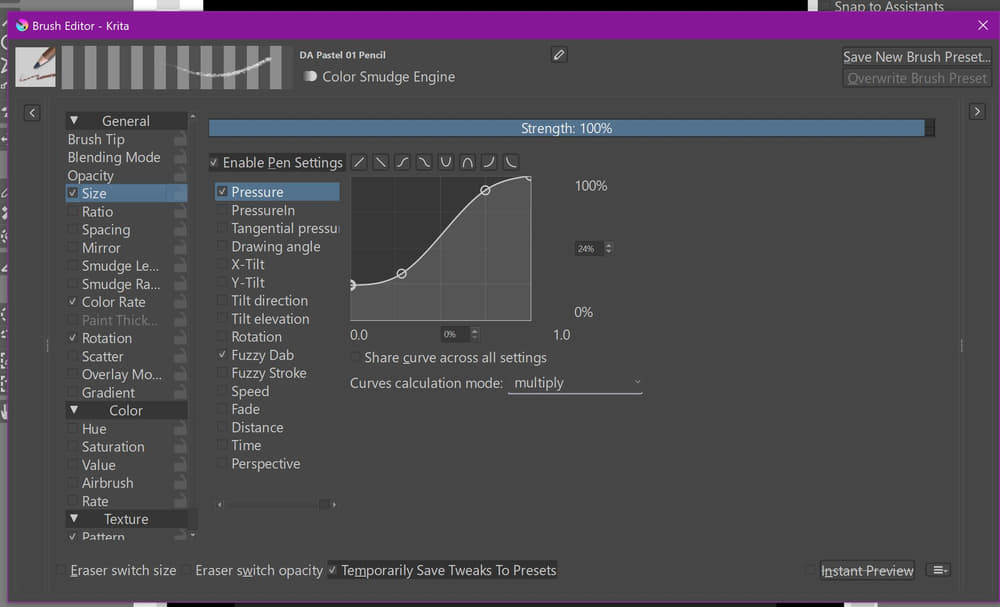
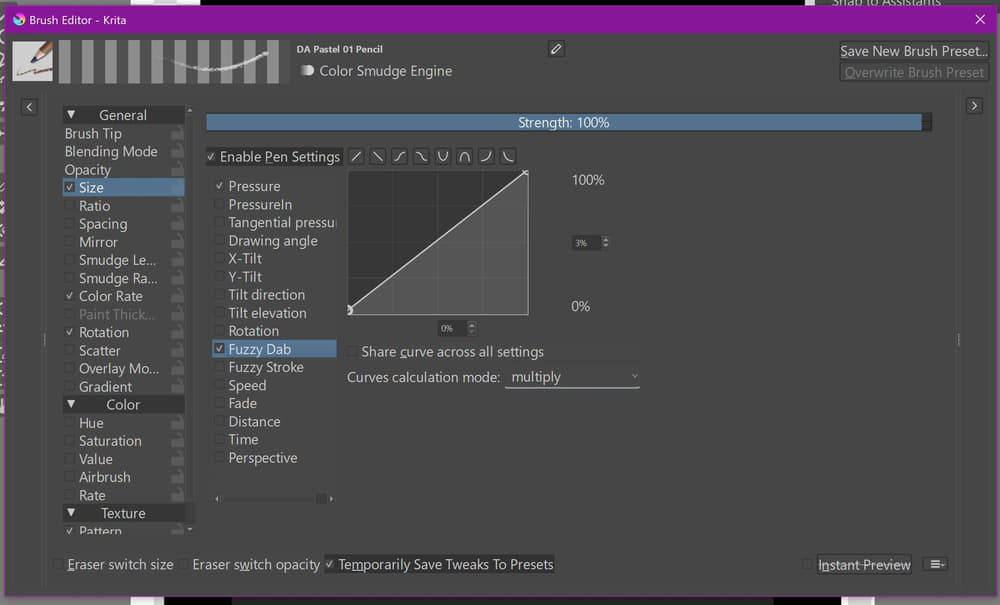
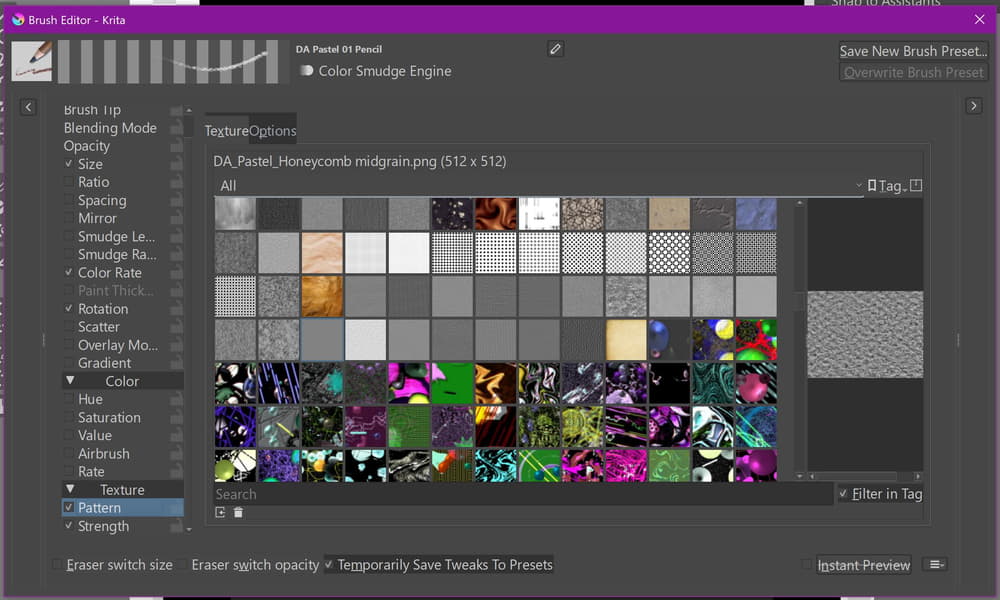
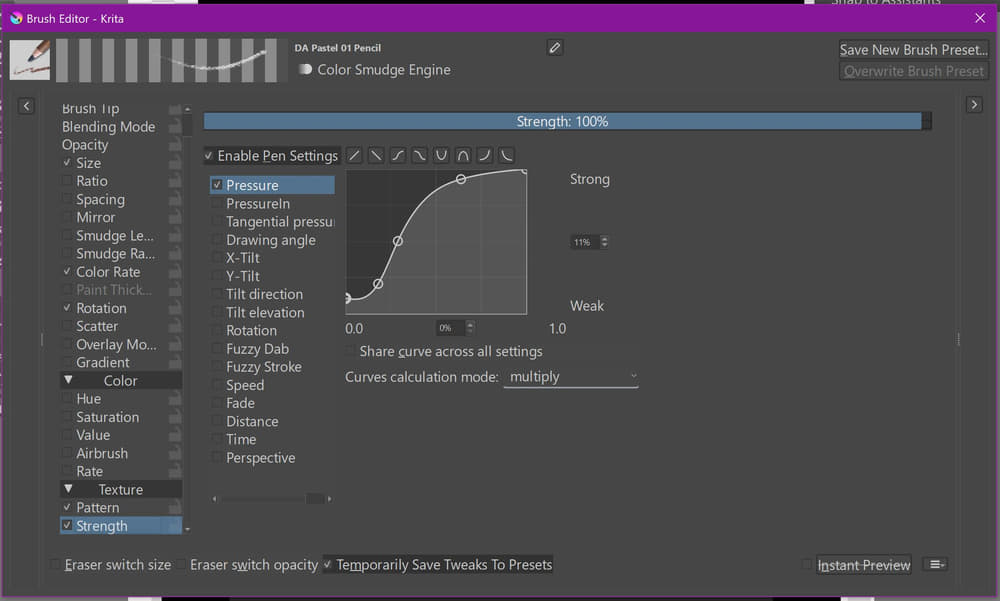
Here you find the settings for the “DA Pastel 01 Pencil”, it uses the “Color Smudge Engine”:
You can find lots of bundles and brushes among a few other resources in the forums’ category for
Don’t forget to check out the other resource categories.
Should you ever be in need of resources that you can’t find in the forum’s resource category or other corners of the web, may it be brushes, papers, gradients, patterns, etc. then please ask here in the forum or send me a PM, I’m a resource addicted person and know of resources you will not find here in the forum.
Thank you so much!! I appreciate all the help you’ve given me so far, and I will definitely ask for your help with finding resources in the future that I don’t feel up to making on my own - probably through PM. I also wanna thank you for telling me which of the two bundles can be used and not used for commercial use. I’ll either work on my own pastel brush either later today or tomorrow thanks to you and post a WIP of it in this thread when I have something presentable.
Yes, no problem. However, you should only ask questions via PM that do not belong in a forum, because normally the purpose of a forum is to answer questions in addition to creating a reference work for subsequent help-seekers.
For this reason, we would also like users to create a separate topic for each question they have, which makes subsequent research easier. And you know which question a vaguely worded answer may apply to; in topics where several questions are asked at once, assigning an answer to the right question can pose problems for the questioner.
So always ask yourself: “Is this a question that others can also benefit from the answer to?” If the answer is “yes”, then you should preferably not write a PM.
I have a question before I start working on creating my own custom brush: When I start making a custom brush tip, does it matter what kind of pen I use to make it? For instance, can I use the Basic-5 Size to make a brush tip that’ll be used for a totally different engine?
Absolutely. A brush tip is a picture, or in case of GIH-Brush Tips, it is a collection of pictures from 2 to x pictures, nothing more, nothing less. These pictures can be in a few formats Krita accepts, I usually use PNG or in special cases GIH.
Good to know. From the pictures you posted of the pastel brush yesterday, I noticed they custom made a pentagon-shaped tip. I was thinking of making my own but didn’t know if I could use the pre-mentioned Basic-5 Brush to draw it or one of the brushes that comes with the Color Smudge Engine. If I do have to use a brush from that engine, which would you recommend me to use?
Edit: When you say “absolutely”, do you mean I can use the Basic-5 Brush to create the tip, or do you mean that I have to use a pen from that specific engine?
I won’t narrow me down this way, you can try any brush as base, be open-minded, play around and collect experiences.
If I gave you a recommendation, I would limit you. Just the day before yesterday, I spoke with a guy in another forum about the 70s where we did things with computers that, regarding the manual of that computer and teaching books from that time we later found in the public library, were “impossible”. But just because we didn’t know it should be impossible, we did things that we probably never haven’t done if we had read the books and the manual beforehand, and funnily, we did “impossible” things. Because why try something that others found impossible?
I don’t want to limit you!
Before I forget it, you can also make scribbles on canvas, select and copy them to create brush tips from clipboard, try it, it’s fun!
Though not this exact video, I have watched a similar video which did a slightly different method, but I will definitely watch this video in case there is something not taught in the video I mentioned. They created a Texture 256x256 canvas before making they started making the brush tip.
Hey, just an update on my progress of making the brush. I created a brush tip slightly similar to the one in the first picture provided by @Michelist. I just made the shape it more like pentagons with the inside angles equaling 108 degrees. Let’s see how things go when I have a prototype pastel brush to test.
Happy New Year’s Eve or New Year depending on where you live. I am back from a small break after finishing the brush tip, so now I can continue making my first-ever brush. I even created the 512 x 512 canvas for the texture pattern - or at least I think it’s the right size. I am gonna start on creating the texture pattern in the 6th picture, but I am confused on something: how can I even make the texture pattern in the first place? Does anyone have a recommendation on how to make it or something similar?
Small question relating to one of the pictures posted by @Michelist while waiting on a response to my earlier question: Why is the textured pattern called “honeycomb midgrain”? It looks more like snow static you’d see from a computer and television screen when it doesn’t connect to a channel.
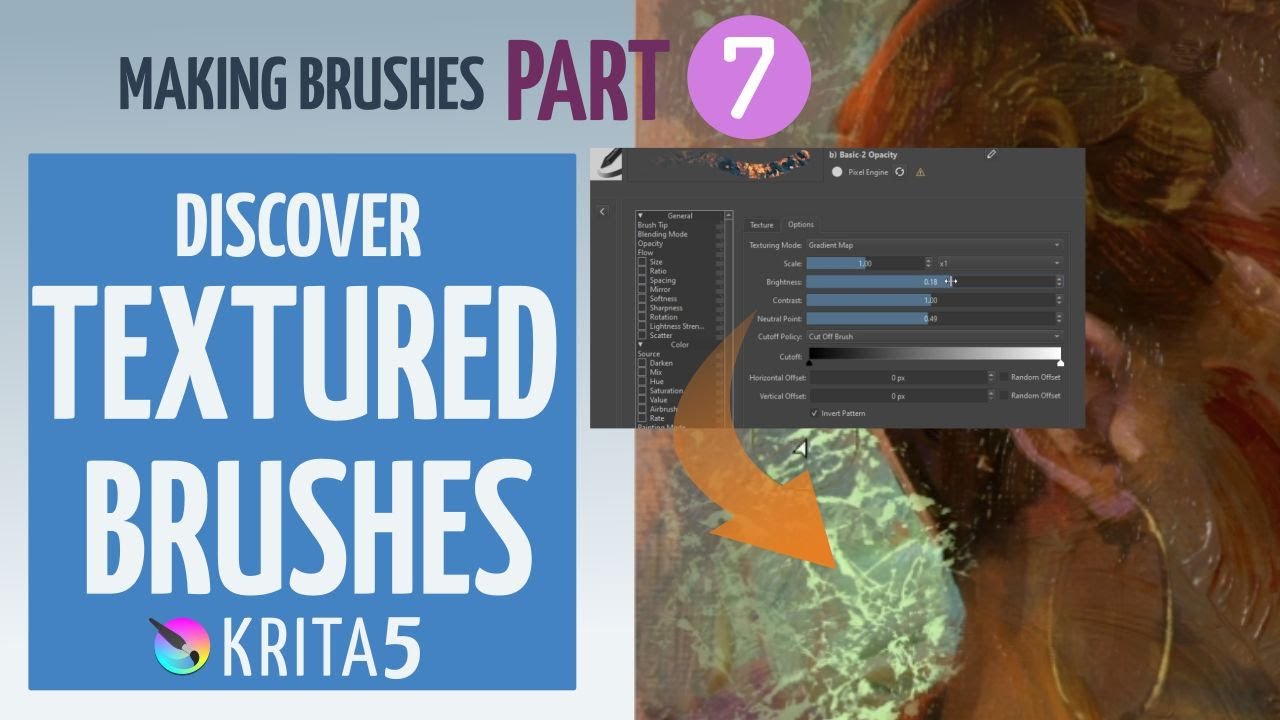
What is a texture? A texture is a “technical surface” that serves to exert a “shaping influence” on other surfaces (my definition). See the videos linked below for more information. Look at the screenshot with the texture, the range is wide.
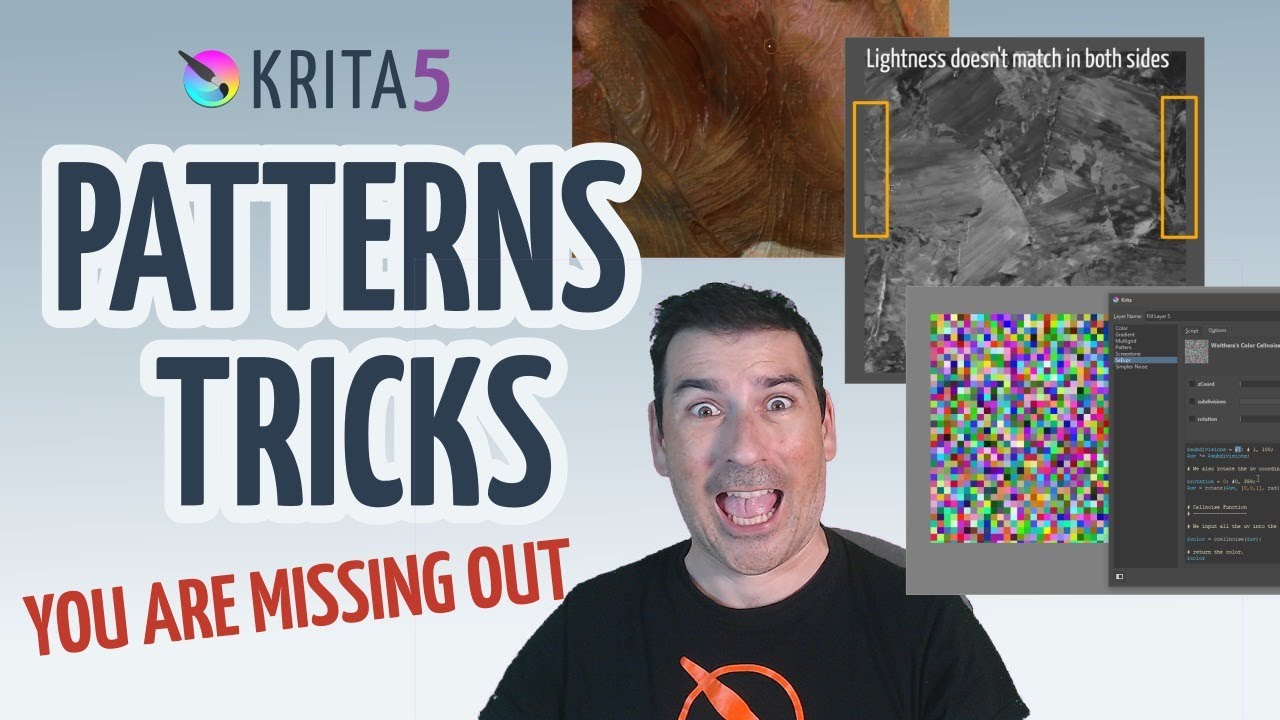
You could create these patterns by photographing a corresponding surface to edit it, you could also select a section of an existing image, whether photo or painted, to manipulate it using the filters of Krita or Krita’s plugin G’Mic, Krita’s SeExpr Scripts would also be a suitable option for creating textures. If you are looking for SeExpr Scripts, see the links at the end.
Why is the texture called what it is? The texture may have been based on a honeycomb pattern, to which a medium grain was then added by a processing step.
Many things are conceivable, the important thing is your own playfulness, the will to try something out, be it a blur filter, enlargements or reductions, distortion, you can bring all that into play. You can also be lazy. The very lazy download ready-made textures from the net, there are enough free textures, the less lazy look for a texture generator, the creative use the above possibilities and more, there are hardly any limits to the imagination. Creating textures is pure creativity, freely selectable levels. You decide what you want and which way to go.
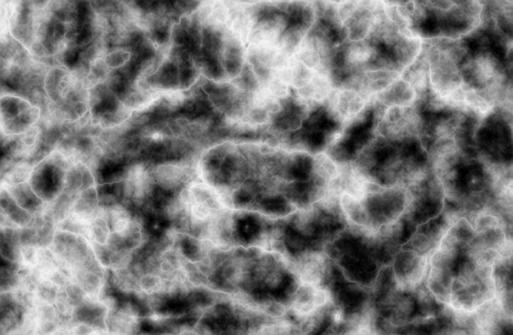
Here you see a surface made via a SeExpr Script, play with it!
Quick question: for the texture pattern that’ll be used for a brush, does the size matter? I am asking because I had to handmake a seamless pattern for the honeycomb that is 740 pixels by 400 pixels.
 Hello
Hello 

 Because why try something that others found impossible?