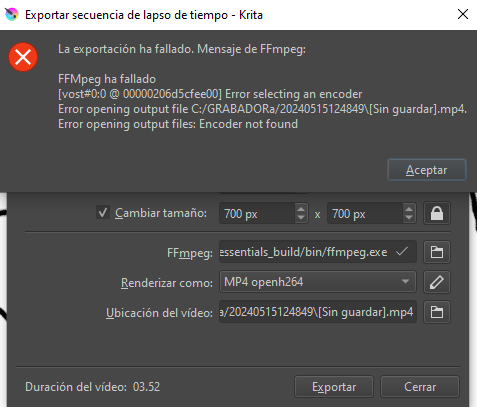
Hola gentita hermosa, necesito una ayuda con exportación de FFMPEG, al hacer el timelapse y exportar me sale un error. Probé con animación pero allí no hay problema, solo cuando quiero exportar timelapse.
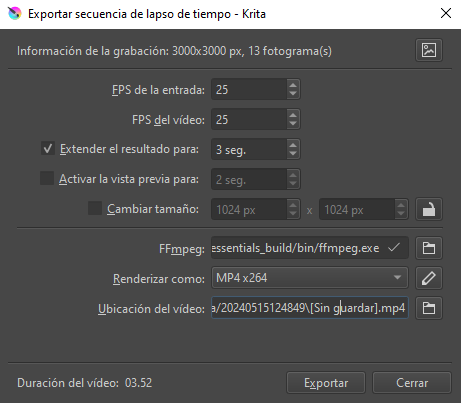
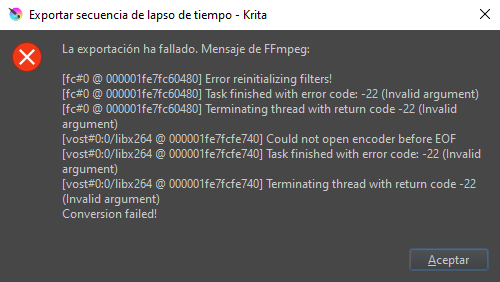
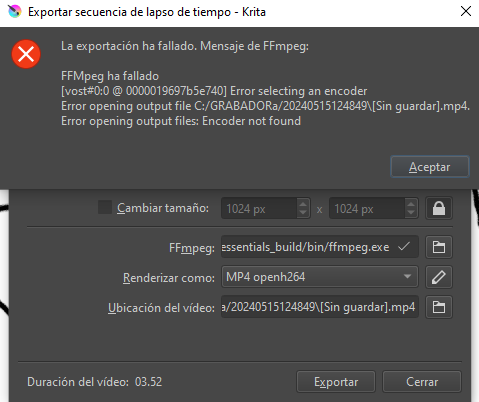
He probado reinstalando Krita y FFMPEG pero error sigue siendo el mismo. Muestro capturas de lo que me sale:
(English translation added by moderator)
Hello beautiful people, I need help with FFMPEG export, when doing the timelapse and exporting I get an error. I tried with animation but there is no problem there, only when I want to export timelapse.
I have tried reinstalling Krita and FFMPEG but the error remains the same. I show screenshots of what I get:
Please help, I am trying to upload content to my networks
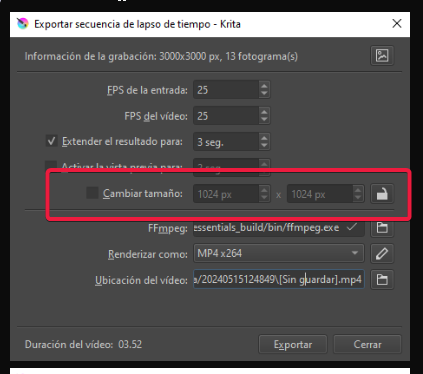
You need to reduce the dimensions as 3000 x 3000 is probably too large for your device to handle. Be sure to click the lock icon next to the resize dimensions box before inputting a smaller size so the aspect ratio is retained.
If that does not work, do this additional thing: Change the render to MP4 openh264.
Please add an English translation to your questions/comments as this is an international forum with English as the specified common language. I added an English translation to your initial question.
I just noticed that part of the video location has the word unsaved in brackets (sin guardar). I’m not sure why that’s there.
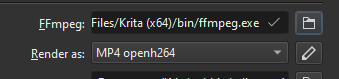
Also, that FFmpeg location does not look like the one that ships with Krita. I should have asked you if you were using 5.2.2 which is the most recent and has FFmpeg built in. You seem to be pointing to a different version of FFmpeg than the one that is loaded with Krita and the location is not correct (unless you’re using an older version of Krita?).
The problem was solved, I uninstalled Krita and deleted the previous FFMPEG folders, downloaded the new version of Krita and everything works correctly. Thank you so much. Muchas gracias :DDD