[needs testing] New EGL backend for GPU acceleration on Linux with X11/XWayland

Hi, all!

tldr; I want to enable a different openGL backend on Linux by default and I need your input if you think it is safe or not, this is especially important for the users of proprietary GPU drivers

Problem

We’ve got a few weird bugs with low framerate on Linux when using Krita 6.x in X11 (or XWayland) mode (this and that). One of the solutions to the bugs is to switch the backend that Qt uses to access openGL on Linux.

Before recently, Krita used the GLX backend exclusively, which was vulnerable to these issues (due to a bug in Qt). Yesterday I implemented a switch to the “newer” backend, called “EGL”.

This backend should resolve the bugs completely, and I would really like to enable this backend by default, but…

But there are rumors that some proprietary drivers, like Nvidia’s, don’t work with this backend properly. We did some local testing and we couldn’t confirm this statement. Could you help me with testing this backend on different GPUs/drivers?

How to test

  1. Download the latest nightly build of Krita Next

  2. Run it is X11/XWayland mode:

    QT_QPA_PLATFORM=xcb ./krita-*-x86_64.AppImage
    
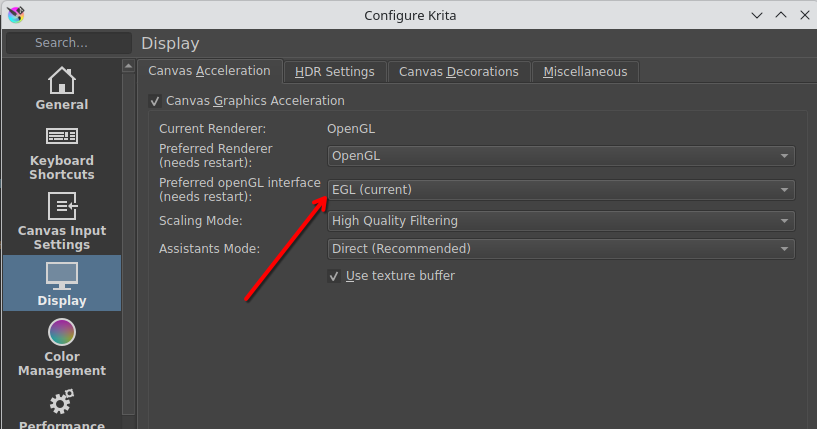
  3. Go to the Settings dialog and switch the “openGL interface” to “EGL”

  4. Restart Krita and make sure that the backend got activated, the switch should say “EGL (current)”

  5. Try to do your normal stuff in Krita, like paint, use assistants, enable “Text Properties” docker (it can help forcing the framerate issue). Check if everything works fine and no framerate issues happen.

  6. If Krita refuses to start or activate the EGL backend, try getting the log by running Krita with the following enviornment:

    QT_LOGGING_RULES='qt.qpa.gl=true' QT_QPA_PLATFORM=xcb ./krita-*-x86_64.AppImage
    

As a result of the test it would be nice to know the following info:

  1. Does EGL work as expected?
  2. What is the driver and GPU name?
    You can get this info with the following commands:
    eglinfo | grep -A5 "X11 platform"
    glxinfo | grep -A5 "Vendor"
    
  3. If you have some troubles with the EGL backend, please attach the full unclipped eglinfo output

PS:

Some clarifying notes:

  • Krita 5.x is not affected
  • Krita 6.x in native Wayland mode is not affected
  • the latest nightly AppImage builds of Krita 6.x have a workaround in the GLX backend, so the original bug should not be visible unless you disable the workaround by setting export QT_GLX_SWAP_INTERVAL_SYNC_WORKAROUND=0
  • the distribution builds of Krita will have this bug visible unless the user manually switches to the EGL backend, that is why I want to make it the default choice
2 Likes

Complete no go, launching Krita with the mentioned command worked (a lot slower to open but it got there), after switching to EGL, closing Krita and after that the application wont run at all i get errors

“Krita has encountered an internal error:

SAFE ASSERT (krita): “result” in file /builds/graphics/krita/libs/resources/KisResourceCacheDb.cpp, line 2092

Please report a bug to developers!

Press Ignore to try to continue.

Press Abort to see developers information (all unsaved data will be lost)” i can abort or ignore about 5 times after that krita launches into a black window with no ui or feedback

eglinfo | grep -A5 “X11 platform”
X11 platform:
EGL API version: 1.5
EGL vendor string: NVIDIA
EGL version string: 1.5
EGL client APIs: OpenGL_ES OpenGL
EGL extensions string:
libEGL warning: pci id for fd 27: 10de:2702, driver (null)

pci id for fd 29: 10de:2702, driver (null)
pci id for fd 30: 10de:2702, driver (null)
libEGL warning: egl: failed to create dri2 screen
libEGL warning: pci id for fd 27: 10de:2702, driver (null)

pci id for fd 29: 10de:2702, driver (null)
pci id for fd 30: 10de:2702, driver (null)
libEGL warning: egl: failed to create dri2 screen
libEGL warning: pci id for fd 27: 10de:2702, driver (null)

the complete eglinfo pasted here, the forum doesnt allow text files

https://textbin.net/tiascxlkqn

Hi, @Pastean_Narcis_Dan!

Could you please also paste the output of Krita when running it using this command? (with the EGL backend enabled)

QT_LOGGING_RULES='qt.qpa.gl=true' QT_QPA_PLATFORM=xcb ./krita-*-x86_64.AppImage

SAFE ASSERT (krita): “result” in file /builds/graphics/krita/libs/resources/KisResourceCacheDb.cpp, line 2092

This assert looks unrelated to the problem. Please try to move your resources folder (~/.local/share/krita) into some safe space a try to run Krita fresh.

We can try to debug this assert separately (the log in the terminal should say what exact resource is causing this issue).

sure

Still no go, black screen, after moving the folder mentioned, there was no more errors but black screen ui opened and errors in the pastebin

GPU: NVIDIA GTX 660 (Kepler)
Driver: 470.256.02 (proprietary)
Distro: CachyOS (Arch-based)
Desktop session: XFCE on X11
Krita build tested: krita‑6.1.0‑prealpha‑98cf3345ec AppImage

EGL backend behavior

Krita launches and the Display settings show “EGL (current)”, but the terminal prints repeated EGL initialization errors:

  • QEGLPlatformContext: Failed to create context: 3009

  • Cannot find EGLConfig, returning null config

  • Unable to find an X11 visual which matches EGL config 0

  • libEGL warning: egl: failed to create dri2 screen

eglinfo reports NVIDIA as the vendor, but also shows multiple failures to create a DRI2 screen and several driver (null) entries.

Despite these errors, Krita runs and basic painting, zooming, rotating, and the Text Properties docker all work without obvious framerate issues. It appears Krita is falling back internally rather than using a fully functional EGL context.

GLX information

glxinfo exists at /usr/bin/glxinfo but produces no output at all when run. This seems to be due to the NVIDIA 470 legacy driver not exposing the Mesa GLX API that glxinfo expects.

NVIDIA’s own tools confirm the GLX/OpenGL provider:

Code

OpenGLVersion: 4.6.0 NVIDIA 470.256.02

Conclusion

On NVIDIA’s 470.xx legacy driver (Kepler GPUs), the EGL backend does not initialize correctly. Krita runs, but EGL is non-functional and falls back to a root visual. This driver/GPU combination appears incompatible with enabling EGL by default.

❯ eglinfo | grep -A5 “X11 platform”
glxinfo | grep -A5 “Vendor”
pci id for fd 3: 10de:11c0, driver (null)
pci id for fd 4: 10de:11c0, driver (null)
pci id for fd 5: 10de:11c0, driver (null)
pci id for fd 4: 10de:11c0, driver (null)
pci id for fd 5: 10de:11c0, driver (null)
X11 platform:
EGL API version: 1.5
EGL vendor string: NVIDIA
EGL version string: 1.5
EGL client APIs: OpenGL_ES OpenGL
EGL extensions string:
libEGL warning: pci id for fd 22: 10de:11c0, driver (null)

pci id for fd 23: 10de:11c0, driver (null)
pci id for fd 24: 10de:11c0, driver (null)
libEGL warning: egl: failed to create dri2 screen
libEGL warning: DRI2: failed to create screen
libEGL warning: pci id for fd 22: 10de:11c0, driver (null)

pci id for fd 23: 10de:11c0, driver (null)
pci id for fd 24: 10de:11c0, driver (null)
libEGL warning: egl: failed to create dri2 screen
libEGL warning: DRI2: failed to create screen
libEGL warning: pci id for fd 22: 10de:11c0, driver (null)

libEGL warning: pci id for fd 29: 10de:11c0, driver (null)

pci id for fd 30: 10de:11c0, driver (null)
pci id for fd 31: 10de:11c0, driver (null)
libEGL warning: egl: failed to create dri2 screen
libEGL warning: pci id for fd 29: 10de:11c0, driver (null)

pci id for fd 30: 10de:11c0, driver (null)
pci id for fd 31: 10de:11c0, driver (null)
libEGL warning: egl: failed to create dri2 screen
libEGL warning: pci id for fd 29: 10de:11c0, driver (null)

~

Also I had already renamed my “krita” folder at “/home/myname/.local/share/krita” to something else before I tested.

Just ran: QT_LOGGING_RULES=‘qt.qpa.gl=true’ QT_QPA_PLATFORM=xcb ./krita-6.1.0-prealpha-98cf3345ec-x86_64.AppImage**

GPU:** NVIDIA GTX 660 (Kepler)
Driver: 470.256.02 (proprietary)
Distro: CachyOS (Arch-based)
Desktop session: XFCE on X11
Krita build tested: krita‑6.1.0‑prealpha‑98cf3345ec AppImage

EGL backend behavior

Krita launches and shows “EGL (current)”, but the EGL debug logs show that the driver cannot create a valid EGL context. Key failures:

Code

qt.qpa.gl: EGL suggested using X Visual ID 0 (8 8 8 0 depth 24) for EGL config 1(8 8 8 8), but this is incompatible
QEGLPlatformContext: Failed to create context: 3009
Cannot find EGLConfig, returning null config
qt.qpa.gl: EGL did not suggest a VisualID (EGL_NATIVE_VISUAL_ID was zero) for EGLConfig 0
Unable to find an X11 visual which matches EGL config 0
Falling back to using screens root_visual.

eglinfo also shows repeated:

Code

libEGL warning: egl: failed to create dri2 screen
pci id ... driver (null)

Despite these failures, Krita still runs and painting/zooming/text tool work normally, which suggests Qt is silently falling back to a non‑EGL path.

GLX information

glxinfo exists at /usr/bin/glxinfo but produces no output (likely due to NVIDIA 470 not exposing Mesa’s GLX API).
NVIDIA’s own tool reports:

Code

OpenGLVersion: 4.6.0 NVIDIA 470.256.02

Conclusion

On NVIDIA’s 470.xx legacy driver (Kepler GPUs), the EGL backend does not initialize correctly. Krita runs, but EGL is non-functional and Qt falls back to the root visual. This driver/GPU combination appears incompatible with enabling EGL by default.

Well, it actually means that the EGL backend managed to start and is being used successfully. There are some not yet investigated warnings in the logs all the time, but I have a feeling like they are more related to some issues inside Qt’s backend…

Does Krita actually work fine for you in such state? I mean, framerate is fine, no artifacts or slowdowns?

Thanks for the log! I’ll try to think about what happens there…

Krita starts and seems to work just fine for me. No issues that I noticed.

1 Like

I’ve been using the nightly (6.1.0-prealpha git 802cded) for about 2 hours now and everything seems fine for me with EGL enabled on my AMD card.

I haven’t had any issues with Krita 6.0.0-beta1 or beta2 relating to low or mixed framerates, tho. I have 3 monitors, one at 120Hz (Primary), one at 75Hz, and the other at 60Hz. I only ever use Krita on the 60hz one because it’s a tablet.

I’m using Arch Linux with KDE Plasma

eglinfo:

X11 platform:
EGL API version: 1.5
EGL vendor string: Mesa Project
EGL version string: 1.5
EGL client APIs: OpenGL OpenGL_ES
EGL driver name: radeonsi

glxinfo

glxinfo | grep -A5 "Vendor"
    Vendor: AMD (0x1002)
    Device: AMD Radeon RX 7800 XT (radeonsi, navi32, ACO, DRM 3.64, 6.18.13-arch1-1) (0x747e)
    Version: 26.0.1
    Accelerated: yes
    Video memory: 16384MB
    Unified memory: no