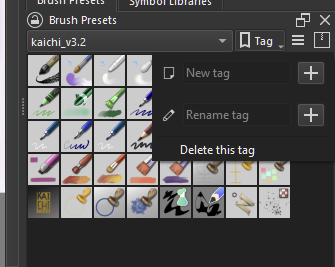
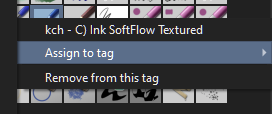
I have just started to use Krita. I have a question to ask about the Pop-up Palette. When I looked a pictorial example of the pop-up palette it shows the palette with 10 brushes which can be selected. When I open the palette in Krita on my PC no brushes are shown only blank circles. Please can someone tell me how to get the pop-up palette to show the brushes or tell me what I might be doing wrong?
Thank you for your reply. The details you have given are very helpful. I have tried out what you said and I’m now able to add brushes to the pop-up.
What confused me was that having never used Krita before I decided to watch a tutorial called Digital Painting in Krita: A Quick Start by Arron Porter which is on Skillshare. In one of the videos called Pop-up Palette: Essentials he talks about the pop-up palette and loads it on his screen in the video. The palette loads in the video shows 10 brushes but throughout the entire video it is not mentioned how the brushes got in the palette. I assumed, wrongly, that the palette automatically load with brushes installed. That is why I thought I had possibly a technical problem.
That sort of thing is a common problem with tutorials.
The properties/appearance of the popup palette is just one of the many mysterious wonders of krita and you’ll encounter many more in the future
That’s what the Krita-Artists forum is for and also the manual:
Something like krita for absolute beginner is needed. There’s also been issue with the younger ones who seems to be lost at the workings of a PC [like directories seems foreign to some]
Specially on things that are connected - like the tag system and the popup palette.
@Takiro I was thinking it should’ve been but probably there is no brush there in ops case . It’s been awhile since i have seen a freshly installed krita.
Thank you. Yes I have found problems with other tutorials for other digital painting applications. I think sometimes the tutor assumes that the student will have some level of understanding of how the program works. Fortunately, I am not completely lost because I have some knowledge of other painting apps. Thanks again. - Greg