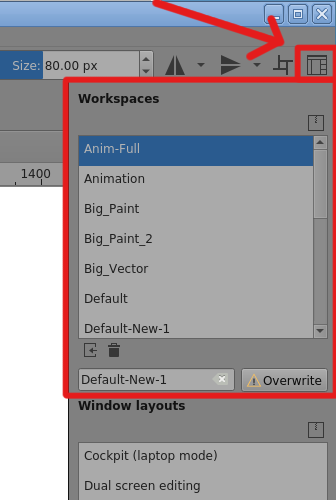
At the far right of the Toolbar is the ‘Choose workspace’ icon. This gives a list of available workspaces and lets you save the current workspace in a named workspace file.
So, when you’ve accidentally made a change to docker arrangements, you can use this to reload your favourite custom workspace, or any of the default ones provided.
Thanks for the tip, i’ll try that next time it happens, i’ve already saved a new animation workspace for myself, but didn’t think to reload the dockers that way. i also don’t think it’s a big deal, really. but there’s a few other issues with the animation side of Krita that i would really like to see happen.
Weird I get the feeling you guys have really bad posture while animating. I can’t see a reason why to drag the stylus from a timeline to the canvas. That or lack of sleep perhaps. Something like that I would buy more.
I am not against the lock but reason for it to occur seems strange.
I have animated on Krita and never are my dockers scaled or undocked once. Because I lift my pen like a normal person.
Thing is without the lock the docker has been able to exist without pushing the rest of the UI making it super simple adjust use the rest or you can integrate it as a normal docker again thing you can do with others again. This behaviour does not exist on other dockers so I donno if not having a lock is really or not the reason. But I prefer docked as normal so if the lock returns and breaks that I don’t mind to much the trade off. But the reason to trade it for is because people can’t lift up their stylus? Never heard of that before and is a bit hard to swallow.
All UI s are not meant for you to drag your stylus all over the place whatever the software. Is like pressing all the buttons and then complaining you pressed them. After once or twice you should know it is there. Expecting a user to lift up their stylus I imagin is something every dev would expect when pressing buttons.
I wonder if you guys use shortcuts too and use the docker for every little change.
yes, i know my posture is not good. i just started digital art and got my first digital tablet 2 months ago, a wacom intuos3 6x11. i haven’t found a quick or easy solution to assigning the buttons on linux, so i keep the tablet near the laptop, so i can use the keyboard. this has made my posture bad and i need to fix it.
i’m fine with no locking dockers, it isn’t a bad issue, i just posted to say that i’ve also had this happen often, and i would lock it if i could. but please, eyeodin, don’t assume any of us are dragging our stylus’s all over our tablets, either from “lack of sleep” or from not using the stylus like a “normal person”, but instead, sometimes, in that limited space of the animation dockers, we sometimes try to grab one thing, but other things happen. i hope that this isn’t that “hard to swallow”, it’s just us, trying to help each other figure out how to work better.
and YES, i use shortcuts ALL the time, it’s how krita works. what would i do without ctrl or ctrl-z or 2 or tab? and YES, i use the animation timeline and curves docker for EVERY LITTLE CHANGE, that is exactly how animation works, frame by frame, in the docker!!!
The other dockers are not as important because your not actually clicking and sliding to do an action. When you want to scrub the time line to see your animation, you have to “click and slide” the time line. Which is the same action to UNDOCK the timeline. So if you happen to miss the little blue line that allows you to see your animation, you end up accidently undocking the timeline.
now imagine a pro work flow, everytime it undocks, i need to redock. it stops me from working and my work flow slows. losing me a lot of money + time. In its current state. Krita is UNUSABLE. for me atleast.
It has nothing to do with “bad posture” or “lack of sleep” - it is simply a bad design decision that :
can easily be fixed.
wastes time
wastes money
I have used many animation software, and Krita is the only one that has this issue.
if someone gave you a fork to have with soup, when a spoon is an option. When every other guest has a spoon. youre saying i should just use the fork?
i get that it wont affect you, but i dont understand why youre arguing againts a feature that would only BENEFIT you.
Me: “Hey can I have a spoon like everyone else?”
Spoon man: “You’re just holding it wrong”
Me “But everyone else has a spoon and there are spare”
Spoon man: “You’re just holding it wrong!”
This sort of thinking can only be from people that are intellectually immature & unsympathetic. Not to mention, people that have disabilites, that have to struggle everyday to do simple tasks, being told they have “Bad posture” by simpleton trolls that [i say again] would only benefit from having this feature added.
In my Animation School good posture was literally worth 1/20 of our grade… because it is that prevalent that problem among animators and I see it happen.
so have I… so have I.
I see no gain from it that is why I spoke. The use case is invalid for me.
kudos on the script for the analogy, style points on the insult, with a sympathetic cause to not look so bad at the end but then you insult again…
I guess to be more mature and more sympathetic I just need to trash talk people that disagree with me and call then simpletons then. How could I have been so wrong in my way to see things. It is not like I have also chronic disability my entire life on my end, and constantly have to work around it in every thing I do in life just to remain a stable human. No… I need someone to speak up for me about pooping out menus and how I need it by insulting my intelligence and how unworthy I am on how they are loosing money with each miss click.
Thanks for explaining the issue if this is the case i can see how annoying that could be, though i honestly never seen this happening. i don’t animate much but i wonder why i don’t see more people talking about this if it’s such a glaring issue.
I honestly don’t see why people are being so agressive over your request, adding the lock button to the timeline would be consistent design with the other dockers and if avoid issues like this i don’t see the point in being against it.
If it won’t affect you in any way, why speak at all? Honestly perplexing. The most mature thing to do would be to ignore the post. Not argue on against a feature that would benifit some and not affect you.
maybe the insults were too much but why say anything. Clearly, this post is not for you.
As for the insults it was uncalled for but I am really not affected by it, but I thought a bit of flare would call your attention to it a bit better. The notion I am “arguing” is being confused with me being argumentative as people often do. Attacking someone personally can go either way and respect is good both ways.
However I guess should reiterate as to what I said on my “very first comment” that this docker seems a new thing and there “must be a reason” for it to exist. It should not be killed it just because, or else it would be acting like all the other dockers to begin with and have the lock too. The gains of the “new” out-weights the gains of going back to the “old” in my mind just to put the lock back as default.
The things I gain or loose with a lock there are none for me, but reverting back to have a lock as of old means probably loosing the how better the animation timeline has become with the change. Reasons did not seem enough to make such a change justifiable. So I spoke.
Well that certainly sheds some light on your stance. However I feel it comes from a place of misunderstanding. I am not asking to go back, there is no reason to. It wouldn’t makes sense to anyway since they recoded it. If they did go back, they would have to go back several years when they removed it. But they need only to add a couple of lines of code.
“if box is checked / button is pressed - disable click and drag”
It wouldn’t be hard to implement. I can do it for myself but it would be better if everyone had it.
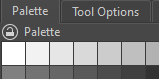
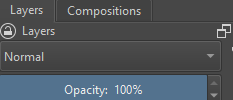
Every other Docker can be locked. It has been years I have been asking for this simple request.
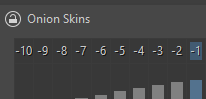
I don’t understand. Even the onion skin can be locked! Evidenced below.
I got a MR accepted to add locking to the animation dockers. It should be in Krita 5.3 when that comes out or the Krita Next builds when they come back.