This is not a requirement. It’s only an idea.
Since I’ve learned UE4 and Blender. In both of them, node and wire based programming(the blueprint in UE4 and node editor in Blender) always helps a lot. This feature is very helpful when people need to do light weighted programming. This could significantly help when people try to create brushes, blending mode. In Krita, the amount of blending mode is almost a hundred, but very few of them are mentioned by people. The top difficulty for people to use them is memorizing the algo. It’s not practical to test them since many of them are very similar and color is literally a 3d vector. Tooptips are too weak to help in this situation.
Besides, for the layer system. For now, if a group has 3 layers inside. A paint layer on the top and another at the bottom, but a transform layer in the mid. The sequence is like, bottom blended by top firstly and then applied with the transform layer in the mid. This is very confusing. But if Krita has a node and wire based editor, this trouble is gone. And for the tree-like style for now which is shared through all the painting software I’ve ever seen, it’s hard to make any structure with layers, which means it’s very hard to implement any arithmetic withe the layer system. The only practical way for people to use the blending mode is limiting themselves inside a very limited range. Actually I’ve heard people talk about only multiply, overlay, hard light, and some others. Most of the blending modes don’t help very much.
When it comes to the brush setting, it’s hard to explain the effects of the values. The formula is totally hidden from people. If people can do some programming with a node-wire editor, they can also share their new brushes in community. It also encourage people to invent new algorithms, which act like new engines. When I tried to tweak the color smudge brush, all I need is seperate the smudge length from opacity. The solution is the new algorithm checkbox. But if people can do some programming, this is not a problem since ever. And a lot details are totally controllable for users.
Edit: I was confused badly by the flow and opacity, ratio and spacing. I would like to see the formula behind the scene. Also, I would like to see the formula for blending mode. I don’t want to dive into the code for a week only for these code. I prefer something people can share. I want the creativity of the whole community.
I would be very pleased if at least the brush editor could display a node tree. For example, I would like to be able to change the order of operations on some things, like having masked brush apply to the brush stamp, not the brushstroke.
However… I suspect there are a whole lot of issues to overcome, performance being the most obvious one. I can’t help but wonder how many operations you can realistically stack in a brush node tree before the performance becomes an issue. Also, I think the brush compositing would need to be done in floating space if you want to allow for atomic operations like add, subtract, multiply etc. Otherwise you find yourself working around clipping and bit depth problems quite fast.
But I agree, it would be very cool.
I’ve always wanted a “node brush” too. But as far as I know, there seems to be only one software called “blackink” that does this. I went to their forum and found that it is very difficult to implement a brush like “basic 5”.
So there is still a big gap in this area of technology
Yeah, the performance. But I guess projects don’t prefer the node tree is because it helps only a bit. I saw someone asked the feather for the sample images for brushes, which can be easily done with the node tree. When this is the case, user need fancy algo to deal with the textures but they actually throw limited amount of strokes per second. When the amount of strokes is very huge, generally it’s non-sample brushes such as simple round brush. And it’s very easy to customize the hatching and bristle brushes. Even the smudge brush. I guess users could handle the performance issue just like they do when they play with the g mic.
Math is part of the base of programming. This idea only helps people who have this knowledge to do fancy tricks. The others could simply google and see what they find.
Would make sense to me too.
And I think it could becomes faster when done right or slower if done wrong.
This is a development problem. If there are no related nodes, no matter how the combination is, there is no desired result.
Bleank • View topic - Brush that does not accumulate paint
I know it’s been a while but I bumped into this discussion the other day and think I can contribute something useful to this discussion. Like all of you I do think a node editing interface would be great in Krita. Actually, not only that but node editing interfaces are useful in many different fields/kinds of tasks.
Because of that I developed a multi-purpose Python node editor called Nodezator. It’s completely free and open-source and available at github. Here’s a screenshot:
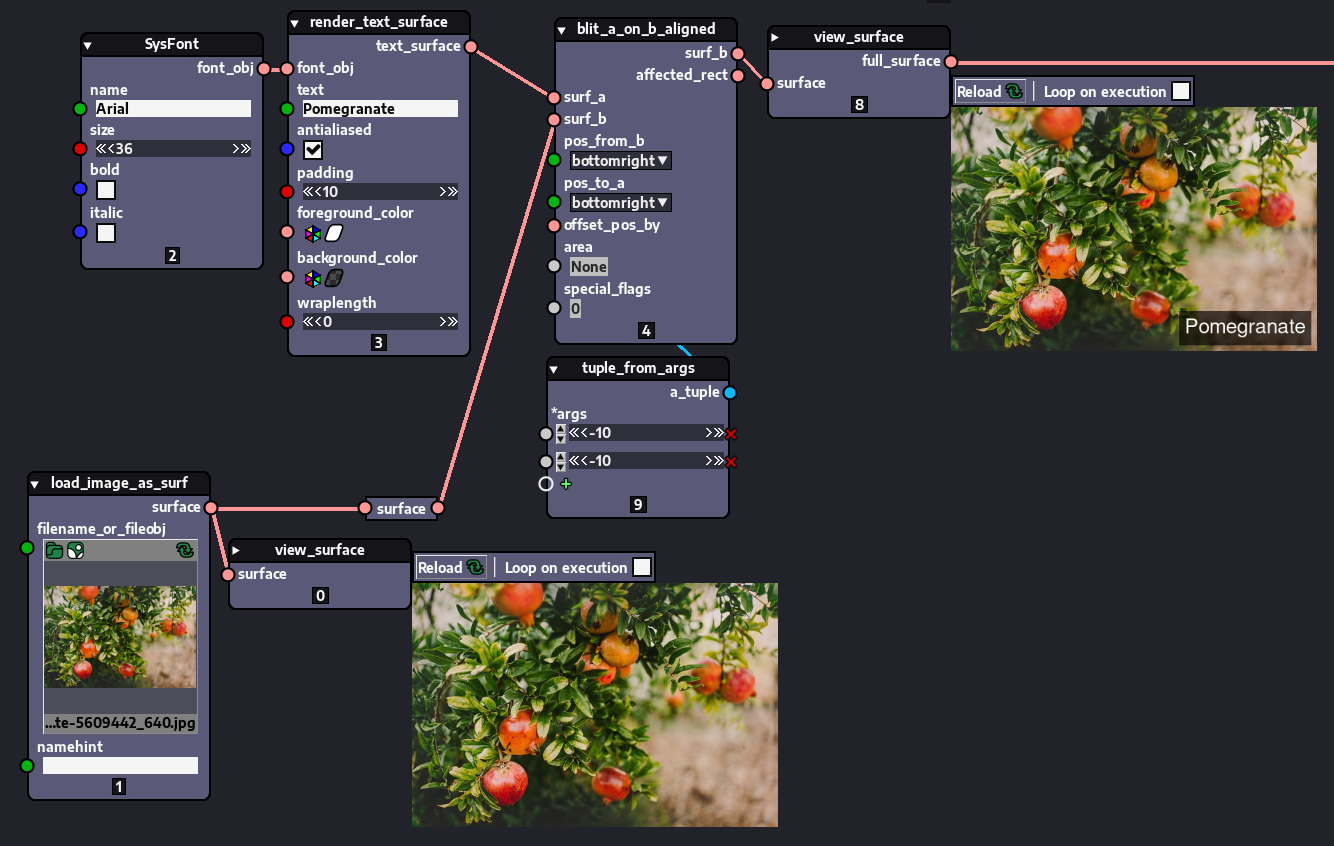
Naturally, as its author and maintainer, I’d be partial to Nodezator, but I honestly think it can at least help alleviate the current lack of a node editing interface inside Krita. That is, you could use it alongside Krita on your digital art pipeline as a post-processing tool.
Nodezator was actually just recently released this past June 18th, so it has a long way to go, but the basic features are already there. Perhaps most useful among them is its ability to turn any Python callable into a node automatically, so all the hundreds of thousands of existing python libraries can be used effortlessly within it.
For instance, the nodes in the screenshot are actually created from pre-existing functions from Pillow, an image editing Python library. Additionally, the node layouts can be exported as plain Python, so your work is never overly dependent on the app itself.
If you want to know more, check out this youtube video where I present it.