Hi,
Following the advice of @josepabloespinoza on this thread Brush Size Docker - #14 by josepabloespinoza
I open a thread here to gauge the interest of what I have in mind.
I like the Brush Size Docker plugin.
It acts like the Quick Settings Docker, but smaller and more user friendly, in my humble opinion (and customizable).
With that in mind, I would like to have a plugin similar to Brush Size Docker, but for Opacity (and maybe Flow as well, would seem legit).
To me, Brush Size Docker answer the same use case of Quick Settings Docker, but in a more user friendly sense.
Hope this doesn’t bother too much.
Hi, the implementation of the basic opacity manipulation is possible, but I would like to know more about how you and others interact with this parameter, as I see it as more dynamic when painting. From what I’ve observed when watching professionals like Nathan Fowkes or Seiji Yoshida paint, opacity manipulation is fundamental, with values typically ranging between 50, 65, 71, and 100.
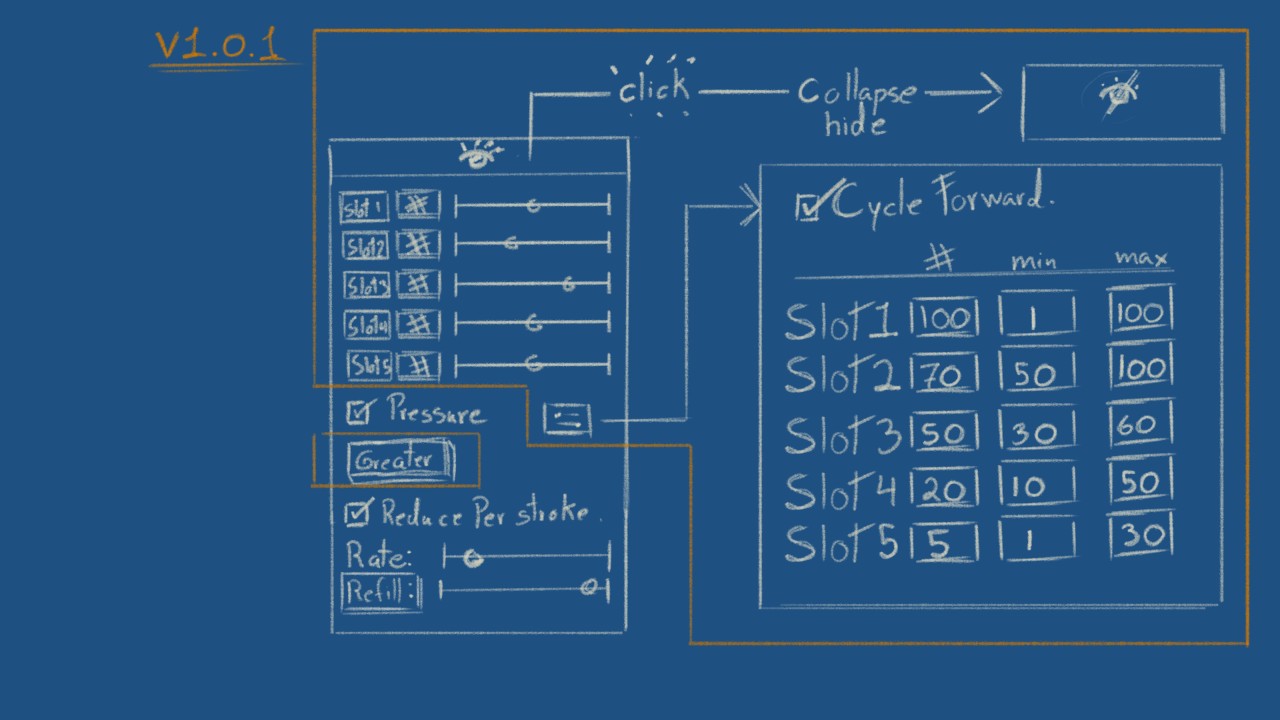
Aside from opacity changes, I think there are three common use cases related to this:
- Disabling the opacity curve.
- Retaining the current opacity to avoid banding (greater blending mode).
- Managing flow.
This is a mockup of a possible layout and a list of functionalities. I still think limiting it to just three configuration slots would be best.
Thank you for your reply 
Long time I didn’t watched Nathan Fowkes and Seiji Yoshida works, thank you for the reminder, pretty useful and pleasing.
They pretty much make illustrations with a painter mindset.
I am nowhere near this kind of level.
In my case, I tend to have some static params, for now (still learning), mostly for assets and UI (for games) where you might need specific values with pixel perfect strategies.
This can be achieved with workarounds, but like previously said, lots of switch between the same values again and again, would be neat to have a shortlist of set parameters like your Brush Size Docker.
Still, I’m pretty interested to try your approach  , I would learn a lot from that for sure (and might discover a better workflow).
Here’s a quick version with most features implemented. Feedback is appreciated, I don’t want to continue without understanding how people typically interact with opacity. After receiving feedback, I’ll publish it on resources.
Features
- Preset Selector: Choose from Small, Medium, Large, or Current Brush presets.
- Current Brush preset: It will use the current brush opacity to generte Opacity ranges
- Manual Opacity Input: Input box to type the exact opacity.
- Opacity Slider: Slider to adjust the preset.
- User Defined Mode: Allows the user to define opacities and ranges in the dialog at the top-right of the docker.
- Shortcut: Cycle through the opacities using a user-configurable shortcut, default: Ctrl+Alt+Shift+O.
- Minimize / Hide Docker: Allows to collapse the docker for better visibility when not in use
- Pressure Sensitivy: Toggle brush opacity pressure sensitivity
- Brush Blending Mode: Set brush in greater blending mode, handy to avoid “banding”
Installation
Method 1 (easiest)
Open Krita go to Tools > Scripts > Import Python Plugin From Web and paste the following URL.
https://github.com/josepablo-espinoza/krita-brush-opacity-docker/releases/latest/download/Krita-Brush-Opacity-Docker.zip
Source: GitHub - josepablo-espinoza/Krita-Brush-Opacity-Docker
Thank you.
Can’t try it right now, no electricity here due to cyclone, and probably won’t have electricity for some days due to damages on cables.
But seems pretty promising, you did it so quickly !! (Amazed).
Will try as soon as possible.
Thank you!!
No worries stay safe, was watching the news so many strong cyclones in the east.
Oh my goodness
Still don’t have electricity at home (currently at someone else’s home to get water and electricity).
But !!
Just quickly got a snack of it…and already fell in love.
Love the minimize / hide docker button, this is pretty neat (it’s not on the Brush Size Docker plugin, is it?)
Can’t wait to test it fully at home. But to me, it already makes the job, in an so elegant way.
Would love if all docker plugins could do that
So if anyone reading this want to make the same tricks on the color palette docker.
Those are small neat details, but really, this makes it so confortable.
Hopefully in the future I can get to the point where I take time to make plugins for the community too.
Anyway. Thank you again deeply !!
Hey here 
Finally got internet back (yeah, took some time ^^).
Just to tell you, didn’t know that, but the Greater Mode is insane…thank you for implementing that in the plugin ^^
So, this is just a message to show gratitude.