I can’t give you more toolbars but I can give you more space in the existing ones.
You can, if you are confident enough to make changes in the configuration scripts, edit the icon replacement texts to save space in the toolbars. If you enter a text of your choice in the icon text line
<iconText></iconText>
sometimes there can be predefined shortcut in it
<iconText>MUCH TO LONG SHORTCUT</iconText>
in Krita’s action scripts, it will be used instead of the entry in the naming text line
<text></text>
For example >>
The entries you marked for the “ten-Brushes” script “tenbrushes.action”, if you would like to have “ABP 1” written in the toolbar instead of “Activate Brush Preset 1”, then you have to open “tenbrushes.action” with a text-editor and change the entry in the icon text line >>
<iconText></iconText>
to >>
<iconText>ABP 1</iconText>
and save the “tenbrushes.action” file and then start Krita. Since “tenbrushes.action” is a standard Krita script you will find it in the installation folder of Krita, in the path "*\share\krita\actions", if it were a plugin you installed yourself, then you will find the associated action script, if there is one for the plugin, in the “actions” folder in Krita’s resource folder.
And to show that this does not only work for plugins, as another example I reduced the displayed text for “Scale Image To New Size” to “SITNS”, this option can be found in the file “kritamenu.action”.
But I urge you to make a backup copy of every file BEFORE YOU CHANGE IT! This way you can restore them in case something doesn’t work as you expect 
Here you could download the two before mentioned customized files as demonstration objects (or even build them into Krita at your own risk (created with version: 5.0.2-alpha (git cb223cd)):
tenbrushes.action (should run in any 5.0.2)
kritamenu.action (?)
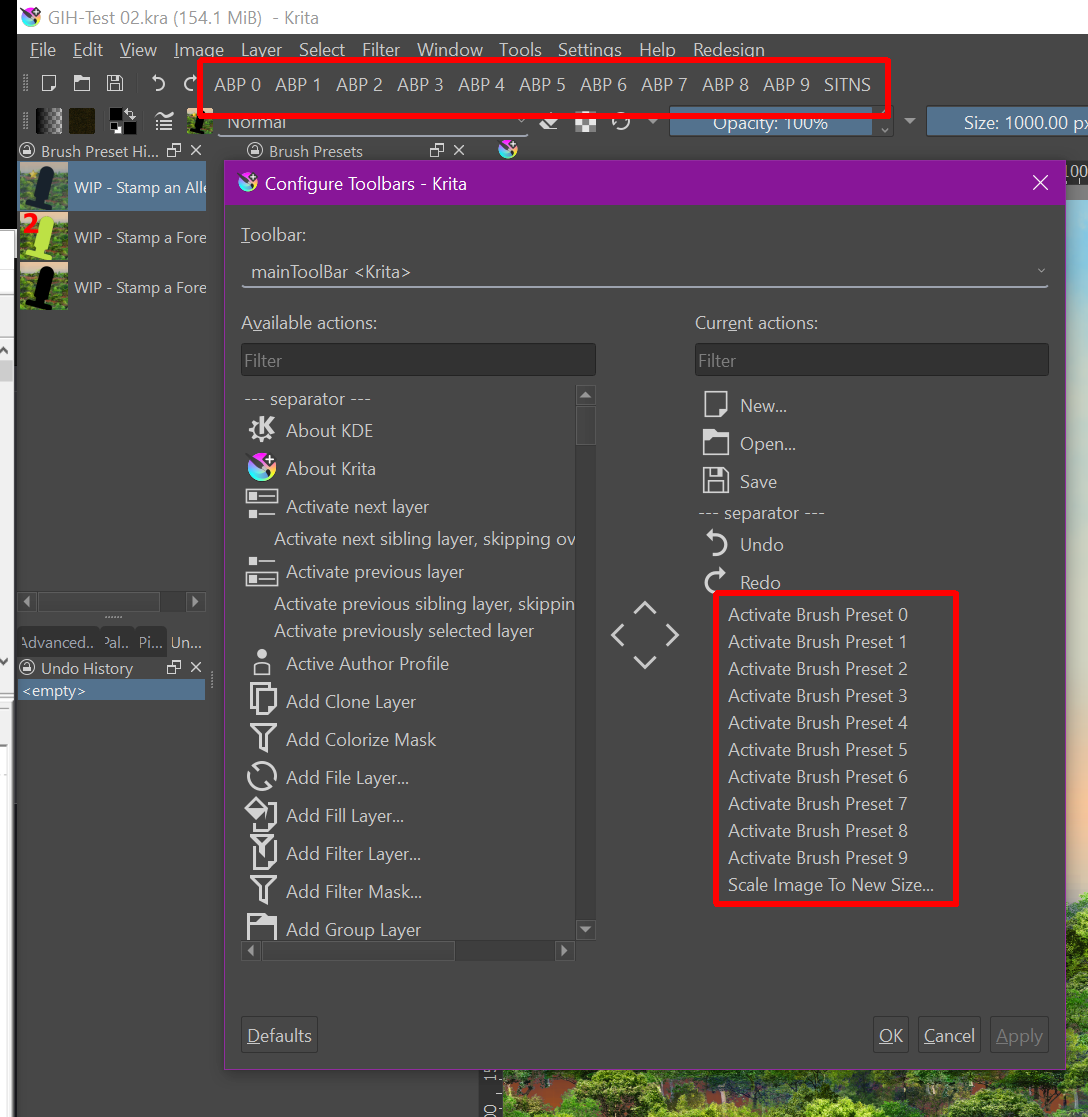
Example of how it could look alike to save space in toolbars
Michelist
Translated with help of a computer, I was tired and lazy.
Add/Edit: Download links renewed