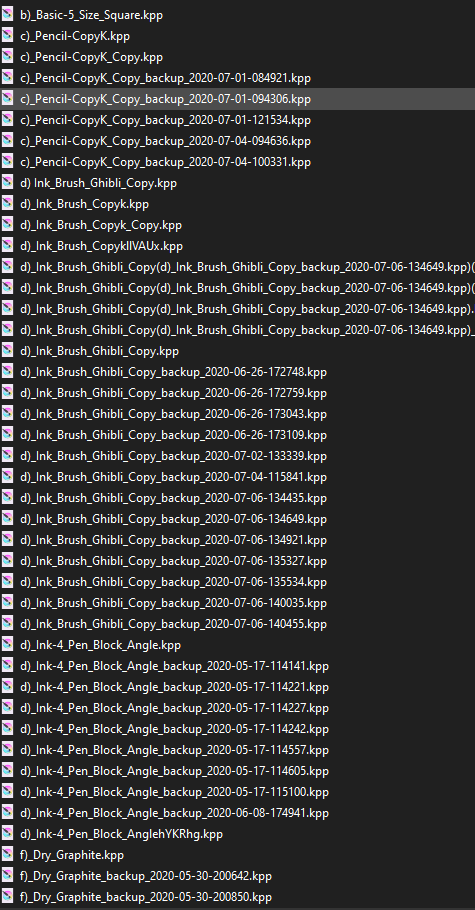
When you overwrite brush, blah blah 202009123.kpp is the latest one ?
I am deleting auto-save and realized that brush with real name is not what i made.
And this naming tho…
When you overwrite brush, blah blah 202009123.kpp is the latest one ?
I am deleting auto-save and realized that brush with real name is not what i made.
And this naming tho…
Do not use “Overwrite Brush” option. This will create duplicates that will appear after restarting krita.
Some of those dups cant be deleted from inside the program. This bug is years old and probably here to stay.
Better use “save new brush preset” and delete old version right away. This wont cause this bug.
Oppsie… I’ve been overwriting for a month. Thanks
Deleting you means clicking the trash bin icon of old brush in brush setting ?
Oh. Can I delete the backup files here ?
Yes clicking trash bin should be enought. If brush could not be deleted using trashbin icon You will have to dig into config files.
Sadly, Brushes can be only deleted by going to manage resources > resource folder > painttoppreset. Saving Brush as new presets a lot will also make brush thumbnail quality lower and lower. Even renaming the brush, Krita makes a new brush with new name instead of renaming old brush.
Only resource rewrite may fix this.
Currently manually managing in resource folder is the solution
Yeah! I ran smack dab into that right away…seemed a bug, but I’m new here…
This topic was automatically closed 15 days after the last reply. New replies are no longer allowed.