so recently ive been looking into moving from paint. net to krita. i tried out krita on android and i loved the experience enough to move from paint. net to krita! one major feature that i couldnt find in krita was the recolor tool. its like a brush that allows you to change a certain color to another without affecting the rest of the artwork. i found it really helpful in many cases in paint. net. i tried scouring the interwebs for any alternatives on krita but no one had an answer or a question similar to mine. is there a tool that can do something similar to the recolor tool, or is it not available yet?
i have also posted the question on reddit here paint.net recolor tool in krita?? : r/krita (reddit.com)
Use the Similar Color Selection tool to select all pixels with the color you want to change and then paint over it with whichever brush you want (or bucket fill).
I used it recently to change colors in my pixel art when I was constrained to only 16 colors and had to find the ones I got wrong.
1 Like
thanks but the issue is im in the “mapping” community and so i use the same color is in multiple places. i couldnt figure out how to select a single region of a certain color without selecting all of the color in question. thx for the suggestion tho!
So you don’t want to change it for the entire artwork just in a specific area, right?
yes, just a specific area
Okay, first use one of the other selection tools for example the Rectangular Selection tool and select the Area where you want to replace the color, now change the tool to the Similar Color Section but don’t use it yet. Open the Tool Options docker and as the Action choose Intersect. Now select the color on the canvas and it will only select the color in that previously square area.
Selections are really powerful in Krita, you can even “save” them to layers for reuse or paint them right in.
1 Like
tysm, ill try it out! i do hope they add a simpler way of doing this in the future, but ig this is the best thing rn.
update: IT WORKED!!
Perhaps there is and I just don’t know. There are a lot of ways to adjust or replace colors (like blending modes, adjustments filters and so on) that’s just the one I thought is most useful the way you described your use case. Krita is huge and even after almost 20 years I don’t know every stick and stone.
krita is rlly complicated when you delve in deep into it. ive used krita in the past and always thought it was a complicated mess. ive only recently tried it out today only to realize its perfect for me! iill try to look for easier ways to do this but for now, this is the best solution. thx man
Understandable. I came from Photoshop and Paint Shop Pro and to me it was simple, streamlined and easy to pick up in comparison x3
If you want to paint the new colour with a brush, you can create a new layer and use the “Color” blending mode. Or you switch a brush to “Color” blending mode. There’s one among the default brushes, called “Adjust Color”.
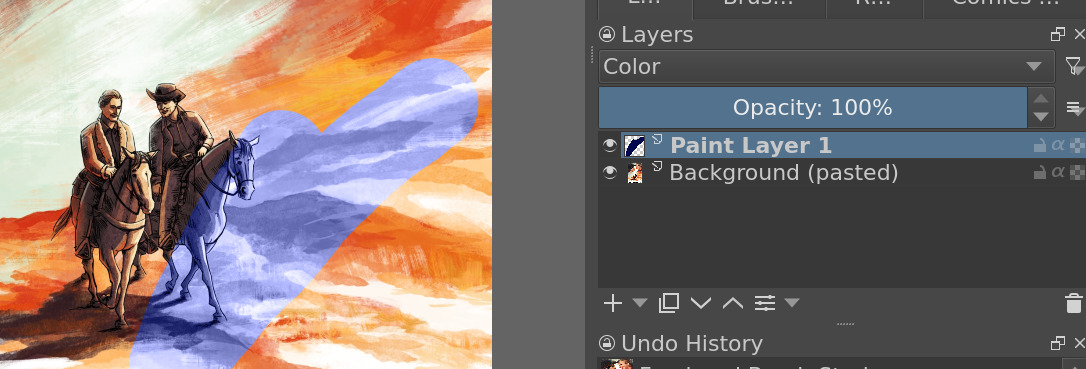
This will however change all the colors not just specific ones.
This topic was automatically closed 4 days after the last reply. New replies are no longer allowed.