Hi, I noticed that like last few weeks my Krita is laging when I paint with any brush. I have android version 5.2.13, I didnt change anything in Krita. Basically when I paint, size of my brush is lagging - after every brush stroke it size change to smallest, and then after second-two it returns to my set size. It is bad when I changing between brush and eraser-version of that brush. It is getting really annoying, because it slows down my painting rapidly. I think it gets worse the longer I have open Krita. I thought it might be problem with my keyboard but it happens even without any hardware connected. Can you help me? I use Krta for work and this is getting serious for me. I am afraid to reinstall Krita, I am not sure what of my seting will stay.
I record screen video of it
Please Check stabilizer in Pen Option

It’s in Tool Option when you select Brush tool.
If you don’t see it, go to setting → Dockers → Tool Options.
Enable it.
I agree with @cowc2 - with the brush as the active tool, look at the settings in your Tool Options docker. You may have accidentally put the stabilizer on full strength or on a high number.
I have it like this, and I think I have it like this a long time. I dont think that is the cause, because sometimes its laging, and sometimes not
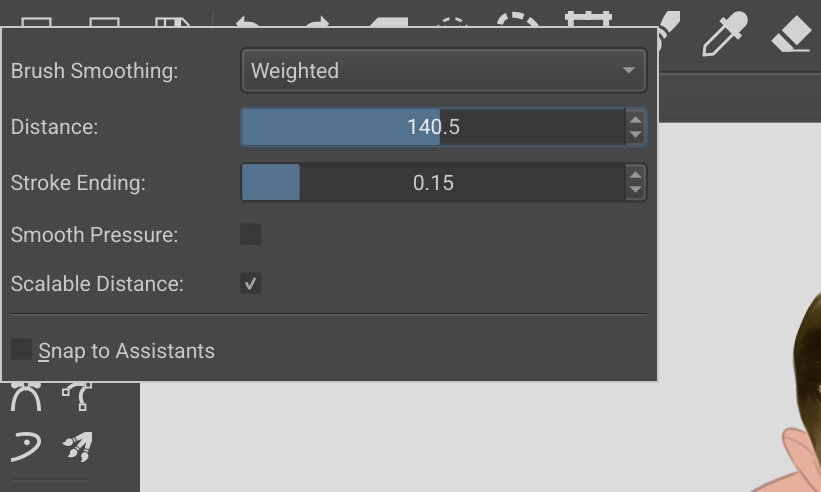
No wonder that you have this behavior, set it to a maximum distance of 50, and depending on the “computing power” of your tablet perhaps less. Or better, set Brush Smoothing to Basic or None.
Michelist
Hi, I was testing it for some time, I set brush smoothing to basic and it is still laging,is there any other possible reason for it?
It is hard to understand what sort of lagging you have been referring to.
My guess is that, if you meant, it is lagging compared to other apps like Infinite Painter,
Yes, Krita is lagging and there is no fix.
Hi @alikal
I’m on a Samsung but have no lag. I noticed a non-Krita icon on your screen recording. Is that Samsung’s writing tool? Can you turn that off?
When I first got my tablet, there was something that kept getting in the way of brushstrokes and I think it was the tool that turns handwriting into text. I had to turn it off because it was so annoying. I can’t remember what the icon looked like as it’s been many months since I turned it off. Can you try to turn off that feature? Leaving it on will interfere with Krita.
This topic was automatically closed 30 days after the last reply. New replies are no longer allowed.