Eu to com um problema, quando vou desfazer ou refazer um traço, tanto um quanto o outro botão começa a arrastar a tela (a ferramenta da mãozinha ativa do nada) o que faço para desativar essa coisa? Isso é um incômodo enorme, pq quando vou tentar apagar algo ele começa a arrastar a tela, eu ja tentei procurar em tudo, nada adianta, alguém por favor me ajuda!!
@Yuika I translated your post for you.
Please tell us which operating system you are on (Windows, Linux, Android, etc.) and which version # of Krita (go to Help > About Krita – the version # is at the top right).
Please translate your text into English if you can. Google translate is a free service.
1 Like
Windows and the version is 5.1.5
So in my wacom pen there’s 2 buttons, one to undo and other to redo the last line i drew, when i press one of those buttons, the screen starts moving (like i’m grabbing the screen), this occurs just when i press the undo or redo, i tried to search for the solution, but i didn’t find anything. (Sorry if my english was bad, i tried to translate)
Hi there, @Yuika. Thanks for the information.
In Krita, the middle mouse button (lower button on a stylus) activates the pan tool (the hand-shaped tool that repositions the canvas). You can change this. These settings are in:
Settings > Configure Krita > Canvas Input Settings
The steps to assign undo to the middle mouse button (lower stylus button) are:
- Click on Pan Canvas and delete the current binding that assigns the middle mouse button to Pan Mode.
- Open your tablet’s interface, and change the lower button to ctrl+z (that’s the Krita shortcut for undo).
Redo is a little different.
Open your tablet interface and change the upper button (right mouse button) to ctrl+shift+z.
There are consequences to making these changes. By changing the upper stylus button to redo (instead of right mouse click) you’ll lose access to a lot of Krita tools that are activated by a right mouse click.
2 Likes
The ‘Space’ keypress also does it.
Does this mean that you’ve made changes to the Wacom driver settings in Windows?
If so, what did you do?
Have you made any changes to the settings in krita for this?
If so, what did you do?
1 Like
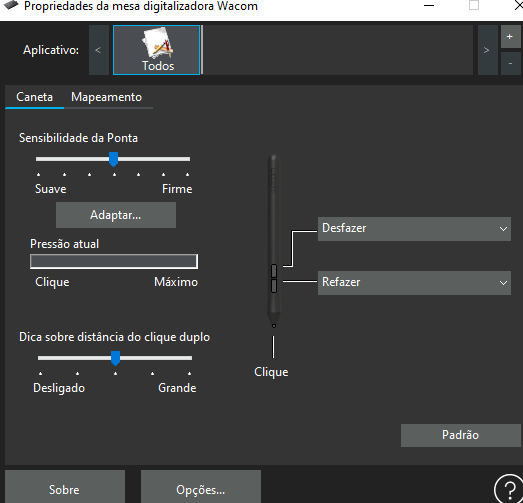
Undo and Redo are usually universally known (as Ctrl+Z and Ctrl+Shift+Z) so that should have worked.
I notice that you have the Application (Aplicativo) profile set to All (Todos).
With krita running, it would be a good idea to create a new profile (with the ‘+’ icon) for the krita application. Then close the Wacom utility, then open it again and select the Application profile as ‘krita’ and make sure the settings are correct.
1 Like
i already solved it, thank you!!
Please say how you solved it. The information could be useful to some people in the future.
Note: It would still be a good idea to make an Application profile for krita.
1 Like
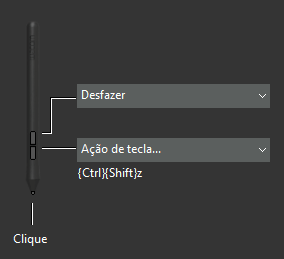
i changed the redo to ctrl+shift+z

changed this option in Canvas Input Settings to V + left click (and I excluded the other 2 options)
‘V’ + left click is used to switch from the Brush tool to the Line tool.
That may cause complications in the future.
If you don’t want an option to be active, it’s better to delete it that to change it.
Also note the comment from Sooz:
Good luck and enjoy using your now ‘properly working’ stylus buttons.
2 Likes
This topic was automatically closed 30 days after the last reply. New replies are no longer allowed.