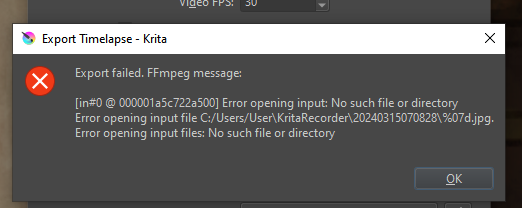
First time on these forums, just looking for some help. I have past save files that are recorded for the time-lapse/speedpaint feature using ffmpeg, but I have no idea how to export the past files.
I have the folders with the frames saved, and would like some help on this.
I have also tried opening the previous save files up, but each time I try to export I run into an error stating: Export failed. FFmpeg message:
[in#0 @ 000001a5c722a500] Error opening input: No such file or directory
Error opening input file C:/Users/User\KritaRecorder\20240315070828%07d.jpg.
Error opening input files: No such file or directory
That is essential for exporting a recorded timelapse.
Krita identifies the timelapse record folder based on the .kra file that you have open.
The failure message indicated that a particular captured frame was not found in the timelapse record folder.
In that folder, are all captured frames present with no gaps in their numerical sequence?
If there was a problem recording and a captured frame is missing then ffmpeg will fail.
If you are using Microsoft OneDrive then that can cause problems with timelapse exporting (and also with rendering animations).
OneDrive should be disabled when working with timelapse recordings and exporting.
I’ve checked the frames, they’re all there and I made sure there is no repeated sequence and no missing gaps.
I still get the same error message, I think it is somehow overwriting the save? I’m not really sure. I also don’t use onedrive and I haven’t moved any of the files around.
The timelapse export process doesn’t write to frame images. It reads them and uses them to make a video file.
I’d suggest a ‘fresh start’ test:
Create a new document of 512 x 512 size and default 8-bit colour profile.
Adjust the Recorder docker height and width so that all of its contents are fully visible.
Capture at Original resolution of 512 x 512 with a 1 second interval and do 10 seconds of recorded painting.
Export the timelapse with Input FPS and Video FPS at 1. Have end result and preview at 1 second.
Then see what happens.
At each stage, take screenshots that show all of the Recorder docker, and all of the Export Timelapse window, then post them in a reply here.