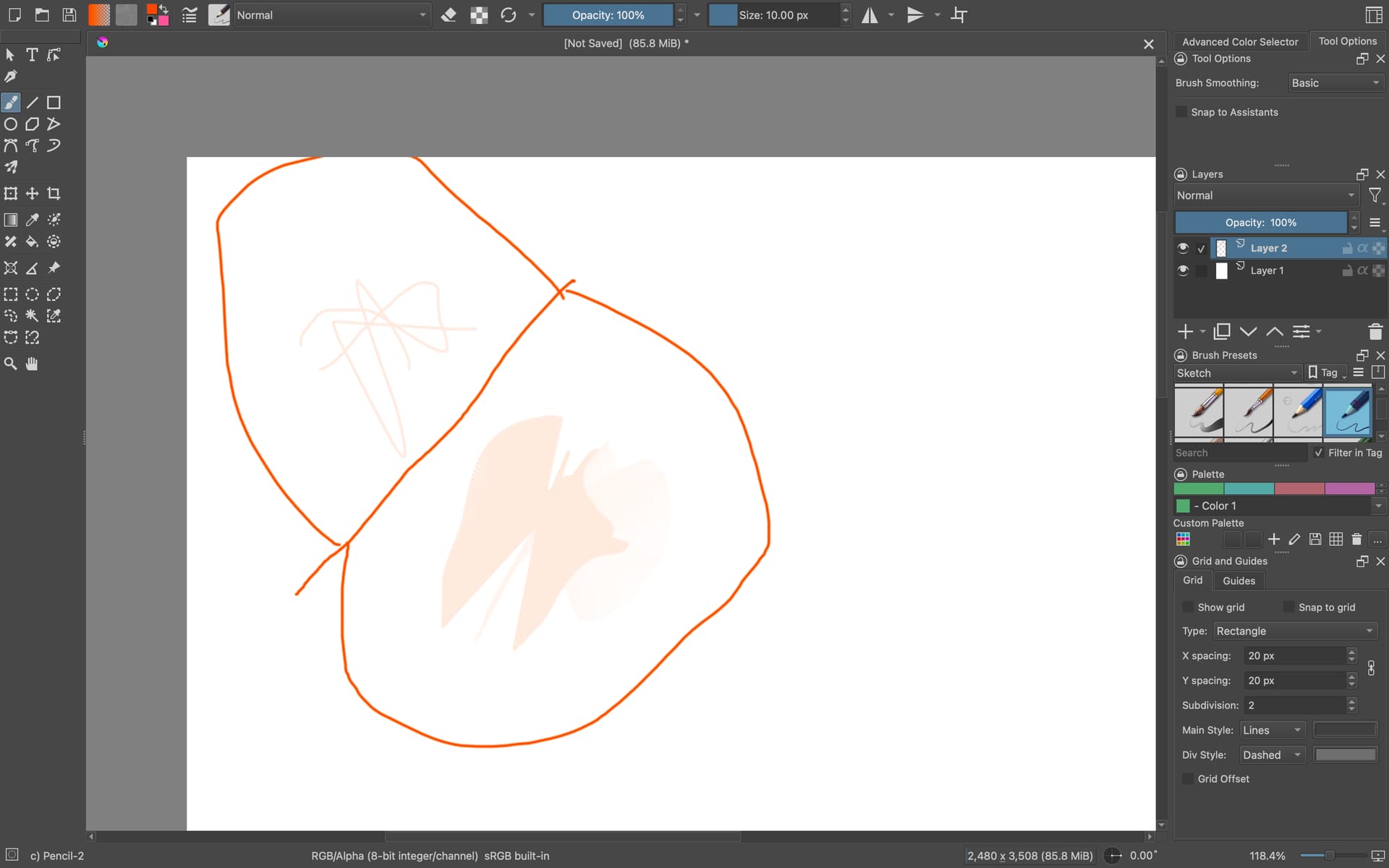
Type of device* : Graphics Tablet
Brand and version of the device: Huion 420 (2048)
System** : macOS Sequoia 15.4.1
* graphics tablet/display tablet/2-in-1 laptop/Android tablet
** Windows/Linux/Mac/Android, + version (you’ll find it in Help -> Show system information for bug reports)
Description of the issue: Hello! So this is the first time I’ve used Krita with a drawing tablet on its own, and for some reason, my pen draws a line between the point I tap at, to wherever I end up positioning my mouse using the trackpad. I’ve attached a screenshot down below showing what happens. The top left area are the lines drawn using a mouse, and the bottom right area are done using the pen. My driver has been updated just today (brand new), and I’ve also reinstalled Krita to its latest stable version (Krita 5.2.11)
Further, the tablet input settings are set to default, with the pressure tester indicating that the pen is actually a stylus (not sure if that’s correct, actually), and that it interferes with mouse clicks. I don’t know how to fix that, or if it’s just a native issue with Krita itself.
Any tips on how to fix this? I’ve tried instances with both the tablet driver not running as a standalone app, and running in the background (though to my understanding it’s not needed to open it for the driver to kick in), and nothing has worked.
 Hello @Joshuality, and welcome to the forum!
Are you sure you have chosen the correct driver for your model, there are three very similar named Huion tablets, namely Huion H420X, Huion H420(2048), Huion 420(2048)?
You don’t have by chance a “fancy” gaming mouse, often equipped with lots of buttons, these are not seldom problematic in combination with Krita, especially no-name manufacturers very often have terribly coded drivers that interfere with Krita. But even Corsair, Razer or Logitech mice were reported a few times being the culprit. Although, it is something I never experienced with any of my Logitech gaming mice.
You could try if enabling or disabling Use mouse events for right- and middle-clicks (workaround for convertible devices, needs restart) in Krita under Settings¹ → Configure Krita → Tablet Settings will suppress this behavior.
Another thing you could try, would be using the alternative driver from
for your tablet to check if your issue persists with that driver, they support the three different Huion 420 models, the H420X is fully supported and the other two are said to have little quirks without naming them.
Michelist
¹ Since you’re using a Mac, the Settings menu of Krita had to be moved into the Apple menu for such settings because of massive requests and pressure on this out of the Apple community, so don’t wonder your Krita won’t have this menu, it has. But this only makes support for Krita “uncomfortable”.