Type of device* : Graphics Tablet
Brand and version of the device: Wacom Cintiq 22HD with Art Pen
System** : Windows 10
I tried searching for this but I couldn’t find a similar topic. It’s easier if I just explain in a video (2min):
Basically I want to be able to change brush size by twisting the pen as if it were a chisel tip, but Krita doesn’t tell the difference between me rotating the pen or drawing at a different angle, and I can’t figure out how to correct it.
My guess it’s because the sensor that determines pen rotation also moves relative to the tablet when you change the drawing angle and emits a rotation signal. It’s probably more of a physics issue, than a Krita issue.
I have a cintiq but unfortunately no art pen to test this, the standard pen doesn’t have rotation.
I’d like some clarification about particular terminology:
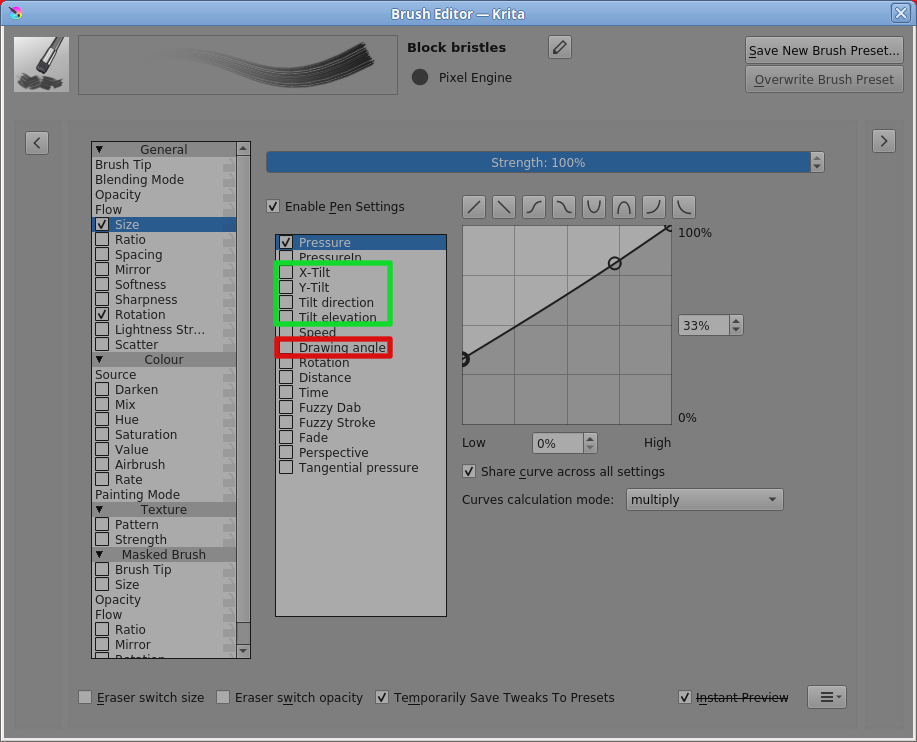
There is a specific sensor/control parameter called ‘Drawing angle’ which is the direction that the stylus tip is moving along the surface of the tablet.
I get the impression that @redmarlin and @Takiro are talking about some aspect of ‘Tilt’ of the stylus, i.e. the physical angle away from the vertical that the stylus makes when held over the tablet:
I’d like to investigate the accuracy/range/resolution of Rotation and Tilt sensors along with any signs of cross linking between them but I don’t have suitable equipment and I doubt that anyone would lend a suitable tablet/stylus to me for that purpose.
@redmarlin You’ve fitted a physical chisel tip to your stylus. Does that tip fit with only one possible orientation?
If not then the physical rotation orientation of the tip with respect to the stylus barrel could change over time and you’d lose the calibration of any brush settings you’ve made.
As far as I’m aware, the physical chisel tip is just a cosmetic feature that helps you to predict, by looking at it, how the brush preset will behave, if you’ve set the brush preset up suitably.
It may also have a different hand feel as you draw a stroke with different physical orientations.
I noticed, in your video at 2:07, you have Size controlled by both Pressure and Rotation so pressure variation may be causing any ‘incorrect’ behaviour that you see.
Something occurs to me as follows:
If I had such a tablet/stylus, my instinct would be to control the brush preset tip rotation by only stylus rotation and the brush preset size by only stylus pressure.
In this case I meant angle as the physical orientation of the pen in a circular plane on the tablet surface with the pen tip being the center (like the hands of an analog clock face), not the angle of the pen tilt.
I think they were talking about the ability of some of Wacom’s pens to rotate a brush. Imagine the pen is upright on the tablet. Now, when you rotate the pen around that vertical axis, the brush tip on the canvas is rotated accordingly, just like a drill turns its bit. It is a very cool feature, but digs big holes in the purse.
Hi, just to clarify:
When I talk about drawing angle, I mean the angle I hold the pen to the canvas, not the “drawing angle” parameter the software is using. I’m not talking about tilt either, if that makes sense. Like I showed in the video, I mean the angle at which my arm is oriented on the canvas. Holding my arm at anything other than a straight 90 degrees (6 o clock) to my tablet counts as “rotating” the pen apparently. Sorry, I don’t know how to succinctly word it which is why I thought it was better to record it.
And yes, I do have a pressure parameter set but all it does is make the brush slightly smaller with lighter pressure. It is not an all or nothing thing.
Last thing - the chisel tip is not in a fixed position but it takes a bit of force to move it. You’re right that it could get thrown off over time, and there is also a cone shaped tip instead but either way I’d like to not have to worry about constantly rotating the pen to compensate if I can help it. The goal is to get it to behave like an actual pencil would.
@redmarlin Yes, what you’re doing causes the stylus to rotate about its own long axis, i.e. the ‘Rotation’ sensor control input.
(I’d love to have such a tablet for a few weeks to investigate what it can do and the technical capabilities in conjunction with varying sensor → transfer curves in the brush editor - but I’m sure that won’t happen.)
I’m sorry but I have no idea why the behaviour is as you show it in the video.