It would be great if there was a way to make the scale lock persistent, so that it can remain toggled.
I use the transform tool a lot, most of the time to move, flip and resize but I need the selection to not be distorted, so every single time I have to move my pen and scroll down the docker to lock the ratio.
I am aware that holding shift also does that, but I use a display tablet with few buttons, and often far away from my keyboard.
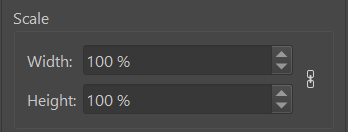
edit: a detail that I don’t know how relevant is but I thought would be worth mentioning, turns out other features like resizing canvas do save the ratio lock choice.
Hi! This is probably a trivial code change, something doable in 30 minutes. I can only see one complexity, without looking at the source.
The state of the transform tool’s settings, including whether the ratio lock is on or off, interacts with the undo stack.
For example, if you scale your image down to 20% and apply, as long as you don’t use any other tool, you can use the transform again and it will start at the same scale of 20%. You will be able to scale back to 100% without the loss of quality due to resampling. The ratio lock will stay enabled.
However, if you use the move tool, or paint a line with a brush, the transform will apply for good. This is also when the UI resets and the ratio lock is disengaged. If you undo that previous tool, you will have a chance to scale again without the quality loss.
So yeah, the interaction with the undo stack is the only potential hiccup I see, but all in all this should be a rather simple UI code change to add the button state to the persistent Krita config.
2 Likes
Haha, I looked at this and couldn’t have been more wrong 
The tool is very complex and the behavior of this particular aspect ratio toggle is erratic. It is modified in several places and simply storing it to the KConfigGroup doesn’t work like for the other options, such as the mesh transform toggles.
So this one requires a bit more work to figure out all the places where it needs additional handling to save and restore properly.
This would probably need the tool presets that was planned
In the meantime you can put this in tenscripts and run it once every restart or package it into a plugin on action or createwindow:
from krita import *

qdock1 = next((w for w in Krita.instance().dockers() if w.objectName() == 'sharedtooldocker'), None)
qdock2 = next((w for w in Krita.instance().dockers() if w.objectName() == 'ToolBox'), None)


def lock_aspect(toggled):
    if toggled:
        QTimer.singleShot(100,apply_lock_aspect)

def apply_lock_aspect():
    wobj = qdock1.findChild(QToolButton,'aspectButton')

    if wobj.icon().cacheKey() == Krita.instance().icon('chain-broken-icon').cacheKey():
        wobj.click()

qdock2.findChild(QToolButton,'KisToolTransform').toggled.connect(lock_aspect)
Not sure if anyone is interested, but it kept bugging me because it seemed so simple to do 
I think this tool is slightly bugged. There’s this class ToolTransformArgs that holds the parameters of the ongoing transformation, and some of its defaults are loaded from a KConfig group (like “show handles in mesh mode”).
However, the KConfig is actually a KSharedConfig, which is a per-thread copy of the config. And the tool is invoked on two threads, one initiated from the KoToolManager and the other for KisStrokeJob. Once the option is changed, it will not be synced by all threads.
I’m not sure how it affects the UI (args are copied all over the place), but in the case of a mismatch, the UI may get that wrong value in the end.
I managed to fix(?) it by using KConfig::reparseConfiguration, which is even mentioned in the docs of KSharedConfig, but I’m not sure if this is really the right solution. Seems awfully heavy (if I understand it, it’s the whole config, not just the group for this one tool), and I can’t see it really used anywhere else across the codebase (save for two specific places).
I could open a review for it like this, but eh, I dunno how I feel about it. If anyone is familiar with this type of stuff and has a suggestion, feel free to chime in 
2 Likes