Hi, the download page for Krita 5.1.5 states the system requirements for macOS are 10.12, my Mac is running 10.12.6. However, when attempting to open the app after installing it I get a system warning: “You can’t use this version of the application “krita.app” with this version of macOS.” “You have macOS 12.12.6. The application requires macOS 10.13 or later”. Can anybody please help me with this?
Hello @Artep and welcome to the forum 
This is puzzling.
Are you sure you’re running 10.12.6.
Did you get a .dmg download file?
(I’m not familiar with Macs or macOS.)
1 Like
As an experiment, can you try the 5.1.3 .dmg to see if that works:
https://download.kde.org/Attic/krita/5.1.3/krita-5.1.3.dmg
Which model of Mac do you have?
1 Like
On it. Thank you
No, sorry. Installing but not opening … same system message.
This is beyond my knowledge and you’ll have to wait for someone with Mac/macOS experience.
Please be patient and they should come along eventually.
Please say what model of Mac you have because that may be useful information.
1 Like
Thank you for taking the time to help me, much appreciated.
I am on a 15inch MacBook Pro, mid 2010 with macOS 10.12.6 installed
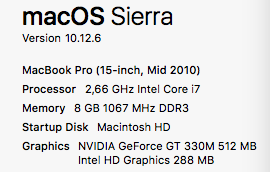
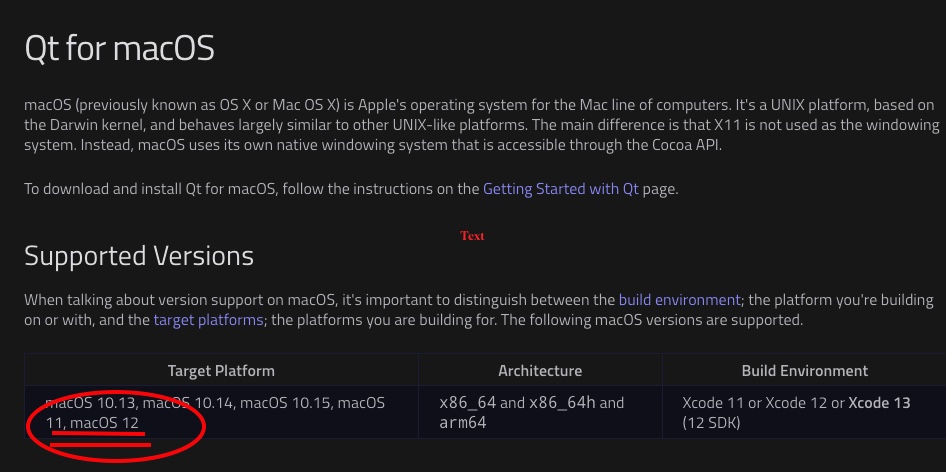
We need to update that text: Qt itself only support 10.13 and up (Qt for macOS | Qt 5.15), so we cannot support 10.12 anymore. (Note that the oldest macOS I have access to for testing is already 10.14 Mojave.)
1 Like
Yes! Please update that text!
And by the way could you please help me to install an earlier versien then??
thaks i.a.
I would follow @AhabGreybeard’s link to the attic and download the next older version step by step till you find one that is installable on your hardware. That may not be elegant, but an effective way to find the newest working version.
Michelist
1 Like
Here are the folders that contain the installers/executables for all the old versions:
KDE - Experience Freedom!
Open the folder of the version that you want to try then find the .dmg file and open that to download it.
They range from version 2.8.1.1 released in 2016, to version 5.1.3 from 2022.
I’d suggest that you go back halfway in time to 2019 with version 4.2.2 and try that.
If it doesn’t work then go back to version 3.3.0.
Keep going back like that until you find one that works, if you can find one.
If you find one that works, go forward to find a newer version that still works for you.
I’ve no idea if you will find one that works for you.
2 Likes
Thank you!
I am happy to confirm that krita 4.3.0 is now installed and running!
2 Likes
I am glad that you can use Krita now!
Michelist
So am I 
This topic was automatically closed 4 days after the last reply. New replies are no longer allowed.