I am having trouble understanding the way you are wording things so let me reword to see if i understood.
The scenario you are describing is:
You have a group and inside it you have a layer in multiply mode. You want to clip the group to an existing layer outside this first group so you clip the group itself, but the layer inside it doesn’t behave like it’s multiply cause the group layer. So you activate the pass through for that to happen, am i right?
If that’s the case i will say you don’t need to do that, just change the group layer blending mode to multiply and it should work like you expect, no need to activate the pass through you can even let the layers inside the group as normal and just change the group blending mode. Though if you have more than one layer i don’t know how it will behave as i didn’t test. But what i am trying to say is you don’t need to make a pass through group, there are many other options.
You may need to adapt your layer organization to make things work better for you. Don’t really know what you are trying to achieve but i think there many ways to solve the problem.
Sorry again. Some right some wrong, It’s just too hard to explain for me but no worries.
I know there are always workaround or other possible ways to do it.
I’m considering and testing many possible ways to solve the layer puzzle of Krita.
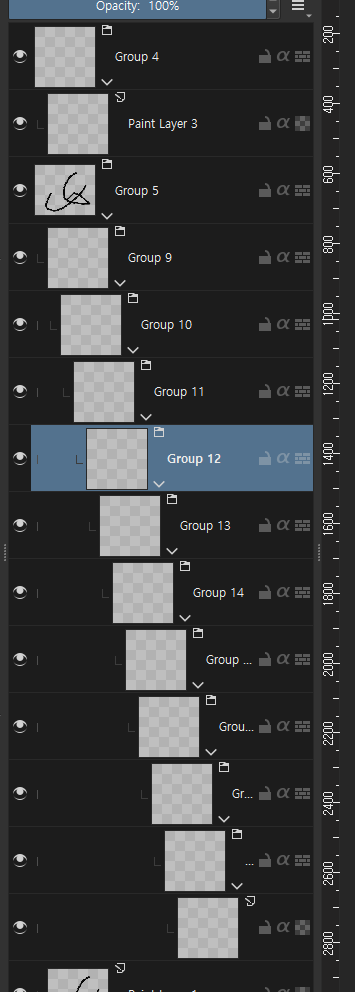
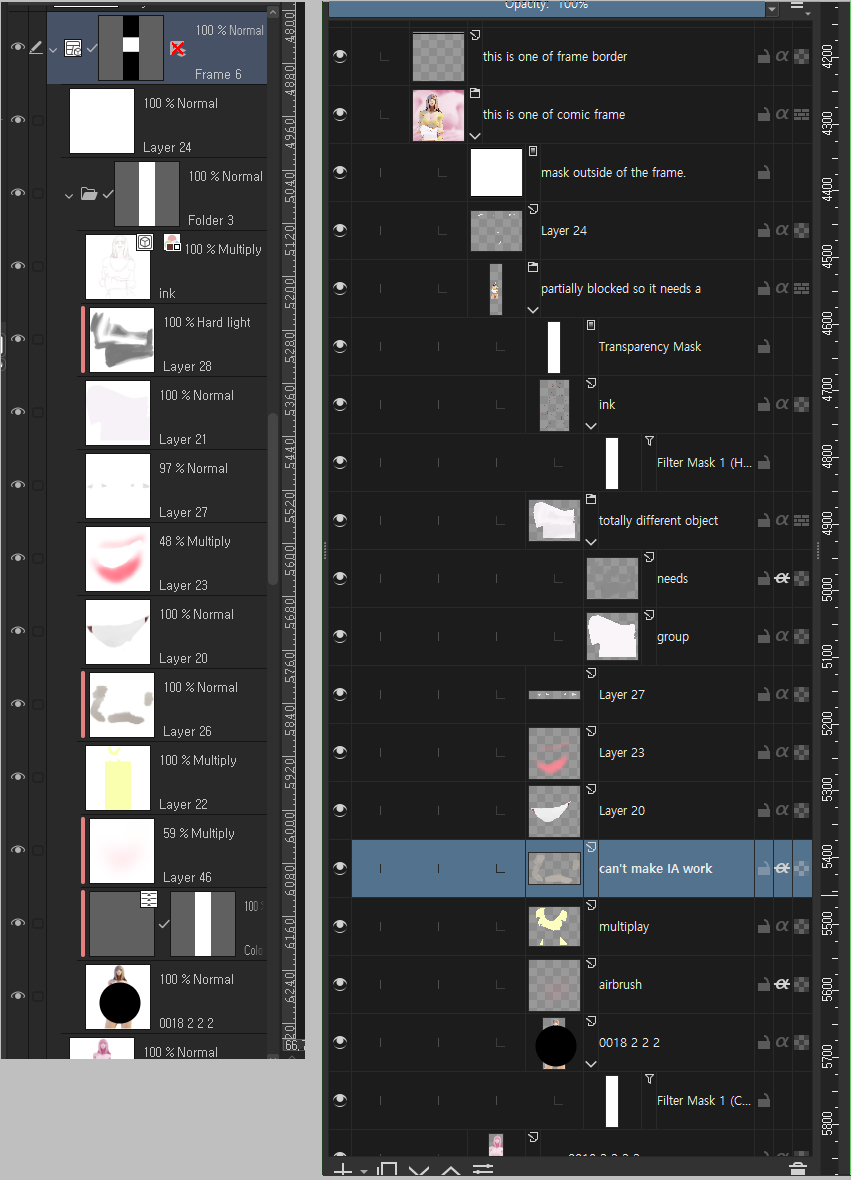
The funny thing is if they fix the indentation problem? everything that I just ranted about will go obsolete. Who cares how many groups running around or not if I can see them.
Anyways, Today I tried to start a whole new project on Krita but there are sudden walls that appeared every single step. Including 28 things that I didn’t mention but I’ve decided to ignore and move on.
I can’t explain how much Krita makes my work style into a hellish abomination and don’t know how much unnecessarily complex my work style at the first place but the fact is, I have no choice but to make a group someday does not change.
Could you please share a screenshot of your layers docker, maybe? You say “there are always worarounds and alternative ways”, and that’s true that sometimes workarounds are just that, and they also need time to set up and are not as useful as if it just worked, but sometimes, and I’m not saying that your case for sure is like that, but sometimes the alternative way is the expected way and the way that the user is trying is the hard, difficult, overly complex way. But Krita does have some limitations, of course, so maybe your way is the simplest/easiest one, just unnecessary complex because of Krita’s limitations.
Also I’ll add making an option for indentation to my list of things. Also to the “easy things to do”, because I can’t promise when I will start working on that, since currently I’m working on ellipse in perspective and it takes quite a lot of brain energy (lots of math needed ).
See? Krita has no choice but to have a half-size thumbnail or double-size layer docker.
Which am I failed to persuade myself that this is okay.
I’m very obsessed with non-destructive workflow.
Because I’m a noob so I can’t decide something on the go.
And again. May someone can say ‘you can organize groups more compactly. you dingus!’
Please let me just draw not math.
If I can make the indentation size smaller it doesn’t matter.
I think what would help is for Krita to implement its own type of Clipping mask, I mean I understand that’s what inheriting alpha is for, but maybe for another way it would be nice to have one.
I’m not saying that inheriting alpha disappears because there are things that I really like about this function.
There is an ongoing topic about clipping masks so that’s why I didn’t tackle it here.
Besides, as long as a group exists, indentation must be resolved.
@SchrodingerCat, I think this topic is about the representation of the layer stack and it seems to me you want something that takes place there but is actually something else, or did I completely misunderstand you?
Ahh my mistake , sorry, I assumed that since they were talking about grouping layers it was about the clipping mask, I didn’t know that in other programs the folders did not have so much indentation.
The truth is that it is something that I had not noticed, what I do is merge the groups from time to time to avoid this, although I know that this is not something that everyone wants to do.
Yes I did, and since several people asked for it, the default is also lower now, at 50% thumbnail size instead of the old 100%, but you can lower it even further.
Though it is not in the appimage build yet as of writing, you’ll have to wait a few more hours

 ).
).

 , sorry, I assumed that since they were talking about grouping layers it was about the clipping mask, I didn’t know that in other programs the folders did not have so much indentation.