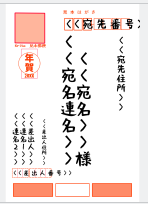
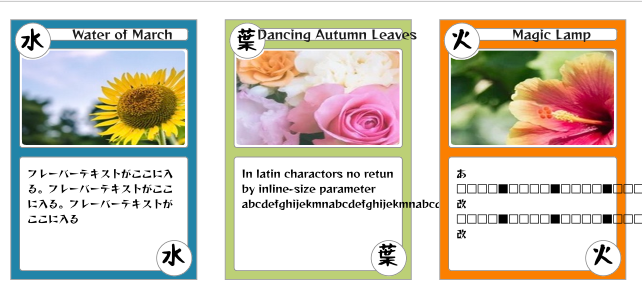
I was studying Python and Krita Plugin from last year’s Winter Holiday.
So I made an experimental plug -in that would be a little convenient.
This plugin can also arrange many FileLayers. Currently, import and editing speeds on Krita are slow. This will probably be resolved when Krita becomes faster in the future.
The plugin
And Sample Data (It contains csv file,kra file ,images, dummy images)
Document
Data Merge Generator Plugin for Krita
This plugin working simple version of Data Merge.
Require Krita v5.2.2 later
What is Data Merge?
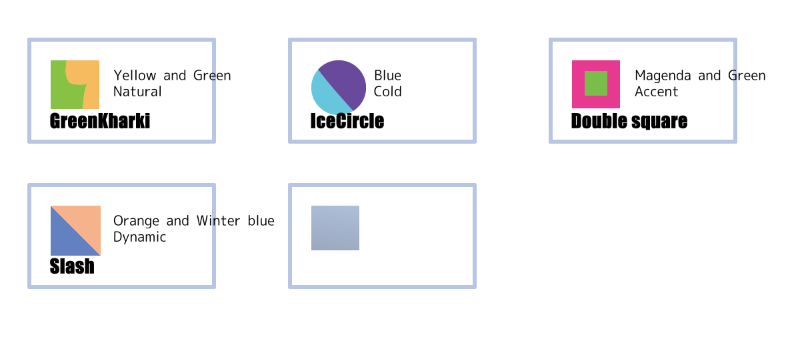
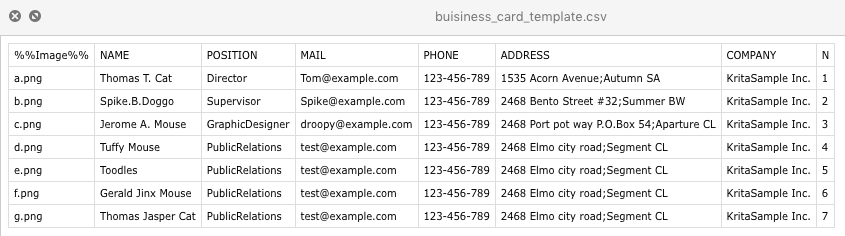
Arrange them in order according to the contents of the database (csv) based on the prepared template krita file. For example, it can be useful for printing number tags, equipment tags, and employee business cards.
There are exist many systems for example ,Adobe InDesign’s feature,LibreOffice MailMerge,Scribus Generator ,Inkscape NextGenerator
Also,this plugin inspired from the script “Improved version of Data Join” for Adobe Illustrator.Thank you very much.
Note and Disclaimer
- This plugin is experimental. It is not suitable for large amounts of data.
- Please try it with a small amount of data first.
- It is slow as the number of items and pixel resolution increases.
- Loading and editing kra file with many linked images will be slowly.
So,it can also specify the max number of units to be placed per each export image file. - Layer styles in template files are not supported.
##How to install a python plugin to krita
- Run Krita application,
- From
Menu → Setting → Manage Resources - Click
Open Resource FolderButton - Find
pykritafolder (Explorer or Finder) - Copy
data_merge_genfolder anddata_merge_gen.desktopintopykrita - ReLunch Krita,and open
Preferences dialog → Select Python Plugin Managerlist. - For enable this plugin,find and click the Checkbox of
Data Maneger Generator(This plugin) from the plugin list.
Note:
In Step7,Select plugin name in the list,you can read built-in Manual.
Also error message indicate with mouse hover tool-tip on the list when this plug-in load failed.
See also this article in Krita wiki.
Uninstall
- Remove
data_merge_genfolder anddata_merge_gen.desktopfrompykritafolder
How to work this plug-in
- Users need to prepare customized kra and csv files.
Preparation
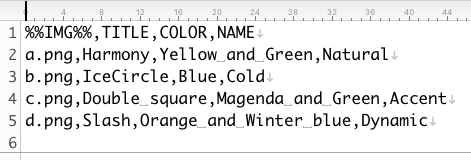
- Create a CSV file (.csv,.txt) The 1st line define for Tag keyword list,charactor code:UTF-8) and list…
- Create a Krita’s image file (.kra) - Need one
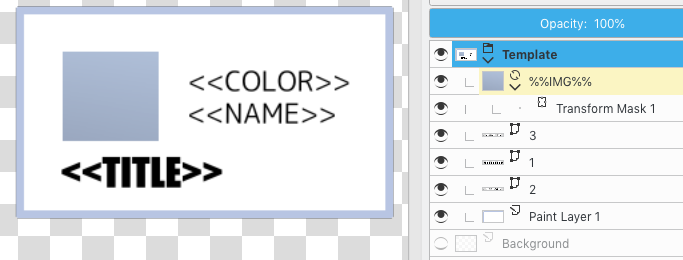
GroupLayerthat namedTemplate,SomeFileLayersthat named%%Tag%%,andVectorLayerthat for replace `<<Tag>>s embed in text object)
Run
- Open the Template .kra file
- Run on Krita (from
Tools → Scripts →Data Merge...) - Setting (Optional)
- Select the CSV file
Update
- 2024 / 02 / 17 v1.6 Add Editable and Moveable aligorithm ,GroupLayer renamer