Plugin proposal: Integrating an AI poison filter directly into Krita (Similar to Glaze)

Hi,

I was a digital artist across multiple disciplines and now I’m programming ways to make the tools better for artists, and to reclaim our power back off of the AI tech bros.

But here on the forum you may remember me from other pro artist, anti AI conversations such as:

If you read through the thread, you have some important takeaways:

YES: Nightshade CAN run on Linux, but*
-They offer no native solution and so if you’re clever you can emulate it, which is slower than native.
-You may find yourself unable to set it up for one reason or another.
-And even then there’s no guarantee that GPU will work, and CPU is much slower

And on top of this, Nightshade doesn’t align with the libre movement and quite frankly may not stack up next to what the community can get together on.

The goal of this proposed Add-on:
Using Psyker-Team’s ‘Mist version 2’
In combination with ACLY’s AI add-on:

Integrate training-resistant “camouflage” based perturbation directly inside Krita; so that an artist may protect their work before, just about before it even leaves the app. Keep creative control, reduce training value to scrapers, stay local and open and reduce the threat of scrapping even in your local files.

You could paint an artwork, then start the poison process, go take a walk around the block and by the time you’re back, your artwork is has been AI poisoned, without the original having left Krita for longer than what’s necessary to poison before it’s quickly placed back in the document.

Then you can paint it out where you want to have less of the visual disruption, and have completely control over the over strength.

Where it stands now
• The core technique has been validated on Linux using the MIST CLI only (local runs, no uploads).
• It works with models artists already have through ACLY/ComfyUI.
• Visual result is a subtle shimmer at pixel-peeping range; normal viewing remains faithful. Strength will be tunable. Tests reveal that minimal pixel difference has been fairly traded with
• Both GPU and CPU work are supported.

Here’s a banner with my original artwork in the background:

And here is the same banner processed by mist:

From a distance it looks ok, upclose it’s to be honest a bit of an acid trip to look at… but as psyker-team improves mist and as we find and provide additional controls and model versions; it’s going to become harder to notice the patterns and harder still for data thieves to easily scrape our portfolios.

I did perform a VAE latency test to determine the factor of how differently the AI saw the image compared to how familiar the image was to the human eye:

  1. VAE-latent cosine: 0.820 → latent shift ≈ 0.18 (1 − 0.82).
    That’s the “poison factor” under an SD-1.5 VAE: ~18% move in feature space.
  2. Pixel SSIM: 0.948 → high visual fidelity (looks close to the original to humans).

Keep in mind… that as with Nightshade, AI detectors WILL flag the art as AI generated, but it’s preferable to a data scrapper seeing your original hand drawn painting as a yummy training snack.
If you’re applying for a job, you can always promise you’ll show your original art in person.

Also I am using this example as a one time only example to show the difference between the original and the misted image. I would advise against posting both versions of your work online as it is actually used by AI engineers to create poison antidotes. As we layer on different models and improve the algorithms for poising data, it’s going to become more important not to reveal our hands. I’m just explaining this so you can understand roughly what goes into this and why it works.

Same reason you keep your encryption keys to yourself :slight_smile:

What I’d like to build next:
• A prototype that plugs into ACLY’s AI Gen (ComfyUI-based) and exposes the camouflage from Krita.
• Reason: ACLY/ComfyUI already organizes the relevant models/tools, so artists can see and control what’s happening instead of a black box.
• Design target: lives naturally in Krita (e.g., Filters), with sensible defaults and advanced controls (seeds, tiling, model mix, strength) for unique “poison recipes.”

Why this approach? Why not emulate Nightshade or running with Mac or Windows? Or Glaze?
• Local and secure. Unlike WebGlaze, this never leaves your computer, unlike Nightshade and glaze, this ONLY leaves krita temporally to be processed and then resides only in your KRA file.
• Opensource: Easily change it to become more effective, it will grow faster with more hands on.
• Open and customisation: more varied camouflage in the wild is harder to counter than a single closed pipeline. This complements, not replaces, other tools.

But it’s not a silver bullet; it raises cost and reduces fidelity for would-be trainers while keeping you in control.

Values
• Linux-friendly, privacy-respecting, no vendor lock-in.
• Works with the model sets you already have via ACLY/ComfyUI.
• Free-as-in-freedom so the community can audit, improve, and evolve it.

Support
If you want this integrated into Krita with a clean UX and docs, contributions help me spend time building instead of unrelated gigs. Even small donations keep the work moving. I’ll share some links.

If you DO want to help me financially with this goal, I do recommend using ‘Buy Me a Coffee’ because you can message me and request for me to focus on this bridge between Krita and Mist.

Thanks for reading. Signal-boosts help—especially from artists who want a local, open alternative that keeps pace with AI training tactics. So please be sure to share this with your friends.
8 Likes

Thank you for that detailed explanation. I’d like to ask some questions that occurred to me.

Couldn’t ‘AI engineers’ download krita and your MIST-derived interface/filter to produce their own set of images for comparison, to enable development of ‘antidotes’?

That doesn’t sound necessary for my use because I only work alone on an isolated computer (unless someone ‘breaks in’ via the internet and copies my artwork).
However, I’m sure other people work in far more connected and potentially vulnerable environments.

Is that some kind of ‘Export as Poisoned’ action that only loads the CPU when asked for, or does it poison the composited image, only when asked, then store it back inside krita for later use as a labelled layer for later Export?

I’m asking all this out of technical curiosity because that’s how i am :slight_smile:

I did a simple subtraction comparison of the two images you posted (after adjustment for their different sizes) and the difference is minor and, as you say, only noticeable if you do a close comparison with the original.

I wish you luck and good progress with this.

3 Likes

In my opinion the main issues with Glaze and Nightshade are not so much their limited compatibility but the fact that there is no formal proof that they actually work and have an effect (other than making the artwork ugly). Before you put anything like it into Krita you have to prove that it actually works. Otherwise it is not better than the metaphorical tiger repellent.

4 Likes

hi @AhabGreybeard, @Takiro — good questions.

1) “if the code is public, can’t antidotes be trained anyway?”

They can try, but the strongest antidotes depend on paired data (your original + your exact output + the exact process/params). Nightshade users tend to post comparisons, unaware of how this can be trained on for poison antidotes. Without revealing poison pair data, counter-training is much weaker. The defence is a moving target:

  • don’t post original+misted pairs (especially with the exact recipe used).
  • per-export random seed, jittered tiling windows, and (if you want) hand-collaging multiple recipes on different regions.
  • optional model ensemble (VAEs/backbones you already have via ACLY/ComfyUI).
  • rotate recipes over time.

Open algorithm + private/rotating parameters ⇒ higher cost and lower generalisation for any one antidote. Closed tools can slow this too, but an open pipeline with diverse recipes in the wild is also hard to “cover” with one counter.

This is why my test is done with one model and without the full recipe plan, and I will resist in sharing which one it was as an example here to explain. You the end user should be the one one to know which models you have used.

2) “why build this into krita if I work offline?”

If your machine is totally isolated, you may not care. For everyone else, integration helps with workflow hygiene:

  • keep the original inside the .kra; apply the camouflage as a filter layer you can paint in/out; only the camouflaged render leaves the app at export.
  • fewer stray “clean” renders sitting around; less surface for automated scraping/exfil. (Not a guarantee—just good hygiene.)

If a hacker gets in on a server, it’s a few extra steps to open a KRA and extract the original image if the user has left the poison ontop so that the thumbnail data is not useful to the attacker. It would have been easier for them if the raw pair data were available. It’s just another humble layer of security.

3) how it will work in krita (planned ux)

  • Filter Layer: “Camouflage (Mist)”
    Parameters: strength, seed, tile size/overlap, model/vae choice. Mask where needed, then bake to a raster layer tagged misted. You can run multiple recipes and blend them—fine control for artists.
  • (Optional later) Safe Export
    File ▸ Export ▸ “Camouflaged …”: one-shot on the composite; writes only the camouflaged image. (Filter Layer comes first; Export only if people want the one-click path.)

Engine: local only. First via the MIST CLI; then a ComfyUI graph through ACLY’s AI Gen so you can see every step and use the models you already have.

4) “is there proof it works, or tiger repellent?”

What we’ve run so far is local CLI validation (no uploads) on a banner image:

  • pixel SSIM: 0.948 → high human fidelity.
  • VAE latent cosine (SD-1.5): 0.820 → ~0.18 shift in model feature space.

success = high human similarity + meaningful model drift.
Aiming for SSIM ≥ ~0.94 and latent cosine ≤ ~0.85 (shift ≥ ~0.15).
Pixel subtraction tests mostly reflect SSIM; they don’t show what the model “sees.” That’s why we report both.

Basically: There should be as little difference to the image as possible while still doing enough to cause a confusing ‘drift’ in how the AI interprets it.

Planned public eval (reproducible scripts):

  • A/B LoRA fine-tunes on clean vs camouflaged sets; measure style-transfer fidelity (CLIP/retrieval) and sample quality.
  • Poison ratio curves (mixing %).
  • No-pairs adversary (attempt counter-jitter without artist-specific pairs).
    I think I like the idea of adding a “check my poison” button so artists can run the metrics locally on their own work. Then you can see the proof yourself, on a case by case basis.

In the example I gave, none of that was applied… on purpose, I only ran the default settings with one model. Once we implement a full recipe, the shift should be higher while the ssim remains similar. And it will become even more important not to share the exact parameters, but it will be then somewhat more secure for those who don’t share any of that.

5) practicality

  • Local by default. No uploads.
  • GPU recommended; large canvases are tiled. CPU works, just slower (still native—no emulation hassles).
  • Uses your existing SD1.5-class checkpoints via ACLY/ComfyUI. No mystery downloads; you can audit and swap models.

6) what’s next

A prototype that plugs into ACLY’s AI Gen (ComfyUI-based) so Krita can hand off the current image/selection, run locally with your model set, and return a layer. Free-as-in-freedom so the community can inspect, improve, and evolve it—and the diversity of recipes makes broad antidotes harder.

Happy to dig deeper into any of this. And please don’t post original+misted pairs—keep your recipe private. That’s a big part of why this works.

3 Likes

You’re mostly just repeating what you wrote already in your first post. Until I see a formal proof that your solution can actually prevent an AI model from being trained on processed (by your solution) images, I remain skeptical but still curious.

2 Likes

Keep in mind the scope:

Engine (MIST): existing CLI by Psyker-Team.

My proposal: a Krita integration so artists can use it locally.

So there’s nothing of mine to test yet. If you want to test something today, that’s the MIST CLI, or the windows or Mac build.

This contains a far better explanation than I can provide, and to be honest I think he almost shows too much of the pair data… Because what I know for sure is that it can be used to train an antidote.

Otherwise, I’m just humbly asking: please hold judgement until I publish the Krita prototype and you can try it on your setup.

Judge me on the prototype when it’s in your hands. Constructive patience helps us to stay motivated in doing all the leg work.

To be totally real with you: I’m working through grieving a friend… so a little kindness between strangers goes a long way.

2 Likes

While I understand good intentions, even if this was run locally, am running computer, and doing art, offline, directly to avoid ai or ai-linked in any form, so just requesting that, if this is moved forward with, it is instead a plug-in.

The important considerations for making this in plug-in form are:
Those anti-ai/ai-linked and pro-ai can both have the choice.
People have various issues e.g. lag, the more is added to krita.
People may have weaker GPUs/CPUs/systems, so need to have the choice.
Discord-focussed (not libre/freedoms!) Mist itself also says it’s protection may be bypassed, in the FAQ, at which point having integrated it into krita would result in a lump of extra code that can’t be used.

2 Likes

Yep—this will be an optional Krita plug-in, not core. It requires a companion add-on (ACLY/ComfyUI path) and lets you choose models, so users who don’t want it won’t carry any extra load.

On “Discord vs libre”: Mist-v2 is open-source on GitHub under Apache-2.0 (the older Mist repo is GPL-3.0). Discord is just their community channel; issues/PRs go through GitHub like normal.

It runs locally/offline, with GPU recommended and CPU supported (just slower).

Thanks for the feedback—I’ll clarify the plug-in scope in the top post.

—S

Thanks for your response and noting it’ll be a plugin. :slight_smile: That’ll be a great help to a lot of users. I think the thread title can be changed, so people can see the thread’s about making a plugin?

1 Like

Noted; I did change the title to:

‘Addon proposal: Integrating an AI poison filter directly into Krita (Similar to Glaze)’

But you’re right, Krita’s semantics is different — I’ve updated the title to say Plugin.

Done.

2 Likes

Awesome! Great that people can easily see it’s all about making a plugin.

Update on Mist Testing (CLI Prototype)

I’ve been working on the shell script for the CLI background process around Mist. It’s not yet integrated with Krita, but that’s the long-term goal. Right now, the main challenge is working within limitations: splitting images into tiles, processing each one individually, and handling scaling issues. Through this process I’ve found weaknesses, but also new ways to strengthen results.

Progress & Challenges

  • Loras & Training: To properly evaluate poisoned data, actual training runs are required. That means I’ve been feeding my entire portfolio through Mist — a huge cost in time and electricity. At this point, I’m the only volunteer artist for testing.
  • Isolation: I don’t feel much support from either the artist side or the tech side. It’s a rough spot mentally, but necessary work if we want alternatives beyond one company’s closed solution.
  • Trust & Safety: Sharing prototypes is risky, since they could be used to build antidotes. I’m leaning toward a trusted committee approach for early testing — people with both technical skills and ethical grounding.
  • Other ideas for innovation: Because description is used to visually encrypt the pixels; Image to text description could be used to procedural describe in detail each tile, which could provide a chaotic checker pattern of alternate poisons that are stronger per tile than what could have been achieved for the overall image.

Community & Support

  • I understand why teams like Glaze/Nightshade chose to stay closed-source, but I still believe open-source drives innovation. For now, I think a hybrid approach makes sense: limited trusted testing first, then wider release.
  • Donations are thin. One commission on OCA tools helped briefly, but I can’t bankroll this alone. Maybe we need something like Blender’s donation tiers, with proper info and a site — but even that means server costs I don’t have yet.

How You Can (Otherwise) Help

  • Image Donations: If anyone is willing to share artwork for private testing, that would speed things up.
  • Trusted Testers: Eventually, I’d like a small group to run prototypes, submit results, and help validate Mist’s effectiveness without exposing how antidotes could be built.
  • Support & Ideas: I’m open to suggestions for funding models or community structures that make this sustainable.

I’ve been spending about 3 days a week on this since I announced this project. Most of that time has been spent misting my portfolio on my Lenovo laptop. The rest of that time goes to a few other paid gigs. Progress is slow, but steady - but I live cheque to cheque and it’s a struggle.

Next update will be after I’ve misted all my artwork — I’m considering doing an official call for volunteers and maybe we can do a community vote on everyone putting their hands up and narrow it down to about 10 people to keep this simple. Otherwise, I’m open to ideas.

-S

1 Like

I’ve been sharing some of my own works online which have been misted;

Hatshepshut here: Which was made using Krita has not been misted as heavily:

But there are also works that date way before I picked up Krita; to my Photoshop days:

Time to show some of my older works, from before the time where we had to try to convince people the tangents in our art are just mistakes, and not a sign of advance AI gen…


MIST v2 used:

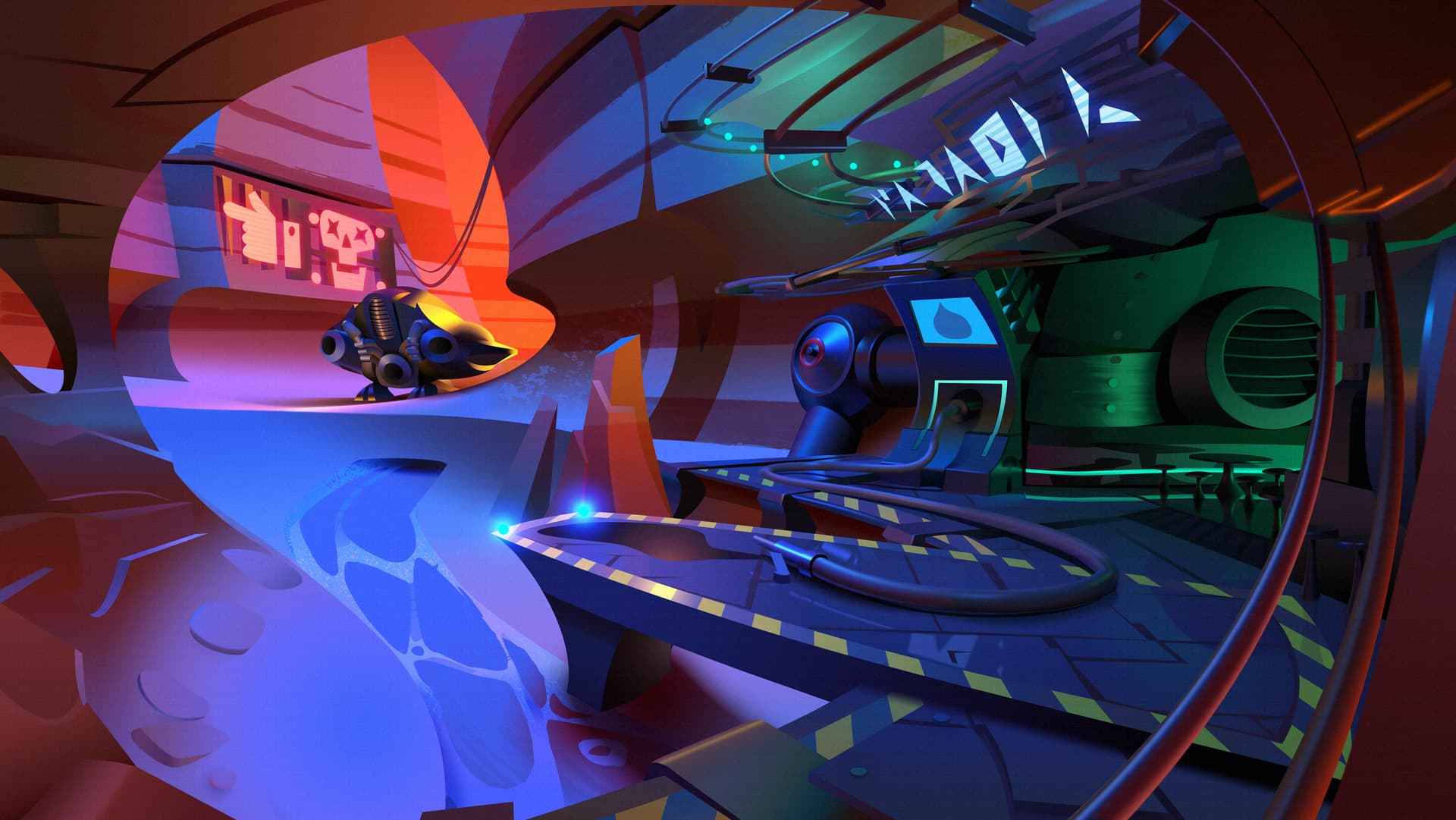
Because this particular artwork is more dear to me than many of my background works, I misted this one pretty heavily. And it’s a mere 46% of it’s default scale here for web sharing.

(Relates to my discussion over here)

I Forgot to sharpen it though! Nutz!


Scene description:

(This was just an old portfolio piece)

In a desolate desert planet known playfully as ‘Planet Canyon’ just about nothing can exist but the most despicable of space pirates. Only in Cockroach Vally. They’ll have you pay out the nose to re-fuel a small scouter space ship but the questionable food and drinks are cheap, and it’s the only service station in the galaxy… because they made sure to it.


Design/Purpose

What you are looking at was an almost fully vector environment using layer effects, gradients and vector brush masks. The goal at the time was I wanted a document I could show to cartoon studios and demonstrate that it could be scaled up at any size to suit production requirements as well as marketing and so on.

So if I’d made it in Krita for instance; I’d be able to zoom in as far as I need to get a shot to create an animation of some characters in the distance coming towards the camera and we only need this one background. Often in production you notice multiple shots for the same angle just to compensate for the zoom in, basically this avoids that :slight_smile:


Technique:

Photoshop: Original sketch, big sweeping lines, going for sense of scale and adventure.
Modo: 3D modelling, Adjusting elements, lighting, re-framing the scene for a render.
Photoshop: Tracing over the render in vector art. Adding finishing touches and vector mask texture.

Krita was not use here but, I think that Krita could do this same kind of thing, given how much support it has gain for vector and layer effects.

So I figure it’s still worth posting here.


The style:

I was Inspired directly by Team Fortress 2 and to a wider extent, the golden age of cartoons that WarnerBrothers worked on. I wanted something that was somehow in the middle.

I really enjoy so many different styles, to the point where I can never stay with just one, so this work of mine is one of a kind amongst my collection of work.

That’s all for now.

I’ll continue to post work that I have tested mist on so we can investigate the results.
If you would like to test any of my works here with lora training, you have my permission, but please return the result to me so I can find out those results and use that to improve the formulas.

I’m hopeful that by using my own work to test this I can pave the way for future artists to be able to share their portfolios once we know for sure it’s helping, and I think Krita Artists is the best place for these security innovations.

-S

I am not a developer, but wouldn’t open source AI poison also provide what is needed for antidotes? If this is a stupid question, don’t waste your time responding. I can tell you are busy.

Yes and no.

If you are using a specific model to poison something, and it is open source, then yes.

But theoretically, you could ask the users of this plugin to set a password that has many symbols at least 14 or so. So every image could have another poison. But I don’t know if that is possible :thinking:

Depends on the algorithm, I guess. It’s just like good modern cryptographic algorithms, they are open but still secure because the algorithm is solid and you can not infer the keys and cipher from the algorithm alone. However, other than with cryptography, AI model training doesn’t really need exact data. Close enough is already good enough, that’s why this stuff is so hard.

Just use a value for the key outside of the plugins knowledge. Like clock value on the moment of creation or the result of the persons screen dimensions in order to make every person running it diferent. Not even the plugin maker know what is tge key. That would make open soirce still possible. Or make key out of the original images color channels.

Solving every image would be super costly in time.

Thanks for the interest and the thoughtful replies.

The protection would be in (randomised/seeded multi-poison tiles, etc.), so kind of what BeARToys said but instead of it being a ‘password’ it’d be a random generated seed to create more work for the antidote.

However: the project is currently on hold. two things are blocking progress:

  1. Almost no one in the artist/dev space wants to touch anything AI-related right now - even when it’s defensive technology.

  2. I’m a solo dev living paycheck-to-paycheck; paid client work has to take priority over unfunded open-source projects. I can’t survive on zero donations… I have to focus on other things.

I still believe this plugin would be valuable and I’d love to finish it, but right now I simply don’t have the bandwidth (or funding) to move forward alone.

If anyone here (or someone you know) has experience with ML/adversarial image perturbations, C++/Python plugin work, and would actually like to collaborate, please DM me. Real help from even one competent person would unblocked this immediately.

Until then, it stays paused.

Right now, I’m working on an interchange between Krita/Blender and Spine.
It’s not even paying anything, but I know it can LEAD to paid work in my city.
Gotta focus on the thing most likely of putting the next piece of food on the table.

Appreciate the support, – S”

3 Likes