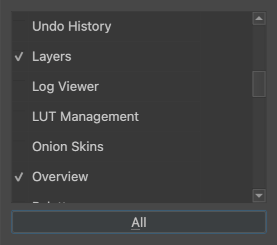
This prototype “Summon Docker” extension does two things:
“Summon Docker”, a shortcut that shows a dialog to choose a docker to show floating at the cursor. (Tip: There is a not-really-visible checkbox to the left of the docker name when ‘All’ is on, which will add it to the non-All list.)
“Toggle Left/Right/Top/Bottom Dockers”, which are a set of shortcuts to toggle the visibilty of all dockers currently in the given area of the window. (There seems to be a bug where the shortcut must be activated twice the first time to work?)
The first part I started a while ago and didn’t get back to working on, the second part I thought about more recently and just added a quick (barely tested) implementation onto the existing plugin.
It’s unfinished and without proper documentation, but I didn’t want to leave it lying around without sharing it just because of that, as it’s still useful.
And, Android users, I know you’re interested in seeing these kind of functions natively in Krita as Android lacks plugin support. I would be interested in attempting to implement these natively, but it needs a better design first.
Update:
I added some actions that can be added to the toolbar to show any built-in docker next to the toolbar, based on the discussion in this thread: Dockers as dropdown menus
The actions have the same name as the dockers.
I tried the plugin, and it has the option to enable and disable right and left docker. This is definitely an ideal implementation. and thus completely removes the requirement of per icon for per docker headache.
However, the canvas changes size / position which IMHO is distracting. Can this behavior be altered?
This is working in full screen too.
This can also technically replace docker as dropdown list in MR but i guess more the merrier option wise.
From my side, this implementation alone is requirement enough. only the canvas movement is killing the game for me. its more like canvas is squeezing for the docker
Let me clarify. The canvas moving around is compensated for specifically with the canvas only switch (pressing TAB).
If you toggle the dockers in either normal or canvas only mode, I think it will still affect the canvas position, unfortunately. Unless, perhaps the dockers are floating above the canvas.
Woaaah. This is just what I needed! I always thought it would be cool to have some dockers like dropdown menus in the toolbar, like the recorder docker or the brush preset history. This definitely helps my workflow. Please! Continue developing this!