I know this is the wrong category, but it’s not a feature request for the krita developers, but for plugin developers.
(I dunno, maybe it IS for krita developers, i just don’t feel like it’s that …big? common? normal? of a thing that they would want to bother with it.)
people who know more about these things than me can feel free to shuffle this post around as necessary.
I want a plugin that essentially makes a key bind where i can hold a key and the brush size will incrementally change at a pre-determined speed while drawing
essentially I want something that would mimic pressure sensitivity, but for a mouse. so I hold a key down and the program thinks or at least behaves like I’m slowly pressing down or lifting up on a pen.
ideally the “speed” of pressing and the “strength” of the pressure would all be configurable via some widget or docker.
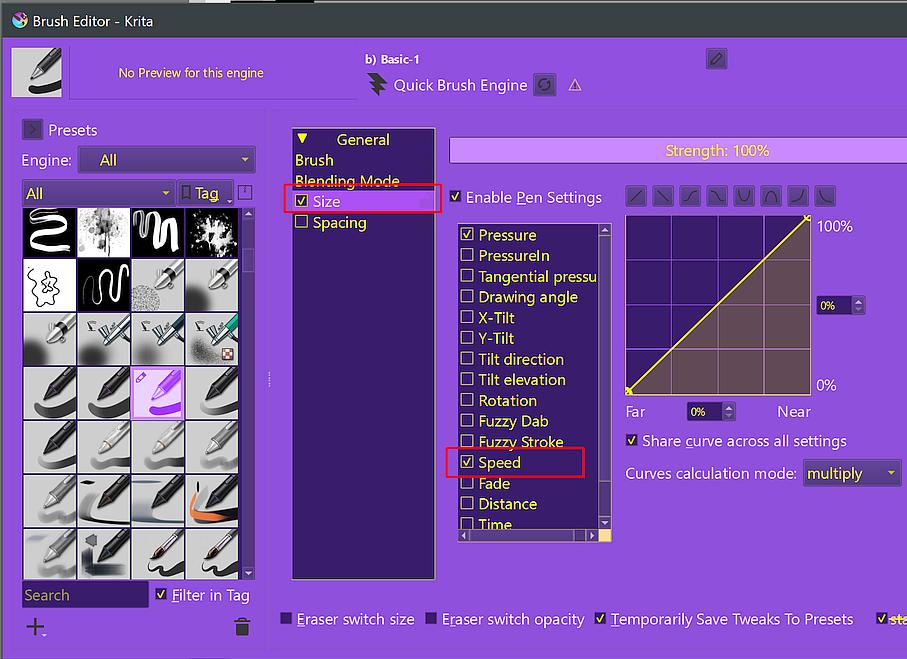
I know next to nothing about python and even less about how krita works in the back end. but the pen setting have things like “fade” and etc, that KINDA work how i want, but you have to know before you start drawing how small/big you want the line to start out at and grow/shrink to, and how fast you want that to happen, which means that you are very limited to very certain line lengths for it to look proportional without constant fiddling with the settings, which is not conductive to a good flowing drawing experience.
so whaddya say?
is this even possible?
would other people be interested in a feature like this?
does somebody want to tackle it?
Here is small code doodle. Brush size can be changed with Alt + Wheel, sad thing is that Krita ignores changes made to brush size while painting single stroke.
also currently API has no function for setting pressure of pen.
Interesting alternative route would be to capture original QMouseEvent and convert it to simulated QTabletEvent…
from krita import Krita
from PyQt5.QtCore import Qt, QEvent, QObject
from PyQt5.QtWidgets import QApplication, QTextEdit


class WheelBrushSizeHook(QObject):
    _instance = None

    @classmethod
    def install(cls):
        cls.uninstall()
        if cls._instance is None:
            cls._instance = cls()
            QApplication.instance().installEventFilter(cls._instance)

    @classmethod
    def uninstall(cls):
        if cls._instance is not None:
            QApplication.instance().removeEventFilter(cls._instance)
            cls._instance = None

    def eventFilter(self, obj, event):
        if event.type() == QEvent.Wheel:
            if event.modifiers() & Qt.AltModifier:
                app = Krita.instance()
                try:
                    view = app.activeWindow().activeView()
                    # there is no function to setPresure(), so using brush size...
                    new_brush_size = max(0.0, view.brushSize() + event.angleDelta().x() / 150.0)
                    view.setBrushSize(new_brush_size)
                    self.debug_log(f'new_brush_size = {new_brush_size}')
                except AttributeError:
                    self.debug_log('Failed to find current view.')
        return super().eventFilter(obj, event)

    _debug_log = None

    def debug_log(self, text):
        if self._debug_log is None:
            self._debug_log = QTextEdit()
            self._debug_log.show()
        self._debug_log.append(text)


WheelBrushSizeHook.install()
but it CAN change the size of the brush while making a single stroke with the use of a stylus and pen pressure.
so what’s the difference?
how is the input received differently that it’s allowed to do so one way but not the other?
and can a plugin be written to spoof that difference to enable mouse uses to get that dynamic in stroke size change?
Krita receives the pressure signals through an API from Qt, whereas this API gets the signals from the driver, it has to rely on the input from that API. And with a mouse it is similar, only that a mouse has no pressure, mice only know⧸have two states of pressure 0% & 100%.
Using the [ or ] keys can adjust the line thickness as you draw, but you have to stop the drawing in order to see the line width increase or decrease.
I recall that GIMP has the feature to adjust line width as you drag the mouse or pen without pressure sensitivity. The faster the input, the thicker the line gets. As you slow down, the line gets thinner. Perhaps that would help if implemented into the software.
You might be able to change the keyboard shortcuts so that the mouse wheel could adjust the line width as you draw.
yeah, I’m aware of the bracket key binds but as has already been stated previously, those changes do not take effect while drawing, defeating the purpose of what I’m asking for. and I also know of both the speed setting and the fade setting, but at least with a mouse, the speed setting isn’t really all that sensitive, to effect any significant amount of change in the line width i need in increase/decrease the speed to much faster than i can comfortably draw neatly at a much faster rate than i can reliably control. essentially i need the change to be happening while i drawl slowly and steadily in order to be able to control my lines. and I’ve already stated the issues with the fade setting in my op.
mapping some kind of change to the mouse wheel seems like something maybe, it’s not ideal as it requires me to hold the mouse in a sub optimal grip and coordinate the movent of a finger on the mouse in a way that doesn’t jostle the mouse itself while drawing, while a key bind would allow me to use my other hand independently of the mouse.
either way. i am not a programmer in any way shape or form so can’t really enact any of these theories or ideas. but I can say that what little I understood of the link that Sooz posted above makes me think that it may be very helpful to anybody who know what they are doing programming wise.
@Alien_Sunset You can pick up a pressure sensitive Wacom tablet for somewhere between $10 and $20 on ebay. You don’t need high-end gear to create art. A CTL-460 or a CTL-490 is just fine. Life is too short for art with a mouse!
not everybody has $20 to spare, or a computer that will work with whatever cheap tablet you are suggesting. or just plain doesn’t want a tablet. this isn’t just for me
suggesting something not related to the actual question is not helpful