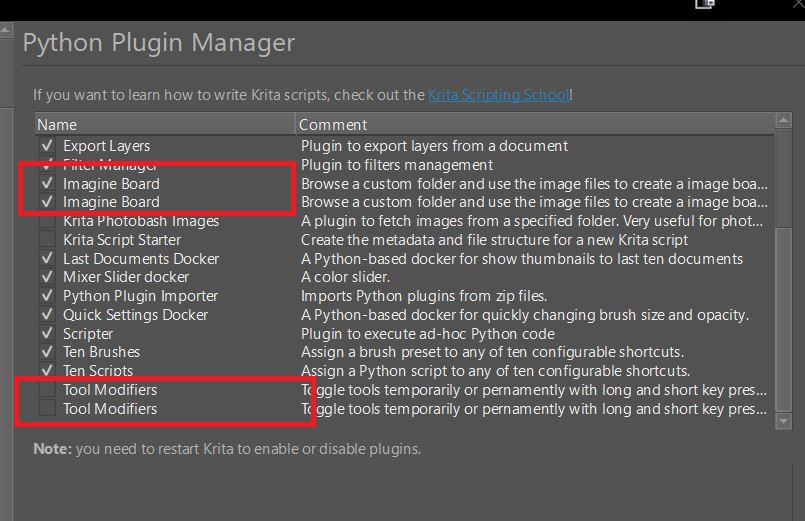
Hi
Why are the plugins I install duplicated in Krita and what should I do about it?
Why this happens is unknown to me, but since I’m not aware of any negative impact on plugin function related to this behavior so far, I tolerate it.
Michelist
Check whether the .desktop files for the duplicated plugins are present twice in the folder?
Sorry in which folder do I look for that?
“pykrita” in the resources-folder of Krita.
Michelist
This has been known for quite some time, there are already topics on this if I remember correctly, but whether it has been reported as a bug yet is unknown to me.
You can open a bug report on https://bugs.kde.org/ if you would like to see it fixed. This is an interesting experience if you haven’t done it yet. You have to open an account there first, you need a valid mail address, preferably one that can be seen by the public, because that’s what it will be.

Furthermore, it is expected that you describe the error, how it occurs or could be “provoked”, what you would expect as normal behavior, and how you imagine it to be fixed. A detailed list of what is expected from a bug report can be found here: ⚓ T7492 How To Report a Bug also here is an explanation: 2. User Guide — Bugzilla 5.0.4+ documentation

Michelist
I checked … C:\Users\Rob\AppData\Roaming\krita\pykrita … only one .desktop file of each
It only duplicate non-default plugin like this topic?
Yep that’s right and thanks for sharing Odins thread … bug still here in 5.0.6 then