So I put my pen tool to tablet for a moment I linger and the pop-up palette bamphs into existence. How do I change the timeframe for this even by a few seconds? I can’t find the control for gestures, I can find the mouse controls but that’s not what I need. If it were possible I’d like to turn the palette off entirely.
1 Like
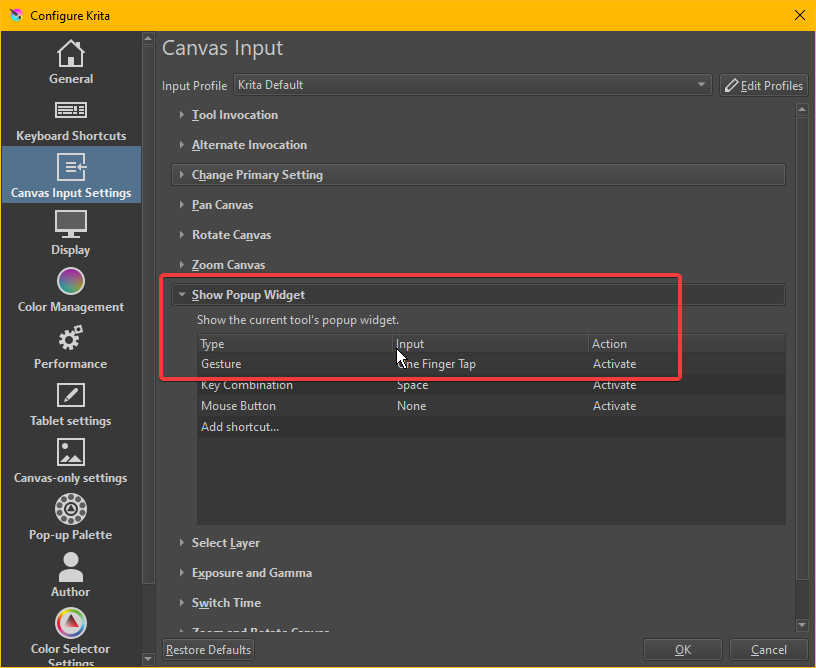
On touch device, the popup palette comes up with “One Finger Tap” by default.
If you want to change the gesture, go Setting > Configure Krita > Canvas Input Settings > Show Popup Widget and change the gesture.
“One Finger Drag” can make it popup when long press, but conflict with Pan Canvas (also in Canvas Input Setting), so need remove “One Finger Drag” in Pan Canvas.
Right click (long press on touchscreen) on the list to remove the action. But it will also disable other tool’s context menu on canvas.
4 Likes
You can change the popup widget to 3-finger tap to avoid that accidental long press you’re describing, @Volkhvy. That way, you can access the popup palette if you want to and also you’ll still have access to other popup widgets.
Double click on the gesture (where it says one finger tap) and you’ll see a dropdown menu where you can choose other gestures. Just be careful about creating a conflict - there’s no built-in warning.
5 Likes
@sooz @Lesqwe56 thank you both I had only seen mouse click there so I just moved on it is fixed now tyvm.
1 Like
This topic was automatically closed 3 days after the last reply. New replies are no longer allowed.