Prior to filing a bug report, I would like to ask if someone else here may be experiencing this same issue.
I’m currently working on an animated music video, and to keep it manageable I work from scene to scene.
Whenever I render an animation it will however have the normal audio speed, but the animation will be too slow.
I found out during editing in Shotcut, that the animation is in fact half the speed, resulting in me having to double the speed of my animation to have it work again.
I’m experiencing this on two separate PC’s in different places, using different brands of drawing tablets.
Which for me leads to the conclusion that this is a krita problem, or am I possibly missing something?
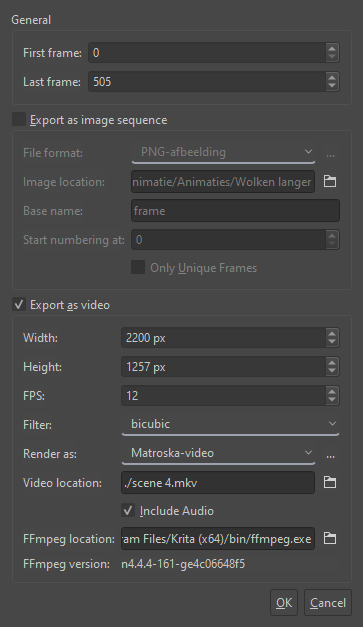
What are your rendering settings and the FPS of the animation? It kinda sounds like your frame rate is stretched to fit the audio length which gives the effect of the animation being slower due to more still frames inserted at render time to fill the gaps.
Yes, I understand. Please send me a DM for this. I’ll try to check it tomorrow morning or maybe earlier depending what happens this evening.
I can use the 5.2.2 installed version on Windows 10.
5.2.2 has a problem, as tested with the appimage on Linux Mint and the installation on Windows 10.
The 5.1.5 appimage does not have a problem. I haven’t tested any other versions.
The .kra file as initially opened does not show any problem.
It is a 506 frame animation at 12 fps and plays for 42 seconds.
The .wav audio file has a duration of 20.6 seconds.
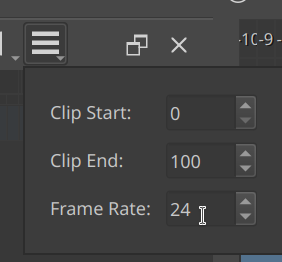
If the audio file is added to the .kra file in the timeline, the animation plays at about 24fps and it also renders out at 24fps.
You can see this by hovering the cursor over the Drop Frames icon where the frame rate is shown.
That’s on Windows. The appimage doesn’t show the frame rate when you hover on the Drop Frames icon. It’s a new feature.
If the audio file is removed, the animation still plays at about 24fps.
Restarting krita fixes this, as expected, until the audio file is added again.
I haven’t tried any other audio file and haven’t tried using an .mp3 file.
It’s all very strange.
That is interesting because 5.2 contains the audio rework.
I’m guessing something went wrong there…
Thank you for your confirmation Ahab, I’ll post a bug report about it.
5.2 is having the new MLT library (same as kdenlive) for the audio support. Might be something due to this. Please file a report and also link it here so that we can subscribe.
I will say this has also been happening with Krita for me, was starting to randomly blame the core amount on my pc, nice (& not) to know it’s a bug that someone else has also been having issues with. I will be checking to see if the 5.1.4 doesn’t have the bug, & will check in later today to give an update on it. * Update * It isn’t bugging on 5.1.4, so there’s that.