EDIT: typed too slow…
yes and this is even more reason to use 2 buttons imo.
Like i said many times before the issue with one button doing everything is unnecessary inputs and unwanted actions happening, if we think of android users who dont have access to keyboard (so they wouldnt be able to quickly turn on or off or change the mode with a shortcut) woulndt this be an issue?
I am unsure about the arrow, honestly i prefer tiar’s icons. they are more consistent. I also still think that changing inactive icons to be confusing. just leaving the disabled alpha symbol is enough to me. The way i see it the button on the bottom choosing modes would suffice. and leaving the alpha beside the layer to turn it on and off.This approach would also not impact tablet users.
What about the button being on the bottom of the layer docker and one click on it changes the mode? would that be slow?
i honestly dont see why 3 clicks would be seen as the easiest to use i mentioned above that you would need to do multiple clicks and get unwanted actions with this approach.
but wouldnt having a button that does that right in front of the user be even easier to see? i think having discoverability based on the user messing up or wanting to do something else kinda terrible as a workflow.
really the more i see it the 2 buttons is the simplest way for me.
I honestly don’t understand how 2 buttons could be easier than 1 button.
Me personally, I know I’m going to be using both types and I’d much rather be able to set it directly on the layer than having to go into some context menu to set it every time.
I wouldn’t mind toggling it in the sub-menu if there was also some sort of shortcut I can do to bypass ever having to use the menu (like clicking does single layer, Ctrl+clicking does multi layer) but that feels like a bandaid and is needlessly complicated.
Okay I think it is general consensus that both alpha should be visible from the ui for user. We have our opinions on how this button is shown and is summarized many times here.
I think we should let this topic cool off a bit and let @Deif_Lou or any other dev who might want to implement this a chance to read and take feedback from this thread. We have stated what we want already. If we let the discussion go on we might a several more ways to do the same thing.
At this point we will be going in the bikeshedding territory and will be repeating same argument in a cycle. So let this thread be.
@Deif_Lou take your time and we can see the issues when implementing the method of setting inherit alpha while testing.
I am enabling a slow mode for this thread if you want to add something really important I’ll open it just message me. For now let this thread cool down a bit and give chance to everybody to digest what is written.
May i just say one more thing and present a mockup of what i have been trying to explain? As i feel so far people have been misunderstanding me in some way. And maybe make it clear why i stand by my position instead of the cycle approach and hopefully this is the last time i need to explain this. I also think this is important cause some main problems are being overlooked.
But first let me address my issue with the cycle approach
One button cycle approach
The issue i see is you have 2 different actions for the same button:
- turn alpha inheritance on/off
- change the mode of alpha inheritance between clip and alpha inheritance
Having more than one action for a button doesn’t make it simpler in my view. Again lets talk about the workflow Lets suppose the order is this:
- Clip
- Alpha inheritance
- Off
So lets think about the workflows of this approach.
Supposing we start with the alpha in off state:
You want to turn clip on
Off → Clip (1 click needed)
You want to turn alpha inheritance on
Off → Clip → Alpha inheritance (2 clicks needed)
Supposing we are starting from other states:
You have Clip on and want to turn it off
Clip → Alpha inheritance → Off (2 clicks needed)
You want to turn Alpha inheritance off
Alpha inheritance → Off (1 clicks needed)
You want to change from alpha inheritance to clip
Alpha inheritance → Off → Clip (2 clicks needed)
You want to change from clip to alpha inheritance
Clip → Alpha inheritance (1 clicks needed)
Total of actions that require two clicks: 3
Total of actions that require one click: 2
The problem see is how the number of clicks change between 1-2 for some actions. If we see the statists 3 actions require 2 clicks while only 2 require one click. May seem somewhat balanced, however depending on your workflow you may need to do 2 clicks more often than 1. And in a way you always have a distance of 2 clicks to a wanted action.
- If you only want to use clipping masks to turn off you always need 2 clicks
- If you want to just use alpha inheritance you always need 2 clicks to turn it on
- If you want to change the mode of a stack of layers in the alpha inheritance to clip you need 2 clicks on each layer. Even if we implement a way to change it multiple selected layers that’s still 2 clicks.
It may not see as much of a hassle at first but imagine you always want to make an alpha inheritance, you will always need to double click. If you click one time more by accident you are back to it being off.
The possible solutions for this that have been discussed were:
- Be able to set what mode will be the first one
- A modifier click to turn it off
Being able to set what mode is the first one solves the issue when you want to turn on either clip or alpha inheritance, but doesnt solve the issue with turning it off needing always 2 clicks.
Even if we changed the order to:
- Chosen default
- Off
- The other mode
To change to the mode that is not the default will now always require 2 clicks. That’s the issue i have with this approach, more times than not the result you want will always be 2 clicks away.
Setting shortcuts or modifier keys to change to a mode faster may solve the issue for some pc users but not for tablet users, unless they use a Bluetooth keyboard. This is also inaccessible for people who don’t have space on the table for both keyboard and tablet, this includes people who have screen tablets without any buttons to set up shortcuts.
So I am sorry but i don’t think this is practical at all on the long run. The problems i see are:
- One accidental click will make you need to cycle all over again
- Depending on the workflow the amount of times you need to double click will be more than 1 click (increasing the changes of accidental additional clicks)
- Possible solutions to this require the use of keyboard, making them not accessible by default when only using a pen
One possible solution I could see is separating the functions on the button by Left click and Right click:
- left click to turn it on and off
- right click to change the mode
This would segregate the actions and the main issue i see with only having one button would be solved, though I see 2 issues with this:
- I have no idea how to one uses right click on android.
- The case of people who only use pen most of the time this would require them to set right click to the pen button. And many have the pen button set to other things.
- Kinda of an easter egg feature, as you would need to know right click does something different
Using 2 separate buttons
At first yes it may seem that having 2 buttons is not as simple as having one but in the long run I think the pay off is better. First lets address the main concern:
The possible need of needing to navigate context submenus to change the layer
I dont think that would be necessary at all (with a compromise). If we have the alpha symbol beside the layer only turn on and off, and put a button on the bottom of the layer stack to change between them both functions will be clear on view.
So I have 2 mockups:
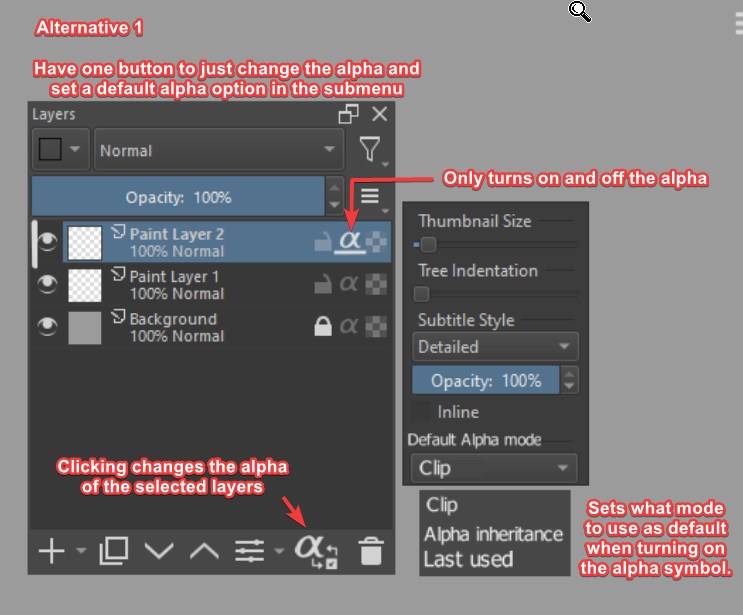
In this one we make use of the hamburger menu to set a default alpha mode. What this does is set the mode that will be activated when you click the alpha symbol beside the layer. So if you have a preference then it will be respected. Though i think one more addition is needed, a last used option for people who alternate between modes a lot as the mode used would always be the last one.
This of course would still cause people to click twice if they change from mode to mode at each new clip added but considering all other cases would have a reduction of amount of clicks i think its a good compromise.
As noted in the image the button down there would only change between the modes, I took this approach in case the other one was too confusing, this way all actions are segregated and very clear to view.
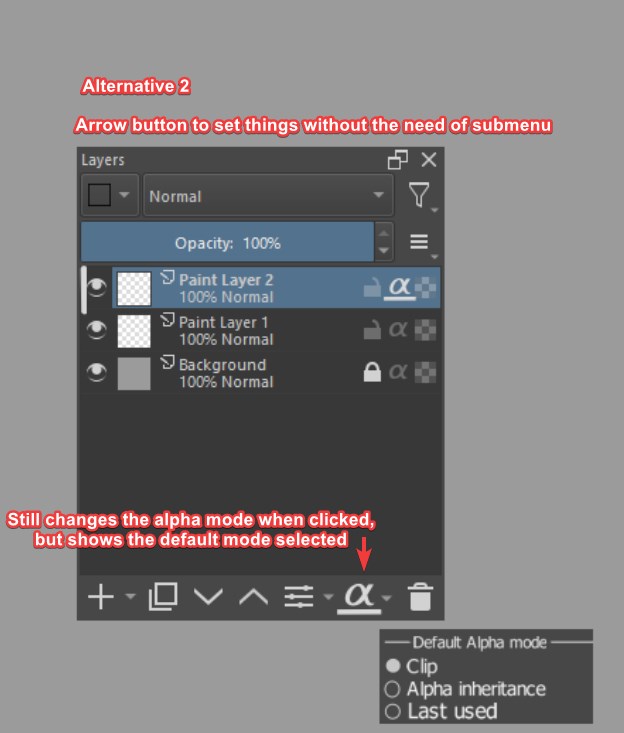
This one the arrow would choose the default mode and the default would be shown in the button. clicking the button would still switch the alpha mode but I understand that this can be cryptic. Thats why think the other approach is better.
The good thing about this is that you see what your default is but dont know if thats trully worth the cryptic ui.
With the 2 alternatives presented. Lets now try the same workflow:
Supposing we start with the alpha in off state:
You want to turn clip or alpha inheritance on
You have the mode as default: Off → Clip (1 click needed)
You have the other mode as default: Off → Alpha inheritance, change the mode (2 clicks needed)
You have the last used as default: either 1 or 2 clicks
Supposing we are starting from other states:
**You to turn clip or alpha inheritance off **
Click the alpha symbol beside the layer(1 click needed)
You want to change from alpha inheritance to clip or vice versa
Click the switch alpha mode button (1 click)
Total of actions that require two clicks: 1
Total of actions that require one click: 4
See how this approach the number of times you need to do 2 clicks is reduced? the only time you need 2 clicks is when you set it on and change the mode in sequence. And even that the cycle approach is not a huge improvement as changing to one of the modes would still require 2 clicks, of course we need to also account with the need to move the mouse to the other button but considering this approach prevents unneeded clicks and cycling i still think its worth.
One issue that could be brought up is that you would possible need to select the layer first to change the mode, to that I could purpose that the alpha switch can work with multiple layers selected.
So while you need a submenu be it in the hamburger menu or the arrow, i dont think that will be accessed much after you set you initial preference.
With this approach the pros i see are:
- Clear separation of on/off from alpha mode
- Being able to have full control on what you want to do, not relying on a order of clicks
- Avoids unwanted changes
The cons i guess its obviously you have two buttons and you need to move the mouse to click on one on another. But i honestly think this is an ok compromise.
All this being said i know that one thing we will all agree with no matter the approach is to:
- have separate shortcuts to change the layer mode and to turn the alpha on and off
- make this avaliable in the python api
And depending the approch maybe a shortcut to set the default mode so you dont need to navigate a submenu but the option will still be there for discoverability and as another option to change
Anyway i hope this really deep dive can show what the issues i see are and why i think the other approach is better and maybe gives the devs the clarity of what each mode can consist of.
If we pursue having both inherit alpha and clipping functuionality I personally would prefer a 2 button solution or even just a menu option (I do like these 2 button mockups from Lunar tho).
The main thing for me isn’t even the argument about whether 2 buttons better than one, but how many other tools in Krita have this “one button+multiple clicks to change mode” function. Because if there aren’t many, even a more cumbersome system would be more intuitive. Even with things that have several modes it’s generally holding Shift + the tool prompt, I can’t think of any painting programs that have these clicking thing right off the top of my head.
If we keep both there is a problem (that was mentioned here already) of compatibility between people that use different modes. Coding some algorithm to change one into another is probably a lot of work.
I’m not a programmer so excuse my simplicity, BUT I think it can be a good problem to have in this particular case, because if in the end there IS an algorithm like that it could also mean that psd compatability is now (potentially) instantly better as far as the layer structure goes, because we now have an inheret alpha to clipping masks path laid out.
I completely understand your intentions with separating the functions, but I feel you are looking at it through the lens of your own usage of the tool, rather than the abstract concept of the tools grouping. Your method will not be easy for workflows other than your own.
This isn’t correct, the button has one function: Cycle alpha inheritance modes.
The alpha inheritance modes are as follows: No inheritance, single inheritance, multiple inheritance.
You are seeing the modes as 2 separate tools rather than 2 sides of the same coin that should occupy the same metaphorical UI space.
Ask yourself this. Assume that currently in the program, the alpha toggle switch was a drop-down menu. In the drop down menu has the 3 methods, none, single, and multi.
How would you simplify that UI to make it faster and easier for artists to choose which of the dropdown options they wanted? I personally think a cyclic toggle would work, as there are few options and likely going to remain a few options.
Taking the drop-down and putting it somewhere else entirely, and only let the alpha toggle toggle it on/off would actually be harder for the artist to use than just a simple dropdown on the layer itself.
The only time your example wouldn’t be highly detrimental would be if the user plans on only selecting one of the two, and never if rarely using the other. That may be how you use the tool, but it’s not how everyone does and I believe the 3-way toggle appeases both your and my use case, while your method highly favors single-method users.
You are speaking quantity because you know quality isn’t on your side. ‘2 clicks’ can be shortened to a ‘double click’ which might as well be a single click when talking about actual time saved. Your method may require less ‘clicks’, but it requires more time moving my hand around the screen randomly, and I value my time. By the 2nd drawn picture I already have the muscle memory to double click the alpha button and it takes 1/5th the time as your method.
Settings should be accessible to everyone, and left click is the only thing everyone has. If there is bonus functionality to make the regular functionality faster, it must be optional and they’re called ‘shortcuts’.
Therefore I propose:
Clicking the alpha button toggles the alpha inheritance method between the 3.
alt + clicking toggles between single and off
shift + clicking toggles between multi and off
There, now the benefits of this method are:
- All main functionality is accessible to everyone, even if they don’t have a pen button for right click
- Shortcuts are assigned shortcut keys and not jumbling the UI
- No new buttons or dropdowns on the UI
- Single button single functionality that controls the alpha mode
- Doesn’t arbitrarily hide or obscure any functionality of the program
- Doesn’t require you to select the layer first to switch it to a different alpha mode
- Doesn’t require you to move your hand at all to switch to a different alpha mode
- Shortcuts improve functionality and speed rather than serve as a crutch
The downsides are:
- You have to double click rather than single click to disable/enable depending on your mode, if you can’t or don’t want to set up shortcuts. This may cost you 100ms or so.
This is biased toward people who would primarily use a single mode.
This is where you are wrong. ‘ignore alpha’ is technically an alpha mode. The 3 alpha modes we currently have are No inheritance/ignore, single inheritance, and multi-inheritance. Your solution solves the problem of separating ‘off’ from the two available modes, and as a result it over-complicates things. It is much simpler to accept that ‘no inheritance’ in a functionality sense, is a mode itself.
There are two solutions to this:
- Keep the UI as is and make the Alpha button a 3-way button
- Redesign the UI and use my mock-up or derivative thereof with a dropdown toggle.
@Ralek wants 1, because this is clearer from a mental conception point of view on the UI. It’s probably also better suited for touch screen devices.
@LunarKreatures and I want 2, to reduce clicks and have more space to read the actual layer names. This saves a lot of repetitive clicking and user error, because you can batch toggle multiple layers as well, as opposed to toggling individual layers.
If you want to present your method thats completely fine, but i would like to counter somethings you said about my proposal.
I disagree with this i am not thinking about my usage in the first place. But what i think the usage will be considering the amount of people that asked for clipping masks in a more traditional sense i truly believe that people will use it way more one method or the other. And when using both it will be in punctual times in their workflow to which what i purposed wouldn’t affect much.
I understand this is a huge assumption to make but considering how much i see people asking for more traditional clipping masks it seems not as wild to think of.
while you are technically correct about the no inheritance also being a alpha method, i still think separating it makes the usage better.
The exact way i purposed. As this sort of cycle has issues as the ones i described in my post. link for those who may not know
i disagree. In fact i think it would be much more clear.
we are both going from assumptions from how user usage will be and i hope you understand that seeing you are talking like you are completely right and i am completely wrong as this is a black and white truth. And my method would indeed help people who will favor one over the other but i dont see how that would make your usage much harder.
What??? No i strongly believe the less amount of clicks is actually better quality as i explained before in my post depending on multiple clicks might make people having a harder time selecting the mode they want.
I also dont see what why calling 2 clicks double click is relevant you talk like i said that as a way to skew the view to my favor which isnt true. I just think its much easier to separate these.
Besides by the way you are talking about it its like i didnt address the need to move the in my post:
Also it wouldnt be moving the hand randomly as the button would always be in the same place.
Again you quote part of what i said ignoring what said right after about the problems of this solution. I addressed this very concern right after saying that
mine doesnt either but ok.
I wonder what use cases this would be an an issue and like i said having the button on the layer docker can open up to change multiple layers modes at once. which would actually be a plus.
??? now thats weird cause in both of our porposals the effect would be the same i dont see how this is a plus for yours.
if thats the way you see i cant do much, we have completely different views, if you really think your method is better ok, i completely disagree.
The valid points of two approach, and the cons mentioned here as mentioned in the other thread is exactly why the alpha/clip method should be up to user’s preference. And there should be factoring into defaults of whether one use tablet or computer. I use a desktop computer, and to me, from my perspective, the two button would make sense and especially with modifier+click to do more. but in my laptop computer where moving around icon would be bothersome if I didn’t have touchscreen built-in, I would rather have the multi-click approach. I’m afraid that there is no one-size-fit-all solution here.
There’s the programming issue though, and as I have made a few patches to Krita, I can tell you that it is one of the most frustrating thing to do. This thing would be hard to do. And I never finished that foreground extraction tool, and that’s probably easier to do than to get a solution that satisfies all instead of most (not necessarily supermajority).
I agree, this doesnt seem a way that fits all. Thats why i also think shortcuts are important for both approaches. At this point i think the easiest way would be to let both approaches configurable but this would be a lot of trouble imo. I am all in for finding a compromise that satisfies both parties but i cant help but to think that 2 buttons so far is more helpful.
the programming issue of what exactly? i am a bit curious.
Well, IIRC you need to add in codes into preferences, link them together, test it together. It’ll take a good while to get a working prototype for two approachs to be available, and to configure defaults for different system. To get the gist, it’s harder to do a multiple approach than to do a single approach on some order of magnitude. @tiar and other coders can probably tell some more details about this.
It doesn’t feel like it, currently the only single problem you can come up with in the 3-toggle methods is:
- it takes a tenth of a second more to turn it on/off, sometimes.
Your method:
- Adds a new button to the UI that further confuses new people who are seeing it for the first time
- Requires you to switch your active layer in order to change the alpha mode
- Requires extra hand movements for people who don’t exclusively use 1 method
- Will make accidentally finding multi-inheritance harder for new users who may benefit from it
- Splits control of the same function (clipping a layer) into two separate areas of the UI, which is bad UX.
Once you address these so that the 2-button idea is even on the same playing field as the cycle toggle, then I think it should start being considered.
What’s being ignored here is the frequency of doing so, and you can only click so much before you start getting tired of doing that or when your finger get strained from doing so. Granted, I’m a bit biased as I had to fuse multiple curves in Rhino 3D (1000+ clicks) manually.
For me personally i dont care whether the 2 clicks or the dropdown alpha. Whatever milliseconds u people want to count im not that picky with the timing cause its only more or less.
BUT i still prefer option 2, the redesign UI for all the alpha, locks, colour label, fx stuffs on top bar in 1 row and above that opacity and blend mode in 1 row and then leave the layer clean for only if the lock is turn on then the icon is shows and same with alpha.
I prefer that UI much cleaner and the 2 clicks method is still going to use the old UI so im not picking that.
Neither of our proposals require the UI to be redesigned, the layer docker redesign is an entirely different proposal agnostic of the alpha inheritance method.
Im replying to hologram since he/she said redesign ui like mockup he/she made before in option 2. Im only saying what i want (like voting for what i pick), and whatever final result the dev pick is up to them cause i cant make the code haha…
But the dropdown menu have to be put somewhere like in the bottom or top bar. If this is picked then might as well redesign ui like i said before.
time is not the the main issue, i thought i made clear the issues in my other post:
- You dont have control of what you want to do, if i want to turn it off i have to cycle to that point.
- Unwanted actions of changing the clip mode when i want to turn off and vice versa.
to counter your points once again
- I dont think a new button will confuse people i think the cycle action will.
- it does require you to switch to the layer but may i ask in what use case you this being a huge problem? specially if we made the switch action change the mode for multiple selected layers?
- It does require an extra movement, but i think the compromises are worth it (bulk change layers and avoid miskicks and unwanted actions)
- I dont think its bad UX giving more control to the user. if they want to just turn it on or off, click on button, if they want to change the alpha mode another, i dont see what is so bad about this.
I dont know why you are bashing my proposal so much. I do think most of the issues you are presenting i explained in my porposal.
anyways i do think we are going in circles now.
That’s why the other thread is slowed down. This might too.
Maybe it’s time for everyone to make a break, let the developers read and take a decision or at least give an orientation of what/how they see this functionalities with all these discussion…? 
Grum999