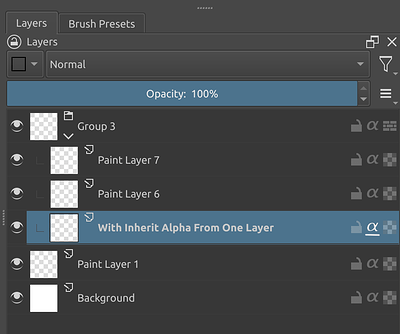
It’s clear most people prefer that and i already voiced my concerns. I also don’t want to stall the debate, as i guess there are more things to be discussed.
One thing i will note though is that would be good to have different actions( shortcuts) for the different modes and turning it on and off, also a way to set these through the krita API would be nice
If so, does Clipping Mask still require layer groups?
I see that there are still layer groups in the quick model you gave.
I know that Inherit Alpha can inherit the alpha of all the layers below, but requires a layer group to limit it.
Clipping masks need to be used consecutively to achieve the same effect, but no layer groups are required.
This means that the two have different advantages.
If I need to continuously inherit the alpha of multiple layers, I choose Inherit Alpha.
If I only need to inherit the alpha of the layer below, I choose to use a clipping mask.
If I want less layer indentation, I also choose Clipping Mask.
Also, I want to be able to use clipping mask and Inherit Alpha at the same time in one image, instead of having to switch in krita configuration, for the above reasons.
Let me eat dinner, and I’ll come back with more mockups The suggestion for some more indication in the layer stack is a good idea imho.
Also regarding the multi click. I think adding the standard behaviour of clicking and dragging (I don’t remember how but I know it is there) would be implemented to. The clicking could be just for people who prefer it.
No, I just put it in a group to make the mockups easier. I thought it was clear enough that while it is in a group, it only sees the layer exactly below. Sorry for the confusion.
It would also inherit from any layer below, be it paint layer or group layer, like in CSP, unlike PS, because why would we limit it.
I agree with the suggestion - both tiar and deif_lou.
I can see the possibilities.
It also addresses the compatibility issue as for the multi clicks - the one who’ll suffer most with that is us who prefer the inherit alpha approach [and im willing to compromise on that so those who want clipping mask / 1 layer below can get theirs]
Though i understand the action to wanting to toggle it off. Is it possible to map right click or middle click to deactivate the toggle straight up? Like if you right click on the inherit alpha icon - you cancel the inherit alpha.
so instead of going - when we want to cancel an action.
[ no inherit]-> click [inherit 1] → click [inherit 2] → click [ no inherit ]
it instead can go.
[ no inherit ]-> click [inherit 1] → right click [no inherit]
[ no inherit]-> click [inherit 1] → click [inherit 2] ->right click [ no inherit ]
plus maybe an option to arrange the cycle. [ 1 layer below → all layer below] and [ all layer below → 1 layer below]
I can defo see a use for mixing inheritance in action.
like for larger clipping and bigger section → its inherit alpha old style
and for smaller details → inherit alpha new/ clipping mask
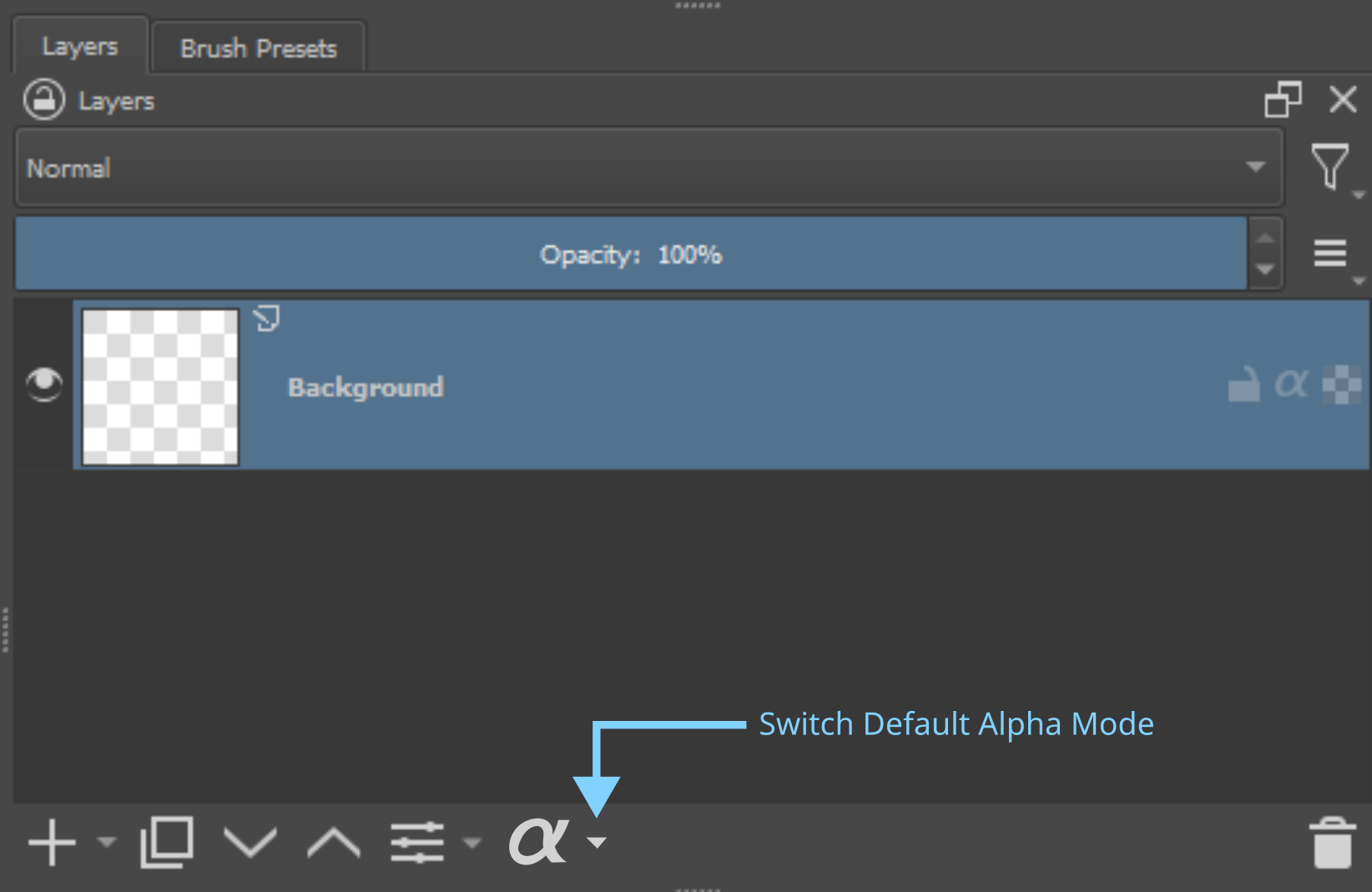
Personally, I prefer to have something like arrow button next to the alpha inheritance icon to switch mode within layer information part of layer docker, and alpha inheritance icon next to layer property with an arrow to switch default mode. The icon next to layer property icon should acts as a way to assign the mode, but the arrow and selection to switch default mode should switch the inactive alpha modes within the layer information part of the layer docker without assigning it.
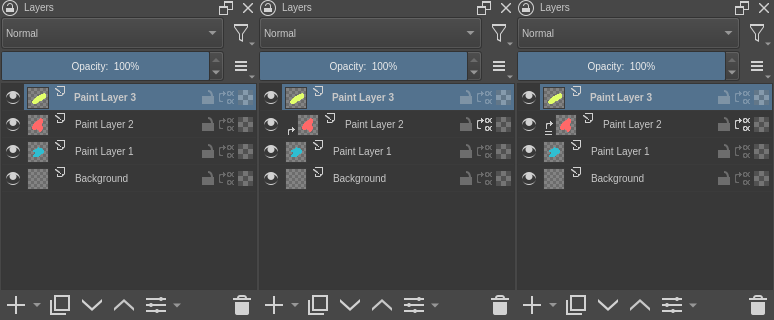
2nd image. “Paint Layer 2” is set to use inherit alpha. The default mode is “inherit from below only”. The layer is indented and an arrow appears to the left of the left of the thumbnail.
3th image. The user clicks that arrow to toggle the “inherit from all” mode. Clicking again toggles the “inherit from below only” again.
At any point the user can deactivate the inherit alpha with the button but the mode is stored, so that if you activate inherit alpha again, the layer will use the last mode you set on it.
I wonder if the icons wouldn’t be more readable if the left icon for the “all layers” was just straight arrow to the right instead of first up then to the right. What do you think?
I think the right icons are a bit small (as in, they have small details)… it looks like a Chinese (?) character from afar. I would prefer something more readable there. It does look like a good design for the icon but not for that place.
I was about to make my own mock-up, but I think I can best illustrate my points using Affinity. In this discussion, I see some changes being proposed that could be detrimental to those who use inherit alpha, but that’s not needed. In fact, there doesn’t even have to be a button for clipping masks at all! Affinity doesn’t have this and Krita doesn’t need it either. The inherit alpha button could stay the inherit alpha button.
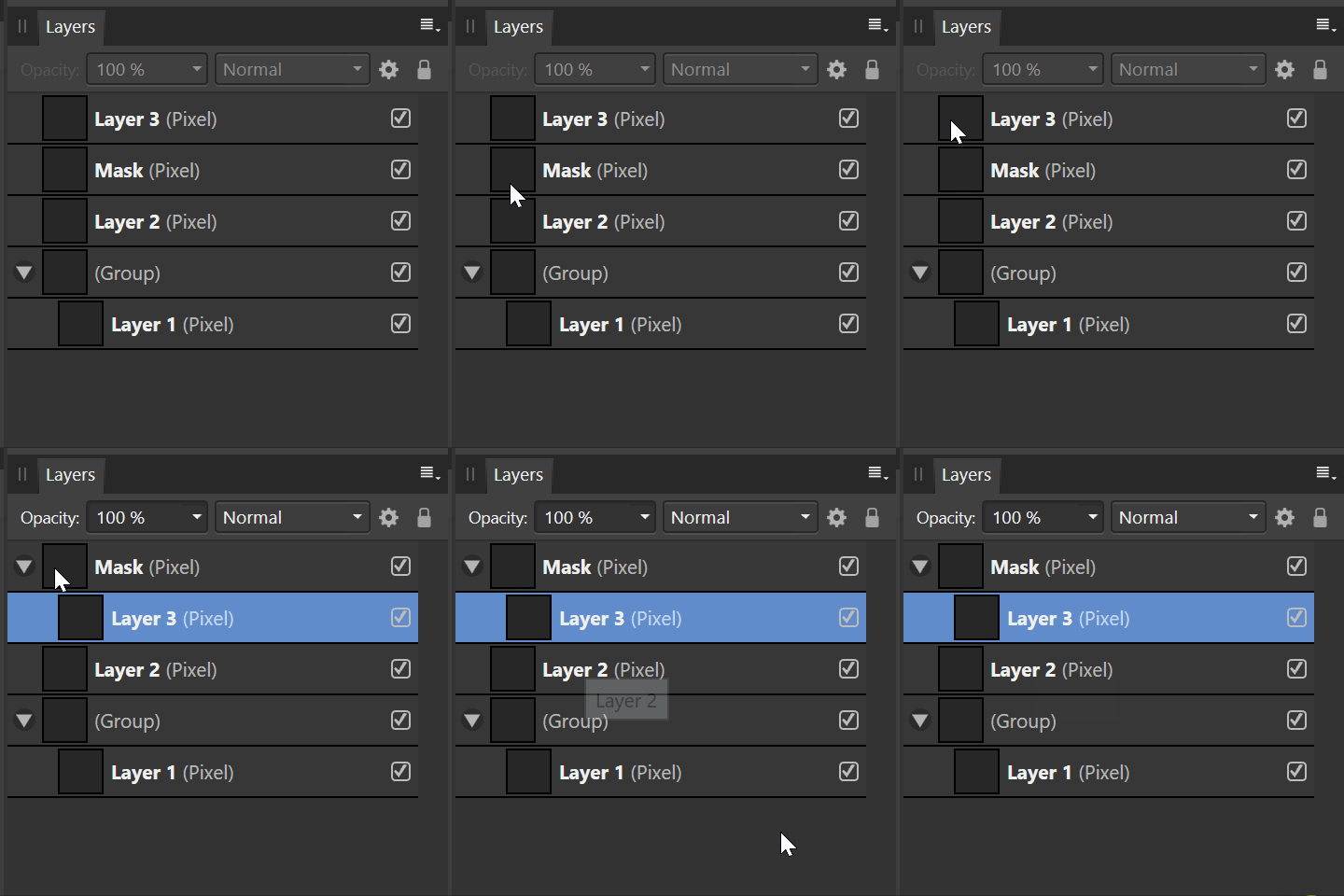
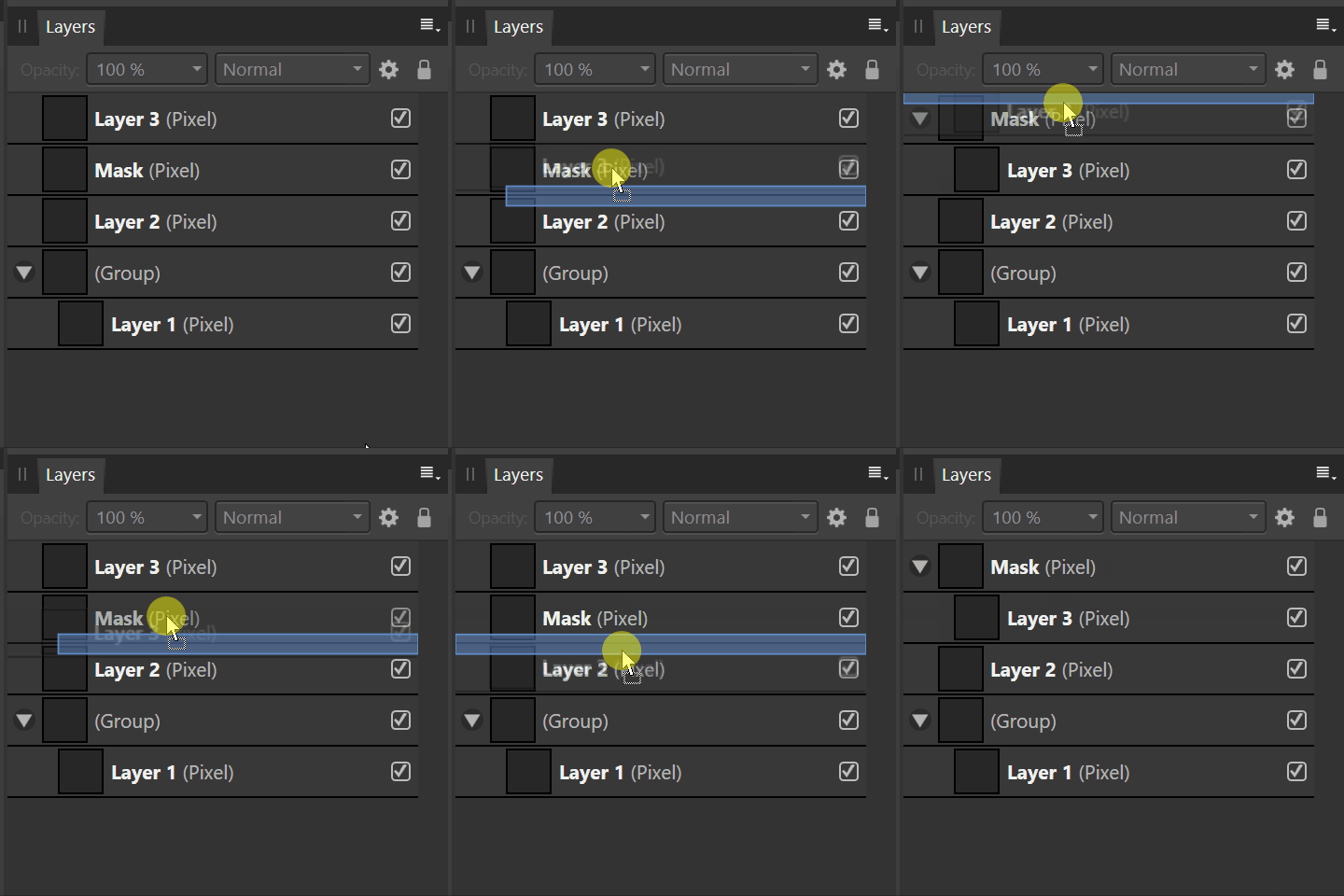
So to illustrate my 5 ‘requirements’ for clipping masks:
PageUp is used for this in Affinity
In Affinity, you don’t really need to use any modifier key, it indicates whether a layer is placed with indentation (i.e. it is clipped by the mask above) or that it is placed below a particular layer.
This can only work, I think, for files that use inherit alpha on just one layer, which corresponds to@Tiar’s mock-up for single layer inherit Alpha:
But, what I am missing is the way a clipping mask should work as top-down arrangement. So you start with the clipping mask on top, this layer affects the layers below and should therefore be treated as the ‘parent’. Then any layer below, the ‘children’ should be indented. I know the black and white colours are the other way around for masks, but this video really shows how flexible it is with vector + raster (the mask is a vector rectangle, the layers are pixels).
This way of organising layers and using clipping masks — which I need to do a lot in — is the main reason why I bought the Affinity suite. It’s such a charm working this way. Especially considering the mess Adobe made it to be in Illustrator and Photoshop.
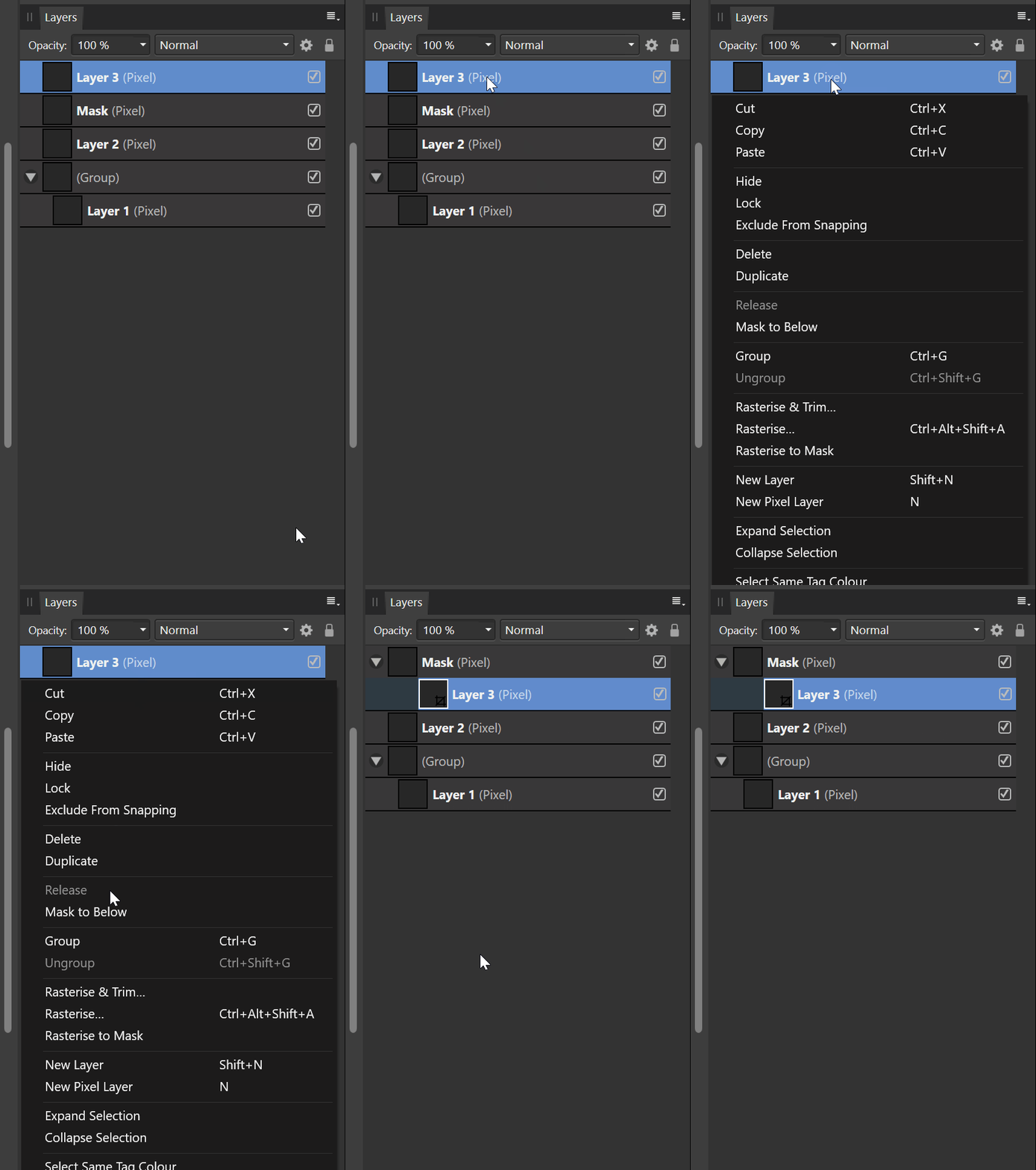
You can also nest clipping masks of course, in which case layer 3 becomes a mask.
I think that the arrows help to indicate the order, but, it makes the layer stack look rather busy. If you see one or a bunch of inherit alpha icons active, then you also know how it works. In that case I like @Tiar’s proposal, which would work as follows in my book:
It’s much cleaner and adds the individual layer below inherit alpha stacking.
And then I would like to see my suggestions for clipping masks being bolted on top of this inherit alpha functionality. It really isn’t necessary to jump through hoops like that.
This is not a big problem. I just tested the behavior of various software:
Sai: you can enable “clipmask” at any time. If there is no layer below, it displays itself (included at the bottom of the layer group)
Photoshop: you can’t use “clipmask” when there is no layer below or at the bottom of the layer group… When you move the layer, the layer structure of “clipmask” will be broken (SAI won’t)
Although compatibility may be considered in the future, I think Photoshop is rather rigid. The behavior of Sai is better, but there will be losses when converting to PSD. And we don’t need to be consistent with Sai. It is easier to understand if it is consistent with “inherit alpha”.
On the other hand, it is meaningless to turn on “clipmask” or “inherit alpha” at the bottom of the layer group. Or is it effective when “pass through” is enabled? That’s a step further than Photoshop.
My mockup is just an alternative to the mockup by @tiar (which is what I have favor since the beginning of the discussion) to accommodate it to those who don’t like a button with 3 states. The icons I made “were made kind of quickly and can be improved” as I said. I’m more interested on the functionality and usability at this point.
@Hologram you are proposing a new system on its own. When opening a psd with clipping masks, does it put them inside the clipping layer). Also, I think that would not work with inherit alpha from more than one layer, or clipping to a whole group of layers (I guess that not a problem with psd since it does not support any of that). On the other hand, t looks kind of interesting that method.
I mostly referred to the arrows, so not the icon design in particular. Arrows in general tend to make this a bit more messy (and I think we could do without). I do like the idea of flipping inherit alpha and clipping masks, but I would only use this with the arrows, without such a system it will get confusing (I forsee you’ll end up using either inherit alpa or clipping masks and always flip to get ths other). In that case two stand alone systems would be more straightforward as a user.
If anyone has a PSD to test, I could check how Affinity handles importing the PSD.
I never really worked much with Clipping masks in Photoshop, honestly. I never really enjoyed using PS to begin with, so I mostly worked with Illustrator instead whenever possible. But I do use clipping masks an awful lot in Affinity as it is such a joy to work with. For instance, you can create a layout with vector shapes, move them around to hearts content and then place any content inside a shape.
I could also see this work really well for comic artists. It would provide an alternative to the artboard/ comic frame method I talked about elsewhere.
Depending on the implementation of an Assistant docker/ Assistant masks, perhaps it eould be possible to clip assistants this way too.
I think the colour denotation can be better used for colour labels. I know it is familiar for users in csp but I see that as better version of colour labeling the layers. So it will also clash with our existing colour labels. I think @tiar showed a good mockup and it is easy to use and not cluttered.
Why show blue tick when the icon is there already. I think we are over engineering things here. I think there is no need to go over the top. Indentation in itself will be a bit confusing since for a normal krita user indentation means either a groups child layer or masks.
Personally, I’m not a fan of the bar. I would like arrow to be used as clipping mask icon. That being said, I want to see users opinion on changing non-active icons to clip/inherit alpha. Look at this post for a bit of detail: Potential improvements to Inherit Alpha in Krita - #113 by Reptorian
 The suggestion for some more indication in the layer stack is a good idea imho.