I’m working a lot with polygon tools (Polygon, Polyline) and the line tool to draw my images on Vector layers.
Until a version (or two?) ago, I was able to draw these in perspective thanks to the Line Preview. I like to disable the Painting Assistant view, because having all the perspective lines is too distracting for me, but keeping the Assistant Preview enabled, that one line was excellent help to keep things in perspective.
I totally see why the preview line is not useful for Calligraphy Tool (which is where the bug report came from) but I think there is a valid usecase for the other tools that I mentioned. (E.g. Polygon, Polyline, Line, etc…)
My request is to re-enable the Preview Line for these.
I’d vote for this but I’ve reached my voting limit and can’t undo other votes, for some reason.
I did some testing on the initial bug report and I’m surprised that the facility has been removed from the Polygon and Polyline tools.
I remember using them, with Assistant Previews, to make sketches of buildings in perspective view. It was very useful to have.
I don’t understand why the problem for the Calligraphy tool couldn’t be dealt with by the user simply removing the Painting Assistants.
Looking at the code change it seems easy enough re-enable for just the tools that are wanted back. To be specific, would do you all think the rectangle, circle, polygon, polyline, and line should be added back? maybe the bezier and freehand path tool too?
Also could you describe how to make it so only the preview line shows? I’m not sure how to get it like you have in the screenshot.
Yes, I believe all these drawing tools will also benefit from having the Preview Line. Imagine drawing a rectangle on a Vector layer and then adjusting it to match the perspective.
To have the Preview Line, I first create a (2 or 1 point) perspective in the Assistant Tool. I then disable Show Painting Assistants in View because I don’t want to see the fixed lines (too busy). I keep Show Assistant Previews enabled in the same menu, which is providing the Preview Line that moves with my mouse cursor.
I’m currently on 5.1.5 again, which has the Line Preview for all tools, including Calligraphy.
I was thinking that in addition to the tools I mentioned, it’s also important to have it enabled for Select Shapes and Edit Shapes tools, because these are used to adjust already completed shapes. I’m using that a lot too, in my workflow.
yeah probably not the ones that produce artifacts. So I guess just the other ones rectangle, circle, polygon, polyline, and line. Possibly the Select Shapes and Edit Shapes tools if they don’t produce artifacts .
I made a merge request to reenable the preview for the eclipse, rectangle, polygon, and polyline tools. They didn’t have the artifacting so should be fine to enable again.
It looks like my MR build pipeline failed but I saw a different merge request failed with the same error so I don’t think its related to my changes.
Hi Reinold, that’s great news, thanks a lot! Do you think it’s also feasible to do the same for Edit Shapes Tool? Once a Rectangle (or other shape) is drawn, one might want to change it again (which is possible on Vector layers).
Probably it is doable, I’ll have to double check they don’t have artifacts before enabling them though .
The MR got accepted (looks like all the MR builds are failing from the binary factory being removed) so when nightly builds come back it should be there.
So I tried to enable the select and edit shapes but I think they still have some tearing/artifacting. I don’t really have any experience fixing bugs like that so I don’t think I’d be able to figure out a fix, sorry.
I kind of expected that, because the line assist has never worked without artifacts for me either. Also in the version I’m now stuck on. However, despite these artefacts it’s still usable and valuable.
If this problem won’t be picked up by someone else, could you at least point me to the files I need to edit in the source? I might just build it for myself in that case. Otherwise I’ll be stuck on 5.1 for a long time
Thanks for having a look, though. Much appreciated.
Maybe the votes limit could be increased by 3, so there are some more options to vote upon @raghukamath? In the end, popular items will always remain on top, so I don’t think it hurts.
I’ll increase the vote limit. I have increased it thus - everyone above trust level 1 (tl1) gets 30 vote earlier it was 15 for tl1 and tl2 and above got 20. tl0 get 10.
I think there is some bug with the plugin. If you notice that after closing a feature request that you have voted and the votes are not released then let me know.
If just for yourself probably the easiest would be to go to this line and change it to return activeTool && true; so the preview assistants are active for all tools. You can follow the build instructions here. Make sure to read thoroughly and follow all the instructions. Good luck!
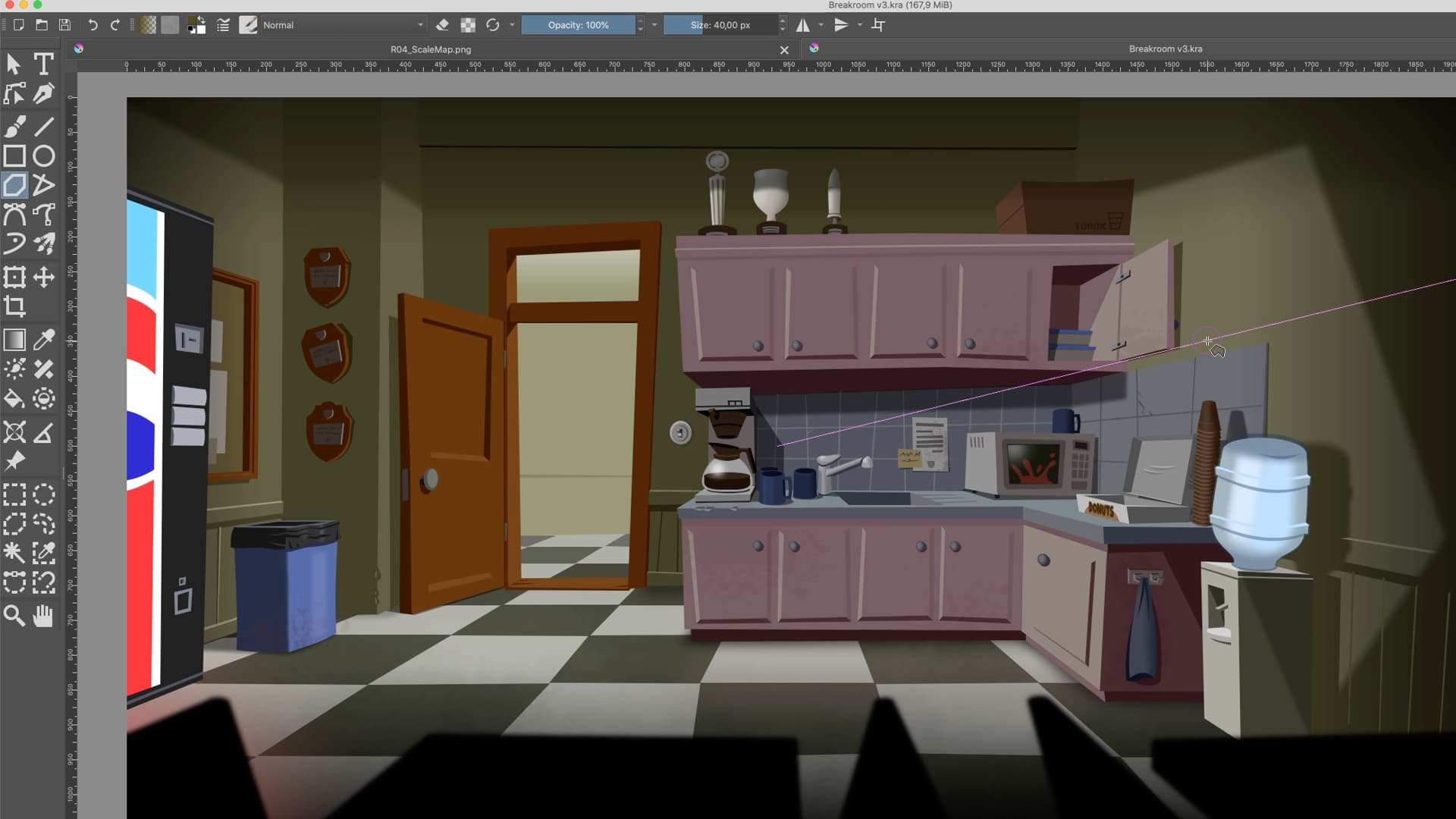
 Do you think it’s also feasible to do the same for Edit Shapes Tool? Once a Rectangle (or other shape) is drawn, one might want to change it again (which is possible on Vector layers).
 .
.
