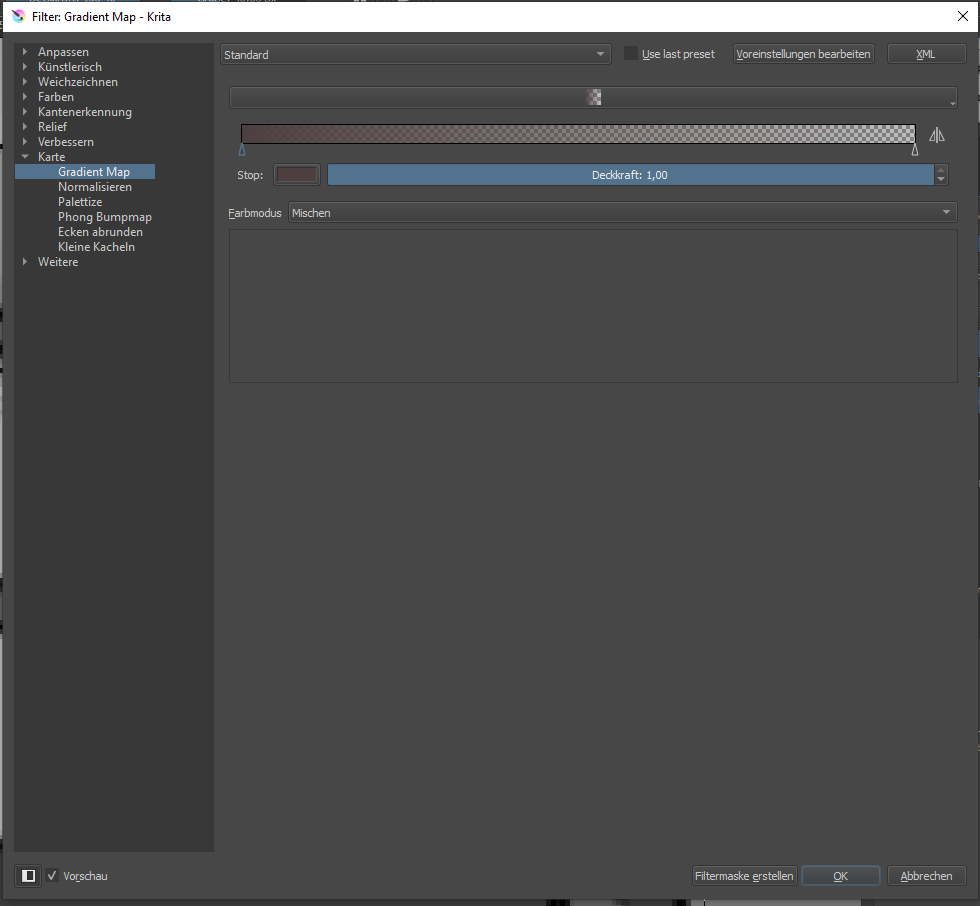
I have a problem with the gradient map tool with the latest 4.3.0 version and couldn’t find any related topics yet.
I cannot find the option to save new gradients and if I choose to create a filter mask instead of applying to the picture it doesnt show any colours.
Since I’m rather new to Krita I assumed it’s just my lack of knowledge but maybe it’s a bug.
If I open the gradient tool the options look lilke this:
The presentation of available gradients in that filter mask/layer has changed from version 4.2.9 to version 4.3.0, as you described.
There has been a similar change in presentation, from 4.2.9 to 4.3.0, for palettes in the vector stroke/fill colour tool options.
Personally, I prefer the 4.2.9 presentation though the change may have been made to show a ‘larger/better’ image of the gradients and palettes.
Then again, it may be a bug that has been introduced.
I suggest that you wait to see if anyone knows anything about it. if not then you could raise a formal bug report here: https://bugs.kde.org/
If you do that, please put a link to the resulting bug report in a reply to this topic.
In 4.3.0 you can edit, create and save new gradients using the Gradients icon on the Toolbar:
I installed a nightly build (5.0.0 git 6240042) and it solved the huge preset gradient bars.
Unfortunately I still cannot create a filter mask from a gradient map, it’s just an empty layer. I chose ‘create filter mask’ - am I doing something wrong?
Another question: I found the option to save new gradients (thank you!) but there is no way to change them while creating the map, is that correct? I do a gradient and use it later to do the map and cannot save changes at that point?
Please use Krita Plus (Krita Stable) builds (it will be Krita 4.3.0-git… or maybe Krita 4.3.1-git…, not 5.0.0-git…), not “Krita Next”. There is resource rewrite going on there in 5.0.0 and not everything is working correctly yet.
To create and save gradients, please use the gradient drop-down from the toolbar - click on the gradient icon and you’ll get it. There are all options for gradient resources. Later you can use them on a gradient map and edit just before use, too.