[Video removed by a moderator]
It has been a few days since my gradient tool has not been working, any help is appreciated <3
[Video removed by a moderator]
It has been a few days since my gradient tool has not been working, any help is appreciated <3
Hello,
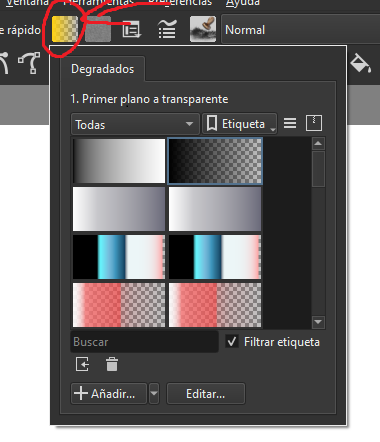
On the top-bar, bellow the menu. That gray icon (square) at the left of the icon for foreground and background color, it represents your current ‘in use’ gradient.
Click on it and try choosing a different gradient. Apparently your gradient is going from transparent to transparent.
My bad, that one is the fill icon, the gradient is at the left of it, but in your case the icon for adjusting the gradient is missing(?).
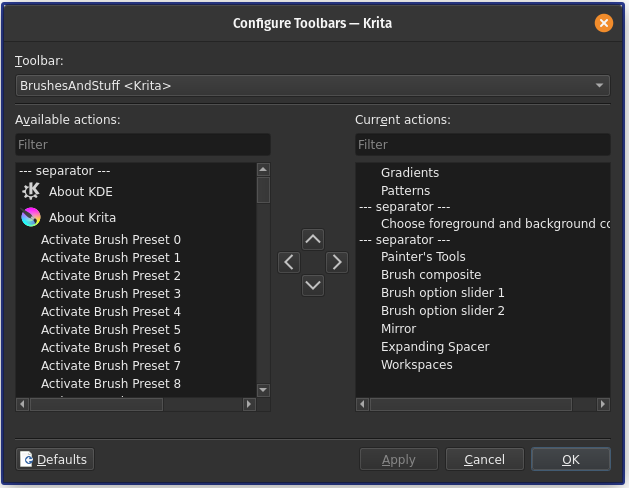
What happens if you go to: Settings → Configure Toolbar → BrushesAndStuff
Do you see Gradients written in the list of action on the right? If not, what happen if you search for it in the list on the left?
Cheers.
@Riezahe You’ve included a music track with the video you uploaded.
Please add a credit statement for the music, giving a link to the artists website and a download link for the music with an indication that you have permission to use it.
This is required by the forum Code of Conduct: FAQ - Krita Artists
8. Post Only Your Own Stuff
You may not post anything that belongs to someone else without permission. The exception is reference images, in which case every attempt should be made to credit the artist or photographer by name. In all cases a link to the image owner’s website must be included.
If you created that music content yourself then please state that you are the creator.
Exactly, you are missing one button, gradients:
You maybe have selected one that is transparent in both sides.
ah my apologies, that is my spotify playing, ill edit the original post
yes i see gradients written, no idea what I did but its back to normal that I’ve clicked on it? ty have a wonderful day
the track heard on my recorded screen is from the artist The Walters titled I Love You So
here is their spotify: https://open.spotify.com/track/4SqWKzw0CbA05TGszDgMlc?autoplay=true
@Riezahe I’m going to make an assumption that you do not have permission to upload that music to this forum, no matter how short the track may be.
I’ve deleted the video from your post.
You can repost the video if you remove the audio track from it.
If you can show that you do have permission from the owner/creator of that music for uploading it, or extracts from it, to other websites such as this forum then you can upload it with that music on it.
This topic was automatically closed 4 days after the last reply. New replies are no longer allowed.