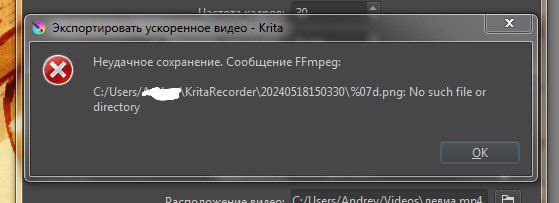
Hello! I can’t export timelapse. Reason: I saved the kra file to png in the process, and then returned the previous format back. Is there any way to fix this and get a timelapse?
Hello @zhenya420 and welcome to the forum 
Which version (number) of krita are you using?
Where did you get it from?
Do you mean that you did File - Save As and specified a .png file for the saved document?
How did you do that?
Do you have Microsoft OneDrive enabled?
If you do, please disable it if you are making timelapse videos or animations.
Please show screenshots of every stage of the Recording and Export process.
You’ve painted over your Windows username in the main part of the image but it’s mostly visible along the bottom edge of that image.
1 Like
Which version (number) of krita are you using?
Where did you get it from?
5 from the official website
Do you mean that you did File - Save As and specified a .png file for the saved document?
Yes, I apologize for my mistakes in English, if they make it unclear what I meant. I want to clarify that later I changed the png format to kra back and continued to draw. I am absolutely sure that this is the only reason why I cannot export the timelapse, because I have checked it on different files, and each time these actions lead to the inability to export
Do you have Microsoft OneDrive enabled?
No
Please show screenshots of every stage of the Recording and Export process.
I’m sorry, I don’t quite understand what you mean.
You’ve painted over your Windows username in the main part of the image but it’s mostly visible along the bottom edge of that image.
Yes, I know, it doesn’t matter.
There have been about ten different versions of krita that start with the number 5.
The latest formal release is version 5.2.2 and I recommend that you make sure you have that one from the official website: Download | Krita
I strongly suggest that you stop doing File → Save As with saving to .png.
You should always do File → Save and use .kra as the file extension.
Here, in the first post is an example of someone providing a screenshot of the important information about their attempt to make a timelapse recording:
FFmpeg recorder export error
I suggest that you start with a new document of about 512 x 512 canvas size.
Then try to make a short and simple timelapse recording of maybe 10 seconds.
If you want to save that document, do File → Save then give it a suitable name with a .kra file extension.
3 Likes
There have been about ten different versions of krita that start with the number 5.
5.2.2
I strongly suggest that you stop doing File → Save As with saving to .png.
You should always do File → Save and use .kra as the file extension.
Yes, thank you, I know that now and I’ll keep it in mind for the future. The only thing I want to know is if there is a way to fix this somehow or not
Then try to make a short and simple timelapse
I have tried this, there is no problem with creating new timelapse
1 Like
A comment on your settings to help in the future…
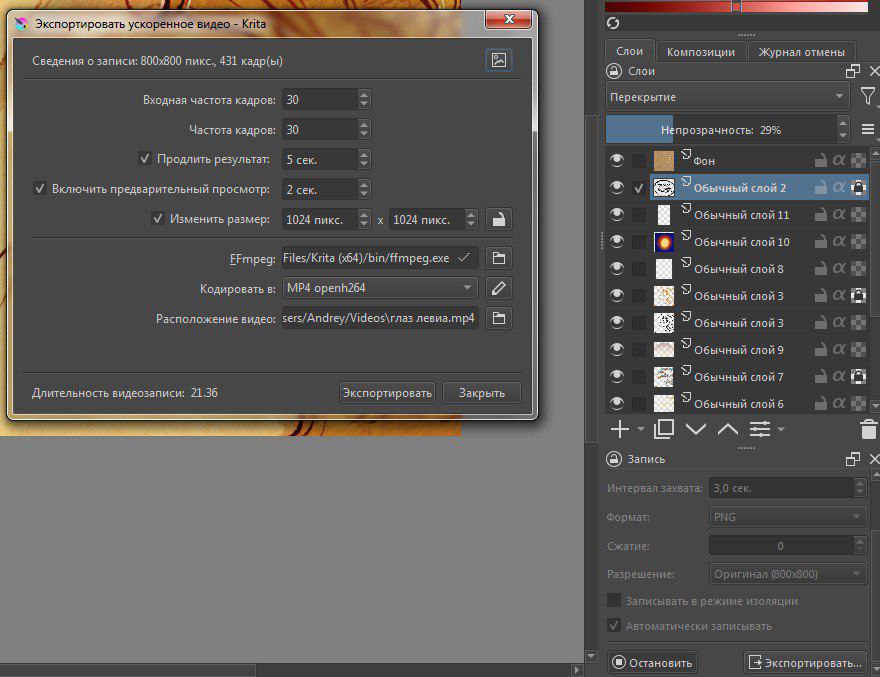
The original appears to be 800 x 800 but you’re asking this to be resized to a larger size (1024 x 1024). This is going to create a fuzzy result. Typically, the resize function is used to make the output smaller rather than larger.
Right now the aspect ratio lock is not engaged (it’s not locked) and that’s okay as both dimensions of your art are the same. If ever you make artwork that is rectangular rather than square, you will want to click the lock icon so that your resized output retains its original aspect ratio.
2 Likes
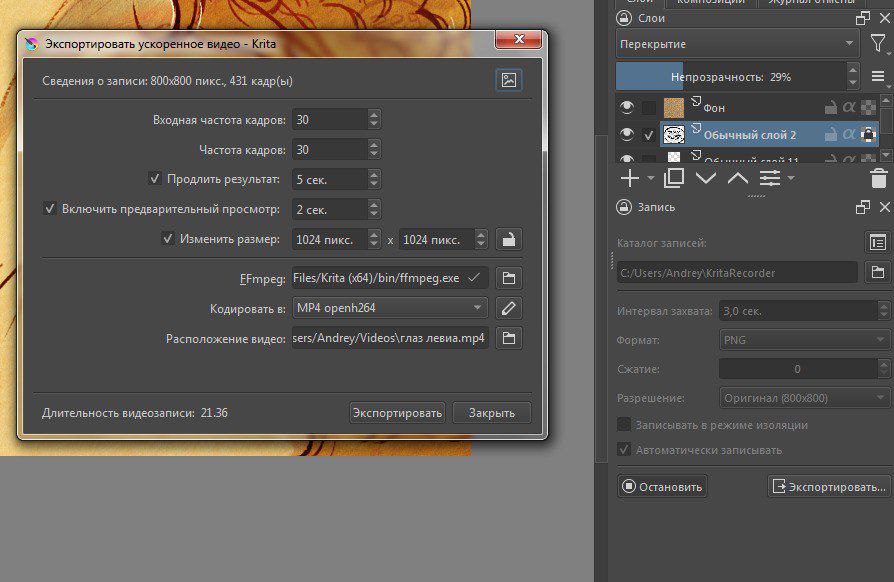
You are not showing the entire contents of the Recorder docker.
Please provide a screenshot that shows the entire contents of the Recorder docker.
So you can now make a timelapse with no problem with new documents?
But you still have a problem with the previous timelapse that has 431 stored frames?
Does it give the same error message as you first showed in your first post?
Check the contents of the folder in the error message to make sure that it does have 431 .png frame images and that they have consecutive filenames starting at 0000000.png and ending at 0000430.png and that they are actually .png images that can be viewed in a file viewer.
2 Likes
My apologies, I didn’t notice
So you can now make a timelapse with no problem with new documents?
Yes. With old documents too. I have a problem with this particular document. I also had a problem with one document in the past, and as I said earlier, the only reason leading to this is a change in the file extension
that has 431 stored frames?
Does it give the same error message as you first showed in your first post?
Yes
Check the contents of the folder in the error message to make sure that it does have 431 .png frame images and that they have consecutive filenames starting at 0000000.png and ending at 0000430.png and that they are actually .png images that can be viewed in a file viewer.
Everything seems to be correct
Then I can’t understand what might be going wrong.
That error message, "… %07d.png: No such file or directory " means that ffmpeg can’t find a file it has been told to look for.
“%07d” is an incrementing counter that points to each file in turn in the folder for use by ffmpeg.
I know, and that is the reason why I am so confused. It seemed to me that changing the file extension should not affect the timelapse recording in any way, or do I misunderstand?
Well, I tried several more times to perform all these actions with a couple of new documents. Result: for some reason, the error sometimes occurs, sometimes not. There are still no obvious reasons other than changing the file extension. Anyway, thank you so much for the answers
This topic was automatically closed 30 days after the last reply. New replies are no longer allowed.