Is there a way to do a progressive blur in Krita. In my Animation I want to gradually blur the foreground as the frames progress and make the midground less and less blurry until it’s very detailed.
Micah
Animation Station
Is there a way to do a progressive blur in Krita. In my Animation I want to gradually blur the foreground as the frames progress and make the midground less and less blurry until it’s very detailed.
Micah
Animation Station
There is a crude and simple method that can be used.
Duplicate the foreground so that the duplicate layer is above the original then blur the duplicate.
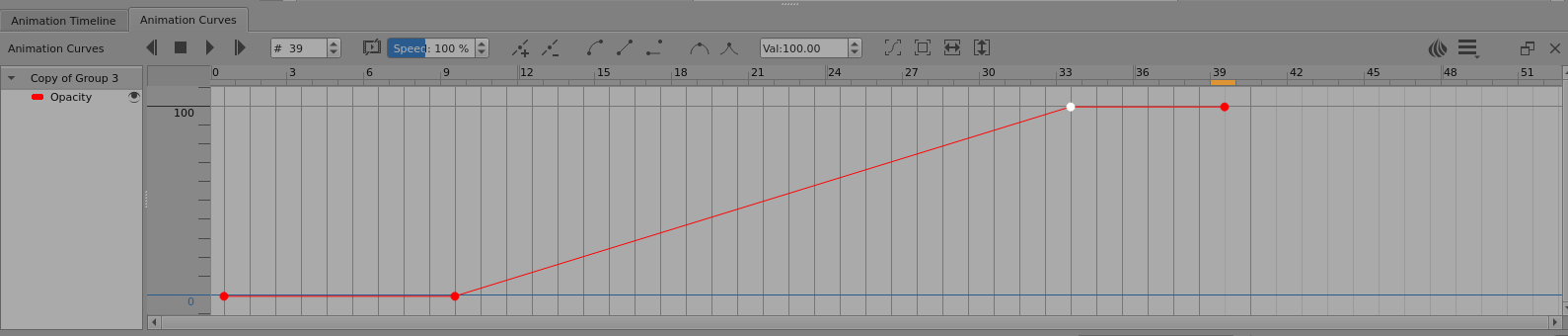
Select the blurred duplicate layer in the Layers docker then select the Animation Curves docker which usually shares a dock area with the Animation Timeline docker.
You will probably need to increase the height of the dock area and grab-drag the Animation Curves vertical axis scale to give suitable ranging from 0 to 100(%) so as to make it more understandable.
Select frame-0 on the top bar then press the ‘+’ icon to add a keyframe.
That will give you a 100% Opacity keyframe. Go to the start-frame of the intended blur transition and add another keyframe then go to the end-frame of the intended blur transition and add another keyframe.
Drag the frame-0 keyframe ‘dot’ down to 0% then drag the start-frame keyframe dot down to 0%.
That will give an animated opacity change from 0% to 100% of the blurred foreground over the not-blurred foreground to give the desired result.
For the midground, use a similar technique but with opacity starting at 100% then reducing down to 0% to give a blurred to not-blurred transition.
That method is crude and can have problems if the image has ‘holes’ in it or a large transparent area - you can see the not-blurred image through the blurred edges of the blurred image.
If the opacity transition doesn’t seem fast enough or is too fast at some stage, you can add more keyframes and adjust their values to give differently sloped stages or you can use Bezier curve interpolation which can be tricky to figure out how to do it and use it.
There are other ways of doing animated blur filter transitions but that is the simplest one I know of.
I suggest that you try that method to see if it gives good results.
You can use opacity keyframes on a group layer or an animated paint layer.
Thank you!
Hey @AhabGreybeard, I have a good understanding of what you wrote because I use the transform mask all the time for auto-movements but when I do what you said above and click start - it generates the cache- but nothing happens. I have my duplicate layer under the blurred layer and I make my selections. I code the opacity to go from %100 to %0 percent but no results. Does it maybe only show when the animation is rendered?
@AhabGreybeard I got it working, I was doing the whole process under the filter layer instead of the main layer. If this is done it has no effect.
Thank you, it looks amazing!
I’m glad you now have it understood and dealt with 
This topic was automatically closed 4 days after the last reply. New replies are no longer allowed.