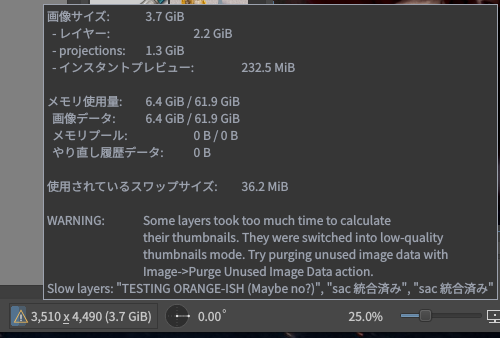
Some layers took too much time to calculate their thumbnails… (etc etc etc)
Try purging unused image data with Image → Purge Unused Image Data action.
I haven’t seen this before – seems new in 5.3.x – and I can’t find much concrete information about this action, what exactly it does, how safe it is, etc. It doesn’t appear to be in the Krita docs yet, for example.
I guess my question basically can be summarized as: is this action generally safe to use? Should I just always use it when that warning pops up? How destructive is it? Anything to worry about? (I see the note about “undo”, but I’m not sure exactly what to watch out for…)
I tried it on a copy of an image and it reduced the file size by a decent amount… and I can’t see any visible difference in the image, which is of course good
Basically, it’s purpose is to speed up thumbnail creation, which in turn speeds up drawing. There’s a plan for a more robust solution for 6.1, but it is delayed for now as it needs more double checking.
And having read through the above resources again, it looks like the action can be summarized as:
Image->Purge Unused Image Data: . . . iterate[s] through all existing layers and remov[es]
all fully transparent areas.
So it really is just removing unused vestiges that are eating up memory … is that a correct understanding?
By the way, FWIW, I haven’t experienced any issues using this action in conjunction with “Undo”. So far so good!
EDIT: And to clarify, I originally wasn’t 100% sure this action wouldn’t remove (e.g.) pixels that aren’t currently visible, or maybe pixels outside of the frame of the current image or something like that. Hence my hesitation! Obviously sounds like that’s not the case!
Yes it really should only remove fully transparent tiles, it will not cut off off-canvas areas. The color in such tiles is considered undefined anyway, AFAIK there is no blending mode that will use color information of pixels with zero opacity, and some operations just write all zeroes instead of wasting time to copy or otherwise process them.
There are some operations that cause allocations of tiles even though they will end up empty, flattening a layer with transparency mask is one of them, it may blow up the layer to full canvas size, potentially causing huge slowdowns and wasting quite a bit of RAM.
As Wolthera said, there are plans to prevent those issues, this was just an easy to implement function that allows people to get rid of redundant data manually in the meantime.

 … is that a correct understanding?