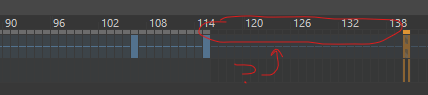
(assuming the image uploaded correctly) You can clearly see the frames with grayed-out rectangles above them. These frames just… don’t show up. when I press the play button, the animation just stops at the colored frames (this has happened before in the middle of the animation, and it just skipped over the frames, but it usually resolved itself where the frames magically load) anyone know whats going on? I’m extremely new to Krita, so please take this with some salt.
Hello @Bonasomnium and welcome to the forum 
The exact appearance of the UI, in terms of colour and shading, depends on the selected theme (Settings → Themes → ) and it looks like you’re using the Krita Dark theme.
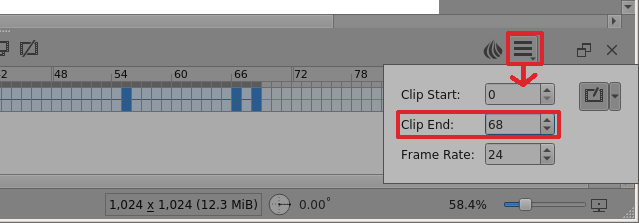
I think you’ll find that your Clip End setting is 114 and the colour of those frames indicates that they are beyond Clip End and so won’t be played.
The pale grey blocks over the Timeline as far as frame 114 indicate the currently up to date animation cache as far as I can tell.
Here’s mine with the Krita Neutral theme so please check yours:
Edit:Add: I’ve removed the ‘no-pressure’ tag from your topic. It means that you have problems with or lack of stylus pressure sensitivity.
1 Like
Thank you SO much! I’m incredibly new to Krita, and it means so much that you’d help me!
that being said, sorry for using the wrong tag; I figured it meant “This is not a big problem, so no pressure about replying to this” 
3 Likes
No worries. You’ll find this a friendly and helpful place to be.
If your assumption about the tag had been correct, there would also be ‘it's-bad’ and
‘I'm dying-here’ tags.
Relax and enjoy the forum
2 Likes
This topic was automatically closed 30 days after the last reply. New replies are no longer allowed.