I have been trying to figure out if there’s a potential workaround on the lack of “Comics Manager” on Android. What I intend to use such a feature is actually to utilize it as a general purpose Page Manager where I can create separate canvases of the same property under the same file, much like a digital sketchbook. Since Python plugins dont work on Android, I wondered if the “Storyboard docker” could be repurposed as a page manager.
As it is, if I understand correctly, it stores a snapshot of each “page” you draw after clicking the plus icon, which actually works quite like a separate page within the same file. Bigger issue I see is exporting all these snapshots, it only exports as a pdf but only as part of a Storyboard and with considerably low resolution. My question is, if there’s a way to configure that on user’s end as it is, and secondly if it could be repurposed, by developers, a built-in page manager, unlike the plugin supposed counterpart?
I decided not to place this under feature request since I dont really know if it would even be feasible to repurpose this existing feature, but rather if the existing feature can be utilized as such.
I don’t know how ideal it would be for you, or others, but I’ve been working on a setup (using default Krita features) that I can use to do storyboarding for a comic concept I have kicking around in my head. It will be my first, so keep in mind this is all experimental for me. Anyway, here’s what I planned to do…
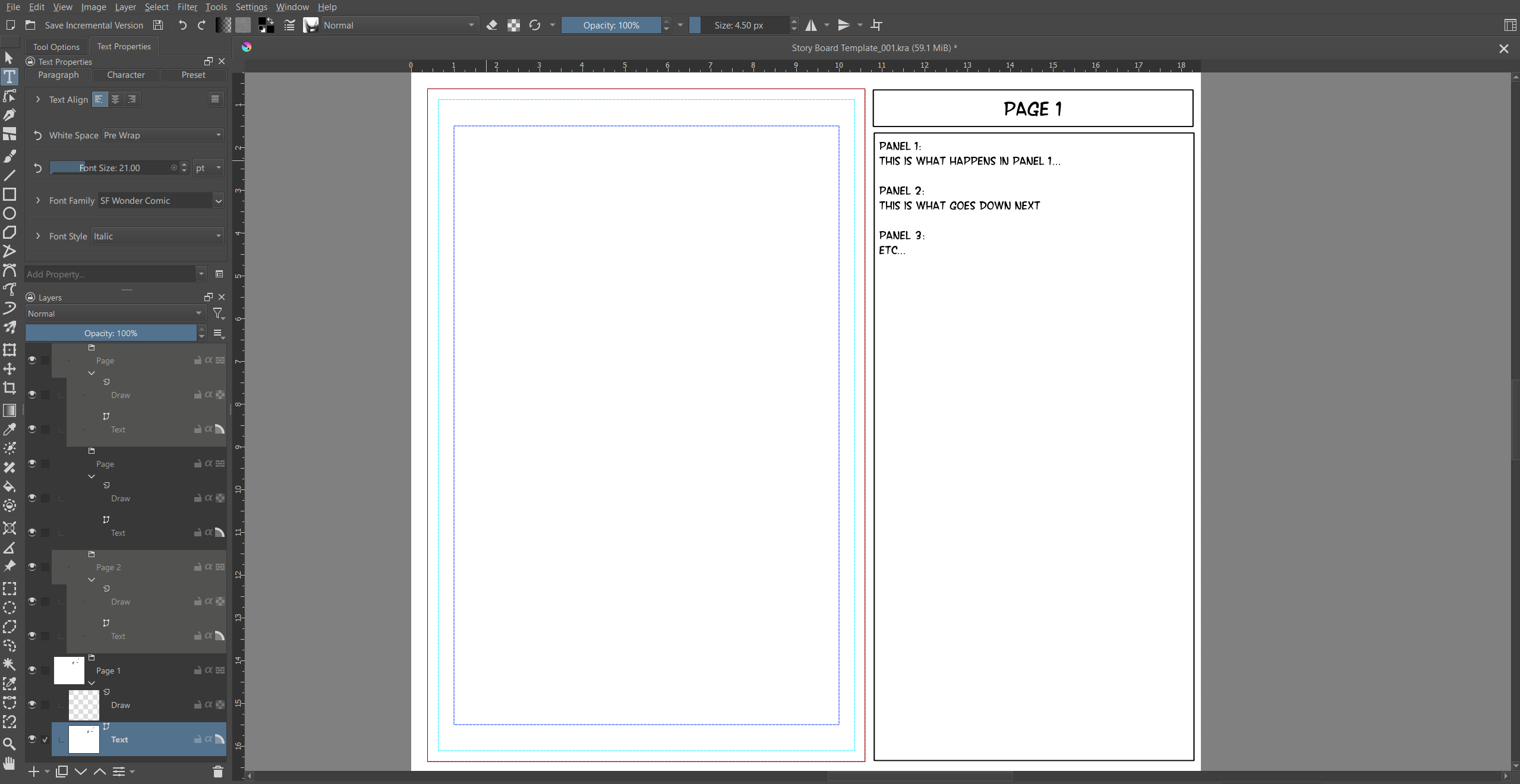
I have a “storyboard” template setup with a comic page template on the left side (for quick sketches) and a text box on the right (which uses the new text flowed into vector shapes, to keep things nice and organized; so, Page # in the top box, and Panel info below). This is all on one vector layer (named “Text”), which is the base layer of a single “Page” group on my layer docker. The next layer in this group is a “Draw” layer. I’m still deciding on whether I want to do both panels and sketching on this layer. Because Krita now has a nice feature for adding gutters, I might just end up adding a third layer to the group for panel setup. Alright, so that’s the layer group setup, now here’s how I expect to use it…
Because Krita has a feature that lets us focus on individual groups on the layer docker (right click in the layer docker and you’ll see the “Isolate Active Group” option, we can turn it on and then select any layer on the docker that’s in a group, and Krita will show only those layers within that particular group. Meaning, I can duplicate that “Page” group to match my intended page count, turn the Isolation feature on, and click between them to display whichever “Page” I want to storyboard out and work within that group, unbothered by the other groups in the document. Furthermore, if needed, I can then export the isolated “Page” groups separate from each other, as well.
I’ve also made a custom workspace for myself, to accommodate this setup, once I get going. Here’s what it all looks like (you’ll note that I’ve color coded every other “Page” group in my layer docker, so I can easily tell which layers are or aren’t in the next available page group).
It sounds like a really neat solution, I gotta try and see if it works. I think the only difference between this and an alternative scheme is being able to export all “pages” under a pdf or similar format. Also if you try to adjust/crop page size, it would be destructive. Despite those problems though, this sounds promising overall! Thanks for sharing 
I created the plugin project pages to do just that. It was a proof of concept to have a collection of kra files inside a zip. However no one seemed interestes in it and also the new welcome screen kinda killed it. I think i could make it even leaner now but i feel it is not useful enough to warrant further development.
For Android, it is not available.
But you are right, it doesn’t seem to be recognized for its potential, I suggested it a few times, but the users were very “reluctant” about it was my feeling.
Michelist
I looked at the plugin and it sounds really useful! Though as I mainly work on Android, python plugins wouldnt mean much unfortunately. I feel like the concept of your plugin and Comic Manager as a whole needs to be integrated into the Krita directly and not as a python based plugin, there are a lot of comic artists who would benefit from this sort of thing and it is a core function for comics, and I’d say functional beyond that, as your plugin showcases, it can be turned into a notebook or a sketchbook.
I know development is costly and needs a lot of backing up (so I am not holding my breath over this being added anytime soon) but I hope recent additions to mobile Krita versions help on that front a bit too!