Questions from a newbie

Would it be possible to call other’s docker method/button from my extension/docker?

Context:

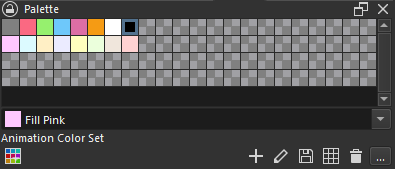
I’m making some kind of palette generator and I’d like to make a button to add at the same time more than 1 color to the ‘PaletteDocker’ docker in Krita:

imagen

The + button may contain the logic I need.

I can get the docker, but not sure what to do next:

app = Krita.instance()
w = app.activeWindow()

def get_palette_docker():
    for d in w.dockers():
        if d.objectName() == 'PaletteDocker':
            return d


pd = get_palette_docker()

# Not sure what to do next.
# type(pd) is QDockWidget, so when calling
# print(dir(pd)) im getting QDockWidget methods so I don't
# know how to 'explore' the methods from the palette that
# I could call for my purposse

(Probably I shouldn’t call others widgets functions (?) (since well, if they change, my extension will break). But since that palette is native from Krita I would preffer to add my colours there instead of creating my own palette system).

The general way to go about this is to first check the API, if not in the API, check the Actions. If it isn’t there, then you access the PyQt. I suggest using the python developer tools to find the item you want in Inspector, then click on the Event/Signal Viewer, it will show you all the signals and events. By playing play and doing an action, you can see what actions and events are triggered and use them

In your specific case, be aware that PaletteView exists, double check first if that meets your needs. If not, then see the signals

2 Likes

Thank you so much for the help, to be honest I appreciate the guidance since sometimes I feel that I’m doing things in a way that feels non-propper or “hacky”.

Also, I found your DevTools plugin to be (again) super helpful. I was able to examine the palette-docker and found one of its methods that was useful for my needs (slotAddColor()). :smiley:

But since you said the API I took a look and found a better method in Palette (addEntry()) (“Better” since I expet it to don’t trigger an UI dialog as slotAddColor())


*(This is an example of what I mean that sometimes I feel I do things in a non-propper way. I’t trying to get the active Palette. And for knowing which one is active I’m using… a label in the docker :question:)

from krita import *
from PyQt5.QtWidgets import QLabel


app = Krita.instance()

def get_palette_docker():
    active_window = app.activeWindow()
    for d in active_window.dockers():
        if d.objectName() == 'PaletteDocker':
            return d

def get_active_palette():
    palette_docker = get_palette_docker()
    
    palettes = app.resources('palette')
    
    # This feels ""hacky""; accessing the active palette by a label in the UI:
    # active_palette_key = palette_docker.lblPaletteName.text() # `lblPaletteName` is the label in the palette docker that shows the active palette
    label = palette_docker.findChild(QLabel, "lblPaletteName")
    active_palette_key:str = label.text() # `lblPaletteName` is the label in the palette docker that shows the active palette
    
    # When a palette has been modified, it starts with "* "
    if active_palette_key.startswith("* "):
        active_palette_key = active_palette_key.replace("* ", "")
    
    return Palette(palettes[active_palette_key])


active_palette = get_active_palette()
print(f"{active_palette.colorsCountTotal() = }")

(Maybe I shouldn’t worry, if it works, it works. But feels bad xD)

Do you know where/when is the best place/moment for loading & saving my plugin’s data?

I searched in the API, and I’ve only found the Window’s signal windowClosed(), that maybe could be an option.
Is it? Or there is a better option (maybe some kind of signal krita sends when is about to close)?

It’s definitely a hack anytime your script has to search through the UI for something, yes. But Krita’s API is currently pretty limited compared to all the things the program can do, so there is no proper way to do a lot of things through script.


Re: saving/loading data: For settings, you might load them when you use them and save them when they are modified. For other kinds of data there’s the Notifier which has imageClosed and applicationClosing signals.

    def setup(self):
        appNotifier = Krita.instance().notifier()
        appNotifier.setActive(True)

        appNotifier.applicationClosing.connect(self.saveStuff)
1 Like

Seems Krita().notifier() is exactly the thing I was looking for! Thank you so much!

Is it possible to trigger a color picker and connect it to a signal to know when a color is picked (so I can later use that picked color)?

Context: I’m using a button to trigger a QColorDialog. In the dialog there is already a color picker, but I’m making some kind of shortcuts in the button (like Alt+Click selects FG color, Right-Click, the BG color, etc. And I would like to add an option to directly trigger the color picker). I’ve searched in Krita and Qt’s API but I found nothing.

Something like this?

from PyQt5.QtCore import (
        Qt,
        QSize)

from PyQt5.QtGui import (
        QPalette,
        QColor)

from PyQt5.QtWidgets import (
        QWidget,
        QVBoxLayout,
        QFrame,
        QPushButton,
        QColorDialog)


class PickledColor(QWidget):
    def __init__(self, **kwargs):
        super().__init__(**kwargs)
        self._init_ui()
        self._connect_signals()

    def _init_ui(self):
        layout = QVBoxLayout()
        self.setLayout(layout)
        self._color_preview = QFrame(
                frameShape=QFrame.Panel | QFrame.Raised,
                autoFillBackground=True)
        layout.addWidget(self._color_preview, stretch=100)
        self._live_button = QPushButton('Show Live Picker')
        layout.addWidget(self._live_button)
        self._modal_button = QPushButton('Show Modal Picker')
        layout.addWidget(self._modal_button)

    def _connect_signals(self):
        self._live_button.clicked.connect(self._on_live_button_clicked)
        self._modal_button.clicked.connect(self._on_modal_button_clicked)

    def _on_live_button_clicked(self):
        picker = QColorDialog(parent=self, pos=self.frameGeometry().topRight())
        picker.setAttribute(Qt.WA_DeleteOnClose);
        picker.currentColorChanged.connect(self.set_color)
        picker.show()

    def _on_modal_button_clicked(self):
        # self.set_color(QColorDialog-getColor(parent=self))  # simple way to get color, but bit limited...
        picker = QColorDialog(parent=self, pos=self.frameGeometry().topRight())
        if picker.exec_() == QColorDialog.Accepted:
            self.set_color(picker.currentColor())

    def set_color(self, color):
        palette = self._color_preview.palette()
        palette.setColor(QPalette.Window, color)
        self._color_preview.setPalette(palette)

    def sizeHint(self):
        return QSize(400, 450)


pickled_color = PickledColor()
pickled_color.show()
Or you just wish to get minimal hue & saturation picker…

from PyQt5.QtCore import (
        Qt,
        QSize)

from PyQt5.QtGui import (
        QPalette,
        QColor)

from PyQt5.QtWidgets import (
        QWidget,
        QVBoxLayout,
        QFrame,
        QPushButton,
        QColorDialog)


def joink_picker():
    d = QColorDialog()
    for c in d.findChildren(QWidget):
        if c.metaObject().className() == 'QColorPicker':
            c.setParent(None)
            return(c)


class PickledColor(QWidget):
    def __init__(self, **kwargs):
        super().__init__(**kwargs)
        self._init_ui()
        self._connect_signals()

    def _init_ui(self):
        layout = QVBoxLayout()
        self.setLayout(layout)
        self._color_preview = QFrame(
                frameShape=QFrame.Panel | QFrame.Raised,
                autoFillBackground=True)
        layout.addWidget(self._color_preview, stretch=100)
        self._live_button = QPushButton('Show Live Picker')
        layout.addWidget(self._live_button)

    def _connect_signals(self):
        self._live_button.clicked.connect(self._on_live_button_clicked)

    def _on_live_button_clicked(self):
        picker = joink_picker()
        picker.setParent(self)
        picker.setWindowFlag(Qt.Tool)
        picker.setAttribute(Qt.WA_DeleteOnClose)
        picker.move(self.frameGeometry().topRight())
        picker.newCol.connect(self._on_hue_and_sat)
        picker.show()

    def _on_hue_and_sat(self, hue, sat):
        self.set_color(QColor.fromHsv(hue, sat, 255, 255))

    def set_color(self, color):
        palette = self._color_preview.palette()
        palette.setColor(QPalette.Window, color)
        self._color_preview.setPalette(palette)

    def sizeHint(self):
        return QSize(400, 450)


pickled_color = PickledColor()
pickled_color.show()

/AkiR

1 Like

You are awesome as always! Thank you so much AkiR! I also learned lots of new things :blush:

I have a few buttons that I’d like to be enable/disable depending on the selected/active layer (and also to display the layer name in button’s text, etc).

Would that be possible?

I have been searching and the close I’ve found is using QAbstractButton paintEvent().

But the problem with paintEvent() is that is only called/updated when the mouse is over (so its weird for the user to go to press a button and then changing it to disable when it hoovers it).

Is there maybe a signal that is called when the Krita’s UI is being drawn? Or maybe to know when the active layer has changed?

What kind of button? Where exactly are you struggling, in telling when a layer changes state or the call to disable and enable the buttons?

Because most buttons should respond to setEnabled(), it’s inherited from QWidget. For some elements the disabled state isn’t obvious; They’ll stop changing under hover but won’t become grayed out, you have to set opacity manually.

Hey, thank you for the help.

What kind of button? Where exactly are you struggling, in telling when a layer changes state or the call to disable and enable the buttons?

Is a QPushButton. I’m struggling in finding when a new layer is selected/active, so I can properly determine if the button has to be disabled and do some other changes (like changing the button’s text when a new layer is selected).

setEnabled() is working btw, my problem is about knowing when the active layer has changed (or when the Krita’s UI has changed (like when we select a different layer)) so I can make my changes in my Docker’s buttons.
Sadly there is no good signal for “Krita active layer changed”, but here is a hack :slight_smile: (not perfect code, but gives ideas)

from krita import (
        Krita,)

from PyQt5.QtCore import (
        Qt,
        pyqtSlot as QSlot,
        pyqtSignal as QSignal,
        pyqtProperty as QProperty)

from PyQt5.QtGui import (
        QPixmap,)

from PyQt5.QtWidgets import (
        QWidget,
        QPushButton,
        QVBoxLayout,
        QTreeView,
        QApplication)


def node_ancestors(node):
    # Note: invisible root nodes parent is always None
    while node.parentNode() is not None:
        yield node
        node = node.parentNode()


class MyLayerWatcher(QWidget):
    def __init__(self, **kwargs):
        self._windows_list = list()
        self._previous_active_node = object()  # initial undefined
        super().__init__(**kwargs)
        self._init_ui()
        self._connect_signals()
        self._on_current_changed()

    def _init_ui(self):
        layout = QVBoxLayout()
        layout.setAlignment(Qt.AlignTop)
        self.setLayout(layout)

        self._button = QPushButton(minimumWidth=500, minimumHeight=50)
        layout.addWidget(self._button)

    def _connect_signals(self):
        QApplication.instance().focusWindowChanged.connect(self._on_current_changed)
        self._notifier = Krita.instance().notifier()
        self._notifier.windowCreated.connect(self._re_connect_window_signals)
        self._re_connect_window_signals()

    def _re_connect_window_signals(self):
        # disconnect old signals
        for window in self._windows_list:
            window.windowClosed.disconnect(self._re_connect_window_signals)
            window.activeViewChanged.disconnect(self._on_current_changed)
            kis_layer_box = next((d for d in window.dockers() if d.objectName() == 'KisLayerBox'), None)
            list_layers = kis_layer_box.findChild(QTreeView, 'listLayers')
            list_layers.selectionModel().currentChanged.disconnect(self._on_current_changed)
        # clear memo
        del self._windows_list[:]
        # connect new signals
        for window in Krita.instance().windows():
            window.windowClosed.connect(self._re_connect_window_signals)
            # hmm, Bug in Krita. activeViewChanged is NOT emited when last view in window is Closed!
            window.activeViewChanged.connect(self._on_current_changed)
            kis_layer_box = next((d for d in window.dockers() if d.objectName() == 'KisLayerBox'), None)
            list_layers = kis_layer_box.findChild(QTreeView, 'listLayers')
            list_layers.selectionModel().currentChanged.connect(self._on_current_changed)
            self._windows_list.append(window)

    def _on_current_changed(self, *args):
        app = Krita.instance()
        doc = app.activeDocument()
        node = doc.activeNode() if doc else None

        if node == self._previous_active_node:
            return  # nothing to do, no change
        self._previous_active_node = node

        file_path = doc.fileName() if doc else '<no document>'
        node_path = ' / '.join(reversed([n.name() for n in node_ancestors(node)])) if node else '<no node>'

        self._button.setText(f'{file_path = }, {node_path = }')


my_layer_watcher = MyLayerWatcher()
MyLayerWatcher.instance = my_layer_watcher  # just trying to keep aliva in Krita Scripter
my_layer_watcher.show()

/AkiR

2 Likes

You are officially the Code Magician, AkiR!:sparkles::man_mage:
Thank you so much, works perfect :four_leaf_clover:

1 Like

I deleted it because it was a bug in my code (I was calling resize() twice in different parts of the code :see_no_evil:)