Questions from a newbie

Hello!

I recently started learning Krita scripting for developing plugins/extensions, and I’m eager to learn more!

I already finished reading the scripting lessons and it was a good introduction. I finished my very first -and very simple- extension, and I got some mixed questions:

  1. Is there any more useful link to learn more? (apart from that link, I found barely no more sites for learning)

  2. Is there any recommended IDE for developing Krita extensions? (I use daily VSCode, and I saw no extensions or anything for krita, so I had no access to the krita module and I made my extension kinda ‘blindfolded’). So, its there any recommended IDE or text editor for better krita scripting? What do you use?

  3. In my extension, I tried accessing the brush presets from a certain tag. I found nothing in the API, so, is it possible?

    a. I thought about the possibility of accesing the brush presets docker, with the selected -brush- tag, and maybe iterate on its content to get the brushes from that tag. Would a thing like that be possible? (I was able to iterate throught all the docks in the window, and get the “Brush Presets” docker, but I’m not sure if I’m able to dig into its content).

  4. Would be possible to edit a brush’ parameters via code? (I mean parameters from the brush editor (things like scatter, flow, ratio, etc)

  5. I would like to make a docker showing a few brushes, just as the “Brush Preset” docker (showing the brush icon (and being able to select them), and with some kind of grid that resizes automatically). How can I make that kind of layout? I’m not very familiar with Qt).

    a. Also, the scripting lesson diferentiates (and has 2 different templates for) docker pluggins from extensions (which seems to be more like actions and such). I already made an extension using the extension template, but I would like to add a docker for my extension (that brush thing I said). I guess that its totally ok to merge both into a single pluggin (?) (or would I need to split it?).

Thank you and excuse me if there too many questions. Any help is appreciated, I would like to learn more about Krita scripting!

  1. Python Plugin Developer Tools

  2. You can use any IDE, ultimately what you are looking for is autocomplete right? The link above can generate an autocomplete for you

  3. If you are on Krita 5.2, there is a Preset in the API, the scripting school had a link to the full API. There are also other plugins like Compact Brush Toggler that may have examples of usage

  4. Yes

  5. Qt Designer can help you build UI files with visual interface.
    A QListView or QListWidget can do what you want

You don’t need a separate plugin, you can add dockers to the extension. Generally, if your extension centers around a docker, make a docker. If your extension centers around an extension that happens to have a docker, then do an extension. You can have them both

3 Likes

Thanks a lot @KnowZero, you don’t have an idea how much I appreciate your comment!

  1. I’m actually super impressed by your Plugin! Is PERFECT! I’d have never thought there was something like that for Krita! IMHO this should be included with Krita’s built-in plugins and be mentioned in the oficial introduction for developing plugins. Thanks again, is GREAT! :pray: :pray: :pray:

  2. Yes, I mean autocomplete (like being able to write Krita. and see available methods/properties in VSCode). I searched in your link (and github) but I wasn’t able to found some info about it (maybe is something trivial, but I’m clueless). Could you (please) elaborate a bit about it and how to set up? :pray: EDIT: I asked about it in the plugin’s thread, in case you prefer to answer there (to had the information gathered there (for future users I mean)).

  3. Thank you! Now I understand it, I have to edit the xml of the preset/resource, thats why it wasn’t showing in the API explicitly. And thank you for discovering me the Compact Brush Toggler, seems pretty handy!

  4. Awesome!

  5. Wow, never heard about Qt Designer but seems absolutely perfect. Thank you!

Thank you so much for your help friend. If I was eager to start developing plugins with krita, with all you said (and your -freaking awesome- plugin) I’m eager multiplicated per 10000!

1 Like

+1 from me one this one.

2 Likes

Anyone knows if its possible to use a custom font for my Docker?

I mean, I can change the font in Qt Designer using a stylesheet, but it only works with fonts I already have installed in my computer.

I’d like to pack my font (.ttf) with my extension and load it from there (with a relative path), so its visibible for all users (no matter if they have it installed or no). Any idea if this is possible?

And, is it possible to draw an image also relative to the plugin path?

1 Like

It may be possible, but I think it is a global UI-Setting in Krita.

Furthermore, I don’t think that it would be a good idea, thinking of all the complaints about certain design choices in Krita, leading to users not using this or that part (docker) of Krita or rejecting a plugin. And one plugin with a different font would disrupt the overall appearance of Krita, for those complaining about the design of an arrow (or whatever else) this would be a no-go.
Every user has its own taste and own ideas of the fonts they want to use belong to these ideas, this may lead to a rejection of your plugin only because of the chosen font.
If you want to spread your font, then you can offer it via the forums’ resource category, this would leave the decision to use it by the user who installs your plugin.
Additionally, it may be that much more users install your font and use it in Krita, so we possibly can see screenshots with it in the future.

Michelist

Michelist gives a valid point on formal application look, but sometimes point is to learn and have fun.

So for fun…

pykrita/
    my_custom_font/
        __init__.py
        my_custom_font_extension.py
        IBM_Plex_Mono.zip  -> https://fonts.google.com/specimen/IBM+Plex+Sans?query=IBM
        Macondo-Regular.ttf  -> https://fonts.google.com/specimen/Macondo?query=Macondo
    my_custom_font.desktop


__init__.py

from krita import (
        Krita,)

from .my_custom_font_extension import (
        MyCustomFontExtension,)


app = Krita.instance()
app.addExtension(MyCustomFontExtension(app))


my_custom_font_extension.py

import zipfile

from pathlib import (
        Path,)

from krita import (
        Krita,
        Extension)

from PyQt5.QtCore import (
        Qt,
        QByteArray)

from PyQt5.QtGui import (
        QFontDatabase,
        QFont)

from PyQt5.QtWidgets import (
        QFontDialog,
        QWidget,
        QLabel,
        QVBoxLayout)


class MyCustomFontExtension(Extension):
    def __init__(self, parent):
        self._added_font_ids = list()
        super().__init__(parent)
        self.setObjectName('my_custom_font_extension')

    def setup(self):
        """ called ONCE in Krita startup """
        here = Path(__file__).parent
        macondo_regular_path = here / 'Macondo-Regular.ttf'
        ibm_plex_mono_path = here / 'IBM_Plex_Mono.zip'
        # add font from ttf file
        self._added_font_ids.append(self.add_fonts_from_file(macondo_regular_path))
        # add all fonts from zip
        self._added_font_ids.extend(self.add_fonts_from_zip_file(ibm_plex_mono_path))
        # call this to remove added fonts
        # self.remove_fonts(self._added_font_ids)

    def createActions(self, window):
        """ called once for each new window. """
        show_font_dialog_action = window.createAction(
                f'my_custom_font:show_font_dialog_action',
                'Show Font Dialog',
                'tools')
        show_preview_action = window.createAction(
                f'my_custom_font:show_preview_action',
                'Show Font Preview',
                'tools')
        show_font_dialog_action.triggered.connect(self._on_show_font_dialog_triggered)
        show_preview_action.triggered.connect(self._on_show_preview_triggered)

    def _on_show_font_dialog_triggered(self, checked=True):
        first_added_family = QFontDatabase.applicationFontFamilies(self._added_font_ids[0])[0]
        select_first_added_font = QFont(first_added_family, 10)
        ok, font = QFontDialog.getFont(select_first_added_font)

    def _on_show_preview_triggered(self, checked=True):
        family_list = list()
        for added_font_id in self._added_font_ids:
            family_list.extend(QFontDatabase.applicationFontFamilies(added_font_id))
        self._preview = FontPreview(family_list)
        self._preview.show()
        self._preview.raise_()

    def add_fonts_from_file(self, file_path):
        return QFontDatabase.addApplicationFont(str(file_path))

    def add_fonts_from_zip_file(self, zip_file_path):
        added_font_ids = list()
        zip_root = zipfile.Path(zip_file_path)
        if zip_root.is_dir():
            # zip contains multiple files (note: sub folders are ignored)
            for entry in zip_root.iterdir():
                if entry.is_file() and entry.name.endswith('.ttf'):
                    font_data = QByteArray(entry.read_bytes())
                    added_font_ids.append(QFontDatabase.addApplicationFontFromData(font_data))
        elif zip_root.is_file():
            # zip is a single file
            font_data = QByteArray(zip_root.read_bytes())
            added_font_ids.append(QFontDatabase.addApplicationFontFromData(font_data))
        return added_font_ids

    def remove_fonts(self, added_font_ids):
        for added_font_id in added_font_ids:
            QFontDatabase.removeApplicationFont(added_font_id)


class FontPreview(QWidget):
    def __init__(self, family_list, **kwargs):
        super().__init__(**kwargs)
        layout = QVBoxLayout()
        self.setLayout(layout)
        for family in family_list:
            layout.addWidget(QLabel(
                    f'[{family}] Everyone has the right to freedom of thought, conscience and religion',
                    font=QFont(family, 12)))


my_custom_font.desktop

[Desktop Entry]
Type=Service
ServiceTypes=Krita/PythonPlugin
X-KDE-Library=my_custom_font
X-Python-2-Compatible=false
X-Krita-Manual=readme.md
Name=My Custom Font
Comment=Testing dynamic loading of fonts to Krita.

/AkiR

2 Likes

Ad 3
It is possible to get tag names and preset names assigned to them, but it requires running SQL queries on krita database.

You can directly reuse this class from Shortcut Composer.

2 Likes

@AkiR Mate, thats probably the best answer I’ve ever received about a programming topic EVER. Thank you so much! I truly appreciate it friend! Works like a charm and I learned a lot! Much appreciated! :four_leaf_clover: (I also love the quote you choose).

I understand what @Michelist say, but is not that I want to change all Krita’s UI font, just the one from my docker (I guess “our dockers, our rules :sunglasses:” haha).
The thing I’m making is a vert little and humble Pixel Art related plugin, so I want the UI to use some pixel font. IMHO it kinda helps to set you “”“in the mood”“” for making pixel art (just a bit like Aseprite does).

@wojtryb You are a legend! Wow, didn’t know we got access to Krita’s resources database :open_mouth: Thank you for sharing your class, if I use it I’ll credit you directly by the way. And I’m a big fan of your work, Im subscribed to your yt chanel long ago before your (awesome) Shortcut Composer. Keep it up! :muscle:

To be honest, Krita’s comunity is great. Thanks again to everyone for your patience and for your help!


Today I got another question: (Anyone here using Qt Designer?) Do you know if Krita supports “promoted” clases created in Qt Designer?

(I’d like to make a special Button derived QPushButton to override mousePressEvent() function (in order to use the right click), but I found no way to make it work (Im able to make it work in a separate PyQt aplication (following this). Krita always complains about the ModuleNotFoundError: No module named mymodulename, so at the end I wasn’t sure if it was supported in Krita (?).

2 Likes

You are absolutely right, your docker your rules.
I just wanted to draw your attention to the fact that there is obviously a not minimal part of the user community that reacts very allergically to such interventions in their beloved UI. Maybe you could give this user group a toggle button that lets your plugin use the default font.
Because I am convinced that most programmers who develop software for the public have an interest in their software being used by as many users as possible.

I’m not trying to dissuade you, I just want to make you aware of the possible difficulties, I myself have no interest in creating pixel graphics, the look and feel of your plugin wouldn’t bother me.

I have also become aware of another special case. There are users who are dependent on particularly legible fonts due to a visual impairment. Not knowing what your font looks like, I can only say that this “could” be a problem.

What you should think about is the scalability of your font. Not every font is scalable over a wide range, and not every user has set the same font size. Your font should work on monitors from 1024x768 pixels to at least 5120 x 2880 pixels, the latter resolution is already not uncommon in Apple user circles today, so you will probably need more than one size of the font. And I don’t know how long it will be before 8k displays are used on a larger scale in the graphics sector, because we artists in particular can rarely have “too much” display area. I, for instance, use 16 pixels, instead of the standard of 9 pixels, and there may be even larger differences in the size.

Michelist

1 Like

I totally understand your point @Michelist (and I appreciate you sharing it, since I know you are saying it with a good will :four_leaf_clover:. Also you made very good points that I may have missed (like choosing a font that works in different monitors) and I appreciate that :pray:).

But at the end is just that I’m new learning Qt and Krita’s plugins, and I like to experiment and learn about its possibilities while having fun, and I was wondering about how customizable were Krita’s dockers. I personally would dislike if every Krita’s native docker had a different font family since it would be a horrible design choice. But for downloaded plugins and such, I’m flexible and I personally have no problem since I know is an “external” thing.

1 Like

I’m trying to change the backgroundcolor and… any idea why this (simple D:) thing do not work?

from krita import *
doc = Krita.instance().activeDocument()
print(doc.name())
color = QColor(255,0,0,255)
doc.setBackgroundColor(color)

(I’m executing it in the Scripter, without errors, I don’t know why it doesn’t work :neutral_face:)

EDIT: Wait, It works. I wasn’t noticing it since I had to disable the layer to see the background :expressionless: But is not what I thought it was doing (I wanted to change the painting background color) (Not sure if there is a way/method (I can only think switching the fg/bg colors, setting the foreground, and switching again)). Is there a better way?
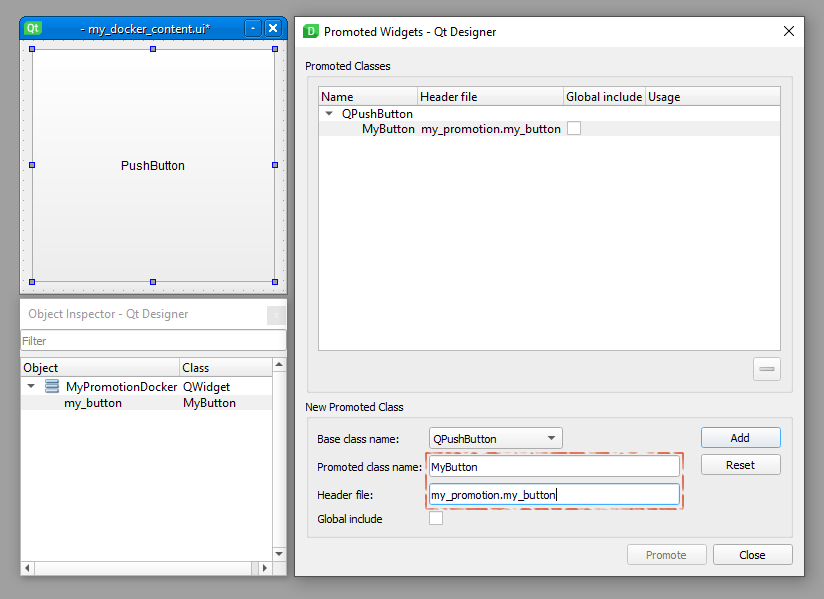
Hmm, normally I do not use Designer, but let’s see…

pykrita/
    my_promotion/
        __init__.py
        my_promotion_docker.py
        my_button.py
        my_docker_content.ui
    my_promotion.desktop

__init__.py

from krita import (
        Krita,
        DockWidgetFactory,
        DockWidgetFactoryBase)

from .my_promotion_docker import (
        MyPromotionDocker,)


app = Krita.instance()
docker_factory = DockWidgetFactory(
        'my_promotion:my_promotion_docker',
        DockWidgetFactoryBase.DockRight,
        MyPromotionDocker)
app.addDockWidgetFactory(docker_factory)

my_button.py

from PyQt5.QtCore import Qt
from PyQt5.QtWidgets import QPushButton, QToolTip


class MyButton(QPushButton):
    def mousePressEvent(self, event):
        if event.button() == Qt.RightButton:
            text = ("A one hump camel has a bump\n"
                    "A two hump camel has the mumps\n"
                    "If you should see a three hump camel\n"
                    "There's too much turps in your enamel.")
            QToolTip.showText(event.globalPos(), text)
            return
        super().mousePressEvent(event)

my_promotion_docker.py

from pathlib import Path
from krita import Krita, DockWidget
from PyQt5.QtWidgets import QWidget
from PyQt5 import uic


class MyPromotionDocker(DockWidget):
    _content_path = Path(__file__).with_name('my_docker_content.ui')

    def __init__(self, **kwargs):
        super().__init__(**kwargs)
        self.setWindowTitle('My Promotion Docker')
        self._init_ui()

    def _init_ui(self):
        self._content = QWidget()
        uic.loadUi(str(self._content_path), self._content)
        self.setWidget(self._content)

    def canvasChanged(self, canvas):
        if not canvas:
            return
        view = canvas.view()
        if not view:
            return
        self._content.my_button.setText(f'current document path: {view.document().fileName()}')

my_docker_content.ui

<?xml version="1.0" encoding="UTF-8"?>
<ui version="4.0">
 <class>MyPromotionDocker</class>
 <widget class="QWidget" name="MyPromotionDocker">
  <property name="geometry">
   <rect>
    <x>0</x>
    <y>0</y>
    <width>250</width>
    <height>250</height>
   </rect>
  </property>
  <layout class="QVBoxLayout" name="verticalLayout">
   <item>
    <widget class="MyButton" name="my_button">
     <property name="sizePolicy">
      <sizepolicy hsizetype="Expanding" vsizetype="Expanding">
       <horstretch>0</horstretch>
       <verstretch>0</verstretch>
      </sizepolicy>
     </property>
     <property name="text">
      <string>PushButton</string>
     </property>
    </widget>
   </item>
  </layout>
 </widget>
 <customwidgets>
  <customwidget>
   <class>MyButton</class>
   <extends>QPushButton</extends>
   <header>my_promotion.my_button</header>
  </customwidget>
 </customwidgets>
 <resources/>
 <connections/>
</ui>

/AkiR

3 Likes

Hooooly molly! To be honest, I ended thinking that for some reason Krita didn’t support it! (Also wasn’t able to see nothing about it in the -almost- whole internet) Thank you so much it works as a charm!
Now I see what I was doing wrong (I thought the header’s path was relative to the location of the .ui file).

Thank you so much friend :four_leaf_clover: this opens lots of possibilities :D. Also appreciate the detail showing each file, even the dir-tree :pray:

1 Like

Probably another silly question, but does dockers have some equivalent method as Extension’s setup().

(I need to initialize (just once) some code when Krita.instance() exists. At the moment I’m using canvasChanged() and checking every time a flag that tells if has been already initialized, to execute that init-code-part only once. But feels cheap, and I was wondering if there could be a better way (just curiosity))

Re: changing the background color, you want View.setBackGroundColor instead of Document.setBackgroundColor.

from krita import *
color = ManagedColor.fromQColor(QColor("255,0,0,255"))
Krita.instance().activeWindow().activeView().setBackGroundColor(color)

Re: initializing a docker, there’s not any sort of setup() function like there is for Extensions. But Python has the special __init__ function called when a class instance is created which can be used for that.

    def __init__(self):
        super().__init__() # initialize the base class
        
        # do first-time-only things here
        # for a DockWidget __init__ will be called on Krita's startup
1 Like

@freyalupen note: DockWidget.__init__() is called once for each new Window in Krita, each window has separate instances of DockerWidgets.

krita.Extension instances are “singletons” in Krita process, and there is nothing stopping from sub-classing multiple extension(s) and docker(s) in single plugin.

Silly chat example:

pykrita/
    my_chat_plugin/
        __init__.py
        my_chat_extension.py
        my_chat_docker.py
    my_chat_plugin.desktop

__init__.py

from krita import (
        Krita,
        DockWidgetFactoryBase,
        DockWidgetFactory)

from .my_chat_extension import (
        MyChatExtension,)

from .my_chat_docker import (
        MyChatDocker,)


def register_plugin():
    app = Krita.instance()

    my_chat_extension = MyChatExtension(app)
    my_chat_extension.setObjectName(f'{__name__}:my_chat_extension')
    app.addExtension(my_chat_extension)

    my_chat_docker_factory = DockWidgetFactory(
            f'{__name__}:my_chat_docker',
            DockWidgetFactoryBase.DockRight,
            MyChatDocker)
    app.addDockWidgetFactory(my_chat_docker_factory)


register_plugin()

my_chat_extension.py

from krita import (
        Krita,
        Extension)

from PyQt5.QtCore import (
        Qt,
        pyqtSlot as QSlot,
        pyqtSignal as QSignal,
        pyqtProperty as QProperty)


class MyChatExtension(Extension):
    info = QSignal(str)

    @classmethod
    def instance(cls):
        """ ask Krita for THE instance of this class """
        for extension in Krita.instance().extensions():
            if isinstance(extension, cls):
                return extension

    def setup(self):
        """
        Krita is now ready to play!
        """

    def createActions(self, window):
        """
        Create Actions for given window!
        """

    def emit_info(self, text):
        self.info.emit(text)

my_chat_docker.py

from krita import (
        Krita,
        DockWidget)

from PyQt5.QtWidgets import (
        QPlainTextEdit,
        QLineEdit,
        QWidget,
        QVBoxLayout)

from .my_chat_extension import (
        MyChatExtension,)


class MyChatDocker(DockWidget):
    def __init__(self):
        """ Note: each new window has own docker instance! """
        super().__init__()
        self._init_window()
        self._init_ui()
        self._connect_signals()
        # it's my birthday, let everybody know about it!
        self.message_everybody('It is my birthday!')

    def message_everybody(self, message):
        me_and_my_message = f'[{type(self).__qualname__}, id = {id(self)}] {message}'
        my_chat_extension = MyChatExtension.instance()
        if my_chat_extension:
            # extension found (normally ALL extensions are setup before ANY dockers are initilized.)
            my_chat_extension.emit_info(me_and_my_message)

    def _init_window(self):
        self.setWindowTitle('My Chat Docker')

    def _init_ui(self):
        self._content = QWidget()
        self.setWidget(self._content)
        layout = QVBoxLayout()
        self._content.setLayout(layout)

        self._info_view = QPlainTextEdit(readOnly=True)
        layout.addWidget(self._info_view, stretch=100)

        self._message_edit = QLineEdit()
        layout.addWidget(self._message_edit)

    def _connect_signals(self):
        MyChatExtension.instance().info.connect(self._on_extension_info)
        self._message_edit.editingFinished.connect(self._on_message_editing_finished)

    def canvasChanged(self, canvas):
        pass

    def _on_extension_info(self, text):
        self._info_view.appendPlainText(text)

    def _on_message_editing_finished(self):
        self.message_everybody(self.sender().text())

my_chat_plugin.desktop

[Desktop Entry]
Type=Service
ServiceTypes=Krita/PythonPlugin
X-KDE-Library=my_chat_plugin
X-Python-2-Compatible=false
X-Krita-Manual=readme.md
Name=My Chat Plugin
Comment=My Chat Plugin

Testing in Krita Scripter after plugin is running

# after Plugin is enabled from Krita Config, run this test script in Scripter

from krita import Krita

app = Krita.instance()
app.action('view_newwindow').trigger()

for window in app.windows():
    for docker in window.dockers():
        if docker.objectName() == 'my_chat_plugin:my_chat_docker':
            docker.show()
            docker.raise_()

/AkiR

1 Like

Thank you so much friend, much better than my bad-switching-fgcolor-thing!
(I searched in the docs for backgroundcolor but only got that reference to the Document method.
(But now I see that is listed in the View class, so I’m confused (not sure if exists an alternative place/API to search (?))).

Yeah, I was using __init__() originally, but was giving me an error when trying to access the Krita.instance(), so I guessed that during the UI/dockers setup it wasn’t accessible.

@AkiR wonderful example (as always, I always learn something new).

Thank you so much the help, you are all amazing, very kind comunity :four_leaf_clover:

You can search in the developer tools, go to Krita API tab, and filter

1 Like

Right! And it gives better results than the official API searcher! (At least when you type backgrondColor it shows the method from View :D. I’ll use it from now.